
Simple Electronic Signature (SES)
Start here
This guide presents a technical overview of our Simple Electronic Signature solution, available for integration through Workflow Studio. For an introduction to all of our electronic signature solutions and help choosing an assurance level, see the Electronic Signature overview.
To enable Simple Electronic Signature on your account, contact your Customer Success Manager or Account Executive, or Entrust's Customer Support.
Solution overview
Simple Electronic Signature (SES) is the most basic method of digital signing, suitable for lower-assurance, low-risk documents — for example acknowledgements or standard agreements — where advanced identity verification is not required.
SES offers a lightweight signing experience and can optionally be combined with less rigorous identity verification steps (for example, only a one-time password (OTP) verification) where some assurance of the signer's identity is still desired.
For regulated agreements that require verified identity and a sealed, tamper-proof transaction receipt, use Advanced Electronic Signature (AES). For contracts that require the legal equivalent of a handwritten signature, use Qualified Electronic Signature (QES).
Please note: This product guide on SES is provided for general informational purposes and does not constitute legal advice. The content herein is not a substitute for professional legal counsel. It is intended to provide a high-level overview of how the product functions from a technical and operational perspective. Customers are encouraged to consult their own legal advisors to ensure that any use of electronic signing products complies with applicable laws and meets their specific requirements.
Simple Electronic Signature request and verification tasks
To add SES to a Studio workflow, two tasks are added in the Workflow Builder — a Request eSignature task configured with a signature_assurance_level of simple, and a Verify eSignature (Simple) task.
The Request eSignature task controls user interaction where the applicant reviews and digitally signs the document. Once a document is signed, the signatory details and the workflow run id are added to the transaction to serve as signature evidence.
The Verify eSignature (Simple) task confirms the integrity and successful completion of the SES transaction. It takes as a task input the signature transaction id output by the capture task, and securely stores the signed documents to ensure their integrity and confidentiality, enabling controlled access for file download and retrieval.
Unlike AES and QES, an SES workflow does not require Document and Facial Similarity reports, although you can still include identity verification steps where appropriate for your use case.
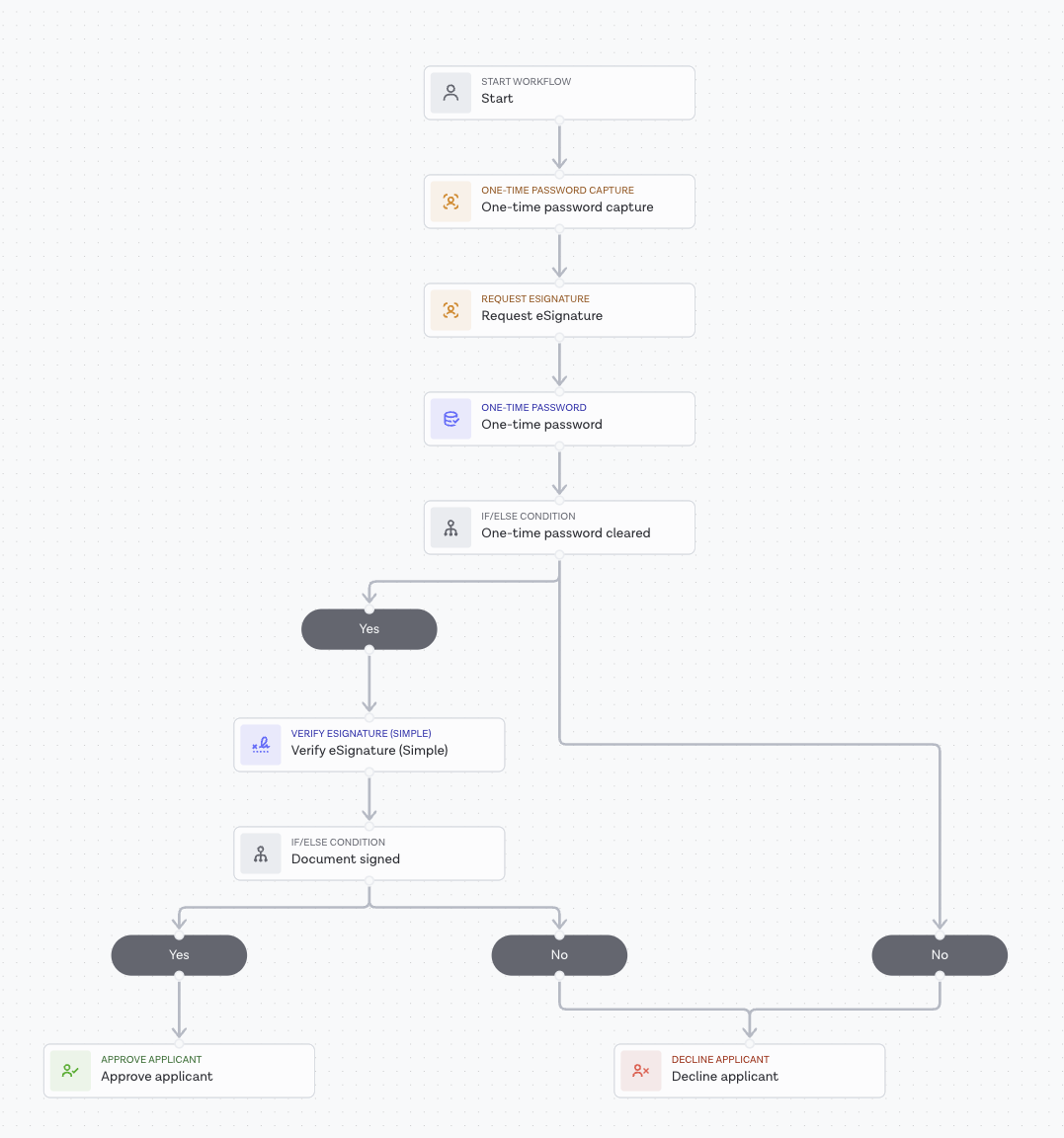
An example SES workflow combining One-Time Password verification with Request eSignature and Verify eSignature (Simple)
Configuration and retrieval
The following are common to all electronic signature assurance levels and are documented in the Electronic Signature configuration guide:
- Supplying documents to e-signature workflows (external URL or private upload).
- Placeable signatures using the
signature_taginput. - Interpreting verification results.
- Retrieving the signed documents and media.
Signed documents and the signature transaction receipt can be retrieved using our API.