
Qualified Electronic Signature (QES)
Start here
This guide presents a technical overview of our Qualified Electronic Signature (QES) solution for contract signing, available for integration through Workflow Studio. For an introduction to all of our electronic signature solutions and help choosing an assurance level, see the Electronic Signature overview.
To enable Qualified Electronic Signature on your account, contact your Customer Success Manager or Account Executive, or Entrust's Customer Support.
This guide covers Qualified Electronic Signature for contract signing, built around the Request eSignature task and delivered as part of the electronic signature suite alongside SES and AES. It is distinct from our ETSI certified identity verification with Qualified Electronic Signature onboarding solution, which is documented separately in the Compliance Suite.
Solution overview
Qualified Electronic Signature (QES) is the highest assurance level defined by the EU's eIDAS regulation. A QES has the same legal effect as a handwritten signature and is backed by a qualified certificate issued to the signer by a Qualified Trust Service Provider.
Entrust's QES for contract signing issues a qualified certificate on-the-fly for the verified signer and applies it to the document(s) being signed, without requiring the signer to hold a pre-existing certificate. This makes QES suitable for contracts and agreements that require the strongest level of signer assurance and legal admissibility.
Key capabilities:
- Qualified certificate issued on-the-fly for the verified signer, following a successful identity verification.
- Visible, placeable signatures — render the signature at a defined position on the document using a signature tag.
- Multi-document signing — present and sign several documents within a single transaction.
- Private document uploads — supply confidential documents via the Signing Documents API rather than a public URL.
Please note: This product guide on QES is provided for general informational purposes and does not constitute legal advice. The content herein is not a substitute for professional legal counsel. It is intended to provide a high-level overview of how the product functions from a technical and operational perspective. Customers are encouraged to consult their own legal advisors to ensure that any use of electronic signing products complies with applicable laws and meets their specific requirements.
Qualified Electronic Signature request and verification tasks
A QES contract-signing workflow is built from the following tasks in the Workflow Builder:
- A Request eSignature task configured with a
signature_assurance_levelofqualified. This presents the document(s) to the applicant, captures their consent, and drives issuance of the qualified certificate and the signing of the document(s). - A Verify eSignature (Qualified) task, which confirms the integrity and successful completion of the QES transaction and securely stores the signed documents, transaction receipt and certificate document.
- Optionally, a Verify policy with eSignature (Qualified) task, which validates at workflow design-time that the required identity verification prerequisites for QES have been met.
Because a QES requires a verified identity to issue the qualified certificate, the workflow must also verify the signer's identity before the Request eSignature task — specifically with a Document Report (video), a Facial Similarity Report (motion), and a Device Intelligence Report. See Compliance package below for the full set of required tasks.
The country_of_operation configuration option on the Request eSignature task identifies the jurisdiction the signing takes place in and applies the correct consent and legal framework for the qualified signature.
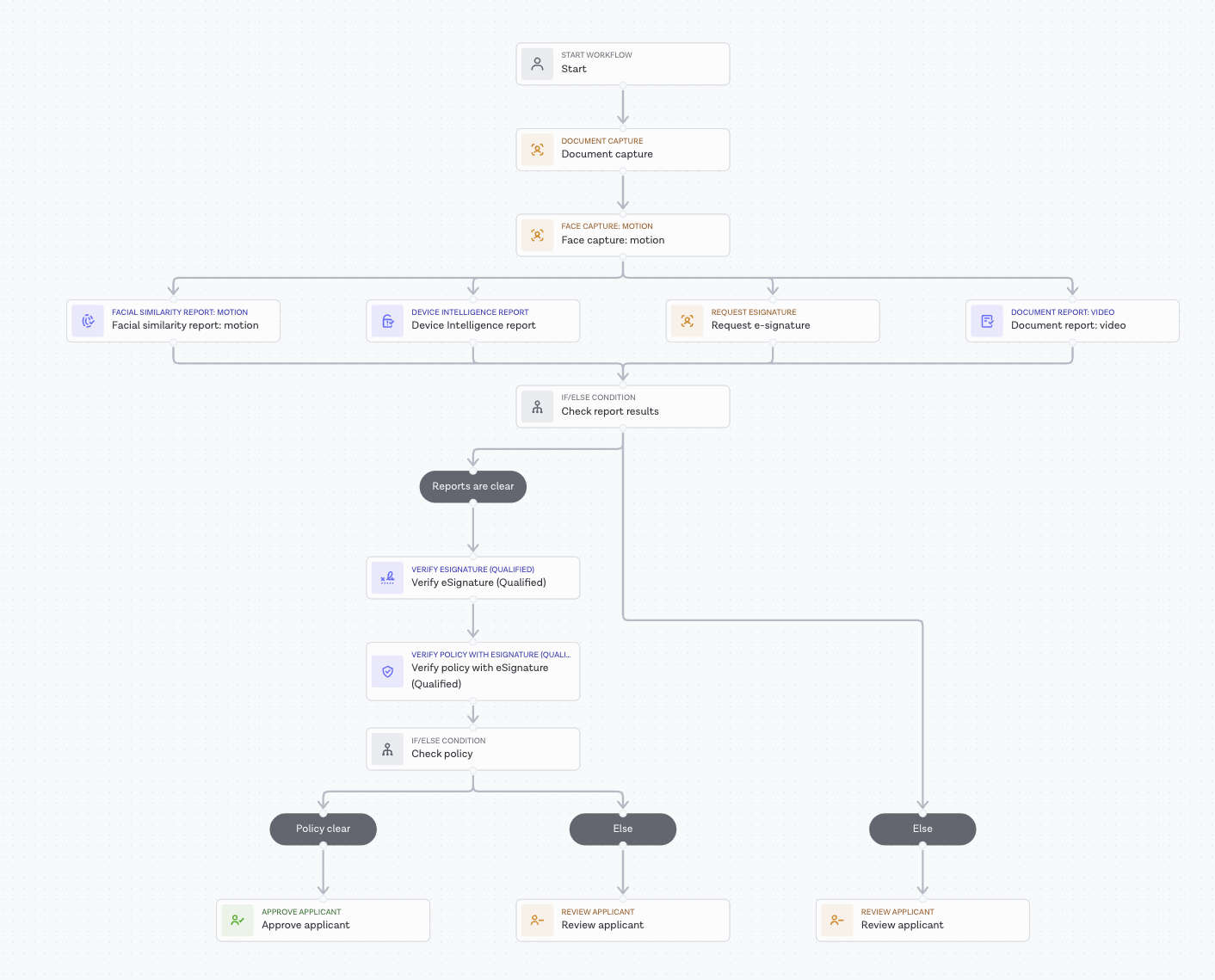
An example QES contract-signing workflow, matching the pre-built Qualified Electronic Signature for Contract Signing compliance package
Configuration and retrieval
The following are common to all electronic signature assurance levels and are documented in the Electronic Signature configuration guide:
- Request eSignature task configuration (
signature_assurance_level,country_of_operation,signature_tag). - Supplying documents to e-signature workflows (external URL or private upload).
- Placeable signatures using the
signature_taginput. - Interpreting verification results.
- Retrieving the signed documents and media.
Signed documents, the signature transaction receipt and the certificate document can all be retrieved using our API. The evidence file is retrieved separately using the Evidence Folder endpoint.
Language selection for QES
For Qualified Electronic Signature, country_of_operation and the applicant-facing language are handled separately:
country_of_operationsets the legal and compliance context for the QES transaction.- Entrust then localizes the Trust Services Contract, acceptance screen, terms and conditions, and privacy notice using the request's locale preferences (for example
Accept-Language), where that language is supported for the selected country. - On native integrations, this request locale comes from the browser or webview environment and is not guaranteed to match an explicitly configured SDK UI language.
- If the applicant's language is not supported for that country, Entrust falls back to the default language for the selected country.
- Where supported, Entrust may also present an English helper-language variant during the consent step.
You remain responsible for aligning your user interface language and the document(s) being signed so the signer receives a consistent language experience.
Compliance package
Entrust provides a pre-built Studio workflow template, Qualified Electronic Signature for Contract Signing, that combines the tasks required to meet eIDAS Qualified Electronic Signature requirements into a single, ready-to-use compliance package.
Regulatory basis
The compliance package is designed to meet:
- eIDAS Regulation (EU) No 910/2014 - the legal framework for electronic identification and trust services within the European Union
- ETSI EN 319 401 v2.3.1 - Electronic Signatures and Infrastructures (ESI); General Policy Requirements for Trust Service Providers
- ETSI TS 119 461 v1.1.1 - Electronic Signatures and Infrastructures (ESI); Policy and security requirements for trust service components providing identity proofing of trust service subjects
Required tasks
To issue a Qualified Electronic Signature, a workflow must include the following tasks. These are enforced automatically when the Verify policy with eSignature (Qualified) task is added to a workflow:
- Document Capture
- Face Capture: Motion
- Document Report: Video
- Facial Similarity Report: Motion
- Device Intelligence Report
- Request eSignature (configured with a
signature_assurance_levelofqualified) - Verify eSignature (Qualified)
- Verify policy with eSignature (Qualified)
The Document Report must use its video capture variant, and the Facial Similarity Report must use its motion capture variant, to meet QES identity-proofing requirements. A photo-based Document Report or Facial Similarity Report is not sufficient.
Evidence folder contents
For QES workflows, the evidence folder includes:
- Certificate documents (the qualified certificate and related consent documentation)
- The document photo and document video captured during verification
- The motion capture video from the biometric step
- An evidence summary file describing all verification steps and results
- The signed document(s)
- The signature transaction receipt
Getting started
To use the pre-built compliance package, select the Qualified Electronic Signature for Contract Signing template when creating a new workflow in Studio. To enable this package on your account, contact your Customer Success Manager or Account Executive.
Supported jurisdictions
Qualified Electronic Signature for contract signing is available in the following jurisdictions and consent languages:
| Country | Code | Supported consent languages |
|---|---|---|
| Austria | AUT | DE, EN |
| Belgium | BEL | DE, EN, FR, NL |
| Bulgaria | BGR | BG, EN |
| Croatia | HRV | EN, HR |
| Czech Republic | CZE | CS, EN |
| Estonia | EST | EN, ET |
| France | FRA | EN, FR |
| Germany | DEU | DE, EN |
| Greece | GRC | EL, EN |
| Hungary | HUN | EN, HU |
| Italy | ITA | EN, IT |
| Netherlands | NLD | EN, NL |
| Poland | POL | EN, PL |
| Portugal | PRT | EN, PT |
| Romania | ROU | EN, RO |
| Slovenia | SVN | EN, SK |
| Spain | ESP | EN, ES |
| United Kingdom | GBR | EN |
Standard eIDAS compliance applies to all listed jurisdictions; the United Kingdom operates under post-Brexit equivalence provisions.
France has additional jurisdiction-specific requirements that are not covered in this guide. Contact your Customer Success Manager or Account Executive for details on QES contract signing in France.
For jurisdiction-specific requirements or countries not listed above, contact your Customer Success Manager or Account Executive.