Liveness Verification (Early adopter phase)
Start here
This guide presents a technical overview of our Liveness Verification product, available for integration through Workflow Studio.
Liveness Verification - solution overview
Liveness Verification is a lightweight biometric liveness check that confirms that the user present during onboarding is a live human.
Unlike Facial Similarity reports, the solution doesn't require a document to be compared against since its goal is simply to verify the liveness of the user (light onboarding).
Liveness Verification is intended for account creation flows where:
- stronger security than email and password is required
- the friction associated with full document and biometric verification must be avoided at onboarding
Verify Liveness task
Light onboarding is a category focused on securing account creation without the friction of full IDV.
The goal is to replace the email and password standard with a more secure low-friction biometric step. It is aimed at high‑volume, lower‑security‑needs segments (compared to full IDV) that still face meaningfully high account takeover (ATO) risk.
In Workflow Studio, the interactive capture of a live selfie for light onboarding is performed by adding a Verify Liveness task to a Studio workflow. An applicant will be requested to take a simple live selfie - a short video capture that eliminates traditional head-turn challenges while maintaining strong security standards including presentation attack detection (PAD), deepfake detection and injection prevention.
Below you will find an example template available in the Studio Workflow Builder running a Liveness Verification:
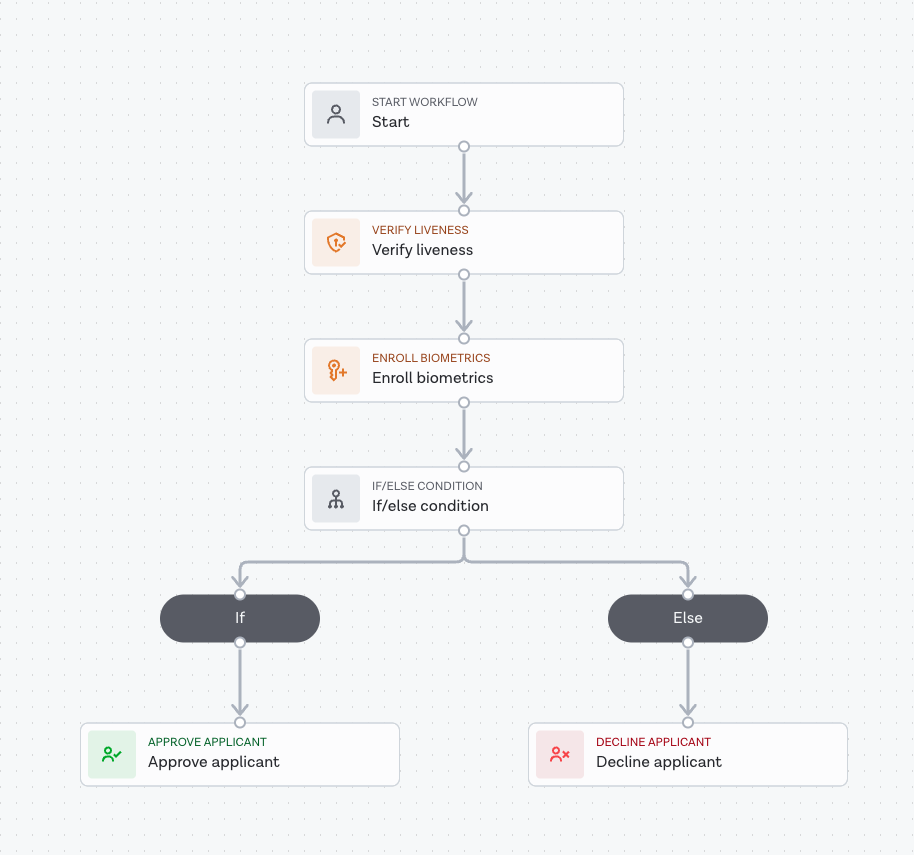
For workflows that require future authentication capabilities, you can optionally include an Enroll biometrics task after the Verify Liveness step. This task processes the captured biometric data and creates a symmetrically encrypted biometric token that can be securely stored and used for subsequent biometric authentication.
The Enroll biometrics task is optional and only needed if you plan to use the liveness data for future authentication. For basic liveness verification without authentication, you can omit this task from your workflow.
Result logic
The result for Liveness Verification can be clear or consider, returned in the output object of a Studio workflow run. The report result is determined by the results of individual breakdowns and sub-breakdowns.
The response breakdowns are similar to Facial Similarity: Motion, but with one key difference. Since no facial comparison is made against a document in Liveness Verification, the sub-breakdown face_comparison is not present.
Breakdown descriptions
| Breakdown | Sub-breakdown(s) | Description |
|---|---|---|
| Visual authenticity | Asserts whether the person in the live selfie is real (not a spoof) and live. | |
| Spoofing detection | Contains a score value between 0 and 1 which expresses the likelihood that the live selfie is real, where 0 represents a spoofed capture and 1 represents a real live selfie capture. | |
| Liveness detected | Verifies that genuine human liveness was demonstrated during the selfie capture process, confirming the presence of a real, living person rather than a static image, video replay, or other spoofing attempt. | |
| Image integrity | Asserts whether the quality and integrity of the uploaded files and the content contained within them were sufficient to perform a face comparison. | |
| Face detected | Asserts that a single face of sufficient quality was detected in the live selfie capture. | |
| Source integrity | Asserts whether the source of the live photo is trustworthy. For example, it has not been digitally tampered with or was not taken from a fake webcam. This sub-breakdown also asserts whether the applicant's document is issued by a country subject to comprehensive US sanctions. |
Below is an example of the response breakdowns for Liveness Verification:
1{2 "breakdown": {3 "image_integrity": {4 "result": "clear",5 "breakdown": {6 "face_detected": {7 "result": "clear",8 "properties": {}9 },10 "source_integrity": {11 "result": "clear",12 "properties": {}13 }14 }15 },16 "visual_authenticity": {17 "result": "clear",18 "breakdown": {19 "liveness_detected": {20 "result": "clear",21 "properties": {}22 },23 "spoofing_detection": {24 "result": "clear",25 "properties": {26 "score": 0.951227 }28 }29 }30 }31 }32}
Fast-feedback feature
The Verify Liveness task introduces a new feature called fast‑feedback, which returns the liveness result immediately after the task completes, before the entire workflow finishes.
Previously, end users (applicants) had to wait for the workflow run to fully complete before seeing a confirmation screen in the SDK/app. With fast‑feedback:
- A green or red halo appears immediately after the liveness check to indicate success or failure
- The final workflow run result is still required for full confirmation
Here is a diagram illustrating this flow:
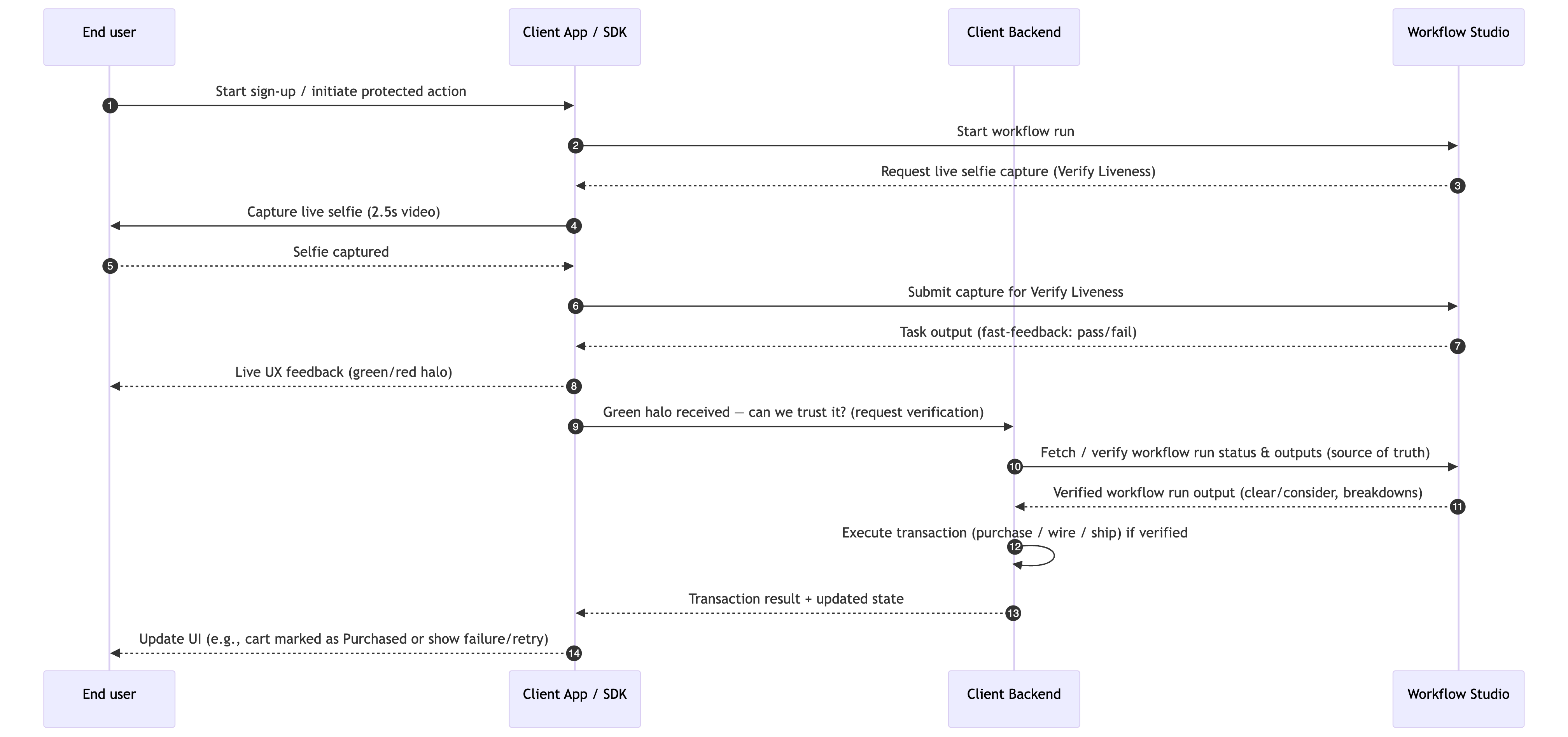
The SDK/app uses the Liveness Verification task fast-feedback to display the green or red halo. The client backend independently verifies the final workflow output with Workflow Studio (source of truth) before authorizing any protected action.


