

Proof of Address
Start here
This guide presents a technical overview of Entrust's Proof of Address report, available for integration through Workflow Studio.
Proof of Address - solution overview
The Proof of Address (PoA) report allows you to verify an end user's address by reviewing an eligible uploaded document. The PoA report cross checks the address information provided by the applicant with the details of a PoA document (such as a bank statement or utility bill), in order to verify the authenticity of the address. In addition, the report also asserts whether the document is supported by Entrust, as well as having a valid date of issue.
For a full list of countries and documents supported by the PoA report, please refer to the sections below.
Supported issuing countries
Documents issued by the following countries are supported for a PoA report:
Group A:
- Andorra
- Gibraltar
- Isle of Man
- Jersey
- Monaco
- San Marino
- Switzerland
- United Kingdom
Group B:
- Canada
- European Economic Area (excluding Greece, Cyprus and Bulgaria)
- New Zealand
Group C:
- Algeria
- Argentina
- Australia
- Bermuda
- Brazil
- British Virgin Islands
- Bulgaria
- Cayman Islands
- Chile
- Colombia
- Costa Rica
- Dominican Republic
- Ecuador
- Ethiopia
- Ghana
- Guatemala
- Hong Kong
- Indonesia
- Ivory Coast
- Jamaica
- Japan
- Kenya
- Kuwait
- Malaysia
- Mexico
- Nigeria
- Panama
- Peru
- Philippines
- Saudi Arabia
- Senegal
- Serbia
- Singapore
- South Africa
- South Korea
- Taiwan
- Tanzania
- Turkey
- Uganda
- Ukraine
- United Arab Emirates
- United States of America
- Vietnam
Supported documents
The following document types are supported for a PoA report, along with its issue date validity based on document issuing country:
| Document | Group A | Group B | Group C | |
|---|---|---|---|---|
| Bank Statement or Building Society Statement | Last 3 months | Last 6 months | Last 6 months | |
| Utility Bill (electricity, water, gas, broadband, landline ) | Last 3 months | Last 6 months | Last 6 months | |
| Local Government Tax Letter | Last 1 year | Last 6 months | Kenya only | |
| Benefits Letter (e.g. Job seeker allowance, House benefits, Tax credits) | Last 1 year | Last 6 months | ||
| Mortgage statement | Last 1 year | Last 1 year | ||
| Mobile phone bill | Last 6 months | Singapore only | ||
| General letter (financial institution/utility company) | Last 6 months | |||
| Insurance statement or brokerage statement | Last 6 months | |||
| Pension statement/letter or Property tax statement/letter | Last 1 year | |||
| Identity document with address | Supported | Supported | Limited to certificate's issue and expiry dates | |
| Address certificate | Hungary only | Turkey only | Limited to certificate's issue and expiry dates if present, otherwise unlimited | |
| Exchange House Statement | United Arab Emirates only | Validity limited to the last 6 months | ||
| Accommodation or Tenancy Certificate | Last 6 months | Last 6 months | ||
| Vehicle logbook (V5C) issued by the UK's Driver and Vehicle Licensing Agency | United Kingdom Only | Limited to the logbook's issue and expiry dates if present, otherwise unlimited |
Please note: When capturing or uploading documents with two sides (such as Identity document with address), document_type should be specified and both sides of the document should be uploaded as separate documents, specifying the side property for each one.
Result logic
The Proof of Address (PoA) report can return a result of clear, consider or null.
The overall report result will be clear if all of the following are true:
- the quality of the provided PoA document is sufficient to process it
- the provided PoA document is a supported PoA document
- the provided PoA document has a valid date of issue
- the data provided by the applicant matches the data that is on their PoA document
The overall report result will be null if any of the following is true:
- the
issuing_countryfield set when uploading the document is from an unsupported country - the
issuing_countryfield is not provided when uploading the document
Please note that if the report result is null, the report status will be cancelled.
The overall report result will be consider if any of the following is true:
- the PoA document was not of sufficient quality to be processed (i.e. image blurred, data points not visible on the document). In this scenario, the value of the
image_qualitysub-breakdown (which is part of theimage_integritybreakdown) will beunidentifiedand no data will be extracted from the document. As a result, the report properties attribute will be empty and all the other breakdowns will benull - the document is not a valid PoA document. In this scenario, the value of the
supported_documentsub-breakdown (which is part of thedocument_classificationbreakdown) will beunidentifiedand no data will be extracted from the document. As a result, the report properties attribute will be empty and the data comparison breakdowns will be set tonull - the PoA document does not have a valid date of issue. In this scenario, the value of the
valid_document_datesub-breakdown (which is part of thedocument_classificationbreakdown) will beconsider. Data is extracted from the document and returned in the reportpropertiesattribute - the data provided by the applicant does not match the data extracted from the PoA document. In this scenario, the breakdowns
first_name,last_nameandaddress(which are part of thedata_comparisonbreakdown) will have a value ofunidentified. Data is extracted from the document and returned in the reportpropertiesattribute - there is evidence of visual fraud on the document. In this scenario, the value of the
visual_fraudsub-breakdown (which is part of thesource_integritybreakdown) will beconsider, hence the report isconsider
Report breakdowns and properties
A PoA report is composed of the following four breakdowns:
| Breakdown | Description |
|---|---|
image_integrity | object Asserts whether the quality of the uploaded document was sufficient to verify the address |
document_classification | object Asserts whether the document is a supported document type and the document has a valid date of issue |
data_comparison | object Asserts whether the first name, last name and address provided by the applicant match those on the PoA document |
source_integrity | object Asserts whether the source integrity of the uploaded document is sufficient to verify the address |
In addition, data points extracted from PoA documents are returned in the properties attribute:
| Field | Description |
|---|---|
document_type | This property provides the document type according to the set of supported documents |
document_source_type | This property provides the document source type |
issue_date | This property provides the issue date of the document |
expiry_date | This property provides the expiry date of the document |
summary_period_start | This property provides the summary period start date |
summary_period_end | This property provides the summary period end date |
issuer | This property provides the document issuer (e.g. HSBC, British Gas) |
first_names | This property provides the first names on the document, including any initials and middle names |
last_names | This property provided the last names on the document |
address | This property provides the address on the document |
address_parsed | object This property provides a structured address |
unsupported_document_reason | array The reasons why the document is unsupported (possible values include unsupported_doc_type, unsupported_alphabet, unsupported_country or possible_fraud). |
Below is an example PoA report breakdown and its properties:
1{2 "properties": {3 "document_type": "council_tax",4 "document_source_type": "pdf",5 "issuer": "city of london",6 "issue_date": "2020-01-01",7 "first_names": "John",8 "last_names": "Smith",9 "address": "123 sample street london xyz 1ab gbr",10 "address_parsed": {11 "country": "gbr",12 "postcode": "1ab gbr",13 "state": null,14 "town": "london"15 },16 "unsupported_document_reason": [17 "unsupported_doc_type",18 "unsupported_alphabet",19 "unsupported_country",20 "possible_fraud"21 ]22 },23 "breakdown": {24 "image_integrity": {25 "result": "clear",26 "breakdown": {27 "image_quality": {28 "result": "clear",29 "properties": {}30 }31 }32 },33 "document_classification": {34 "result": "clear",35 "breakdown": {36 "supported_document": {37 "result": "clear",38 "properties": {}39 },40 "valid_document_date": {41 "result": "clear",42 "properties": {}43 }44 }45 },46 "data_comparison": {47 "result": "clear",48 "breakdown": {49 "first_name": {50 "result": "clear",51 "properties": {}52 },53 "last_name": {54 "result": "clear",55 "properties": {}56 },57 "address": {58 "result": "clear",59 "properties": {}60 }61 }62 },63 "source_integrity": {64 "result": "clear",65 "breakdown": {66 "digital_tampering": {67 "result": "clear",68 "properties": {}69 },70 "visible_fraud": {71 "result": "clear",72 "properties": {}73 }74 }75 }76 }77}
Proof of Address Report task
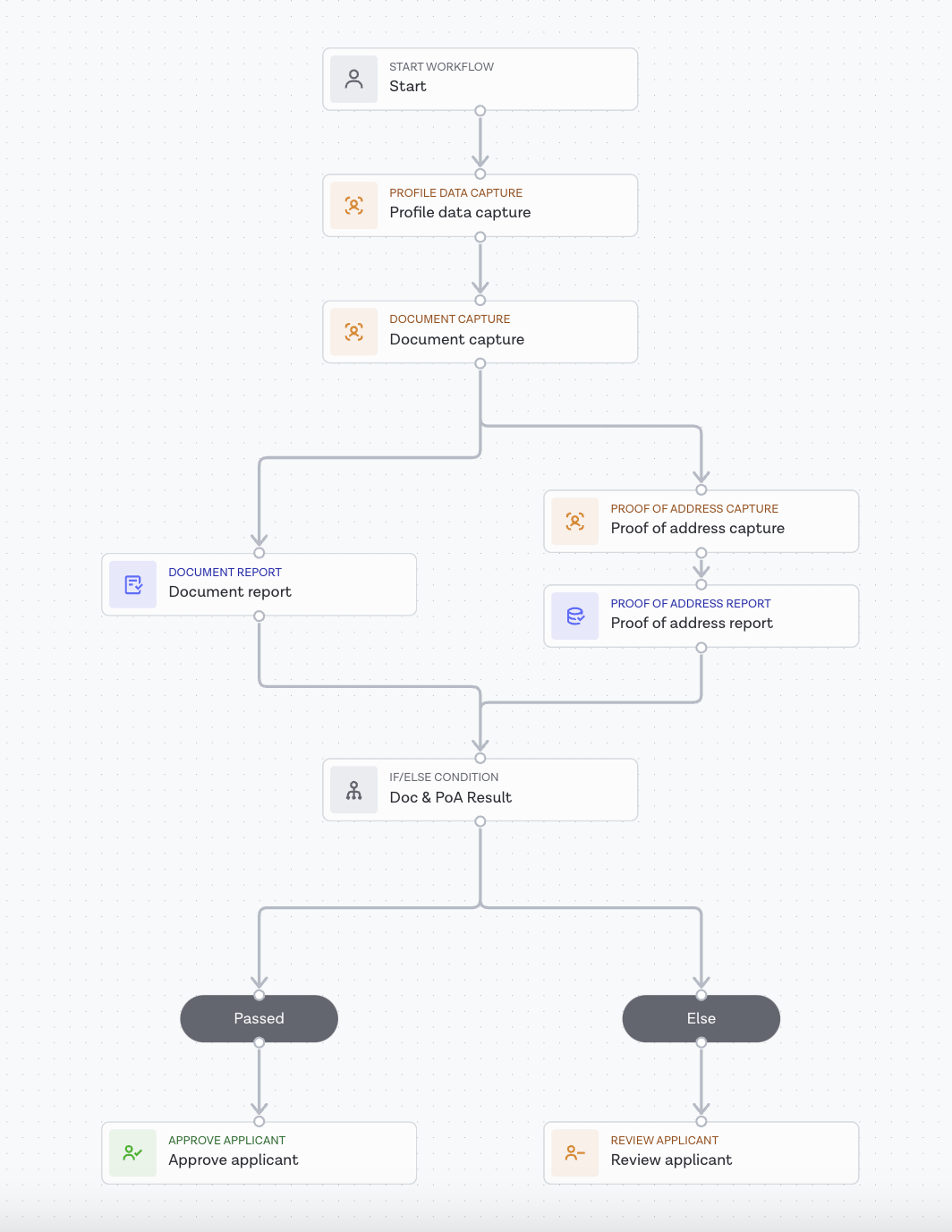
Similar to other reports, to run a Proof of Address (PoA) report, the dedicated Proof of Address Report task should be added to a Studio workflow from the Workflow Builder.
In order to verify the address data, the document's data needs to be compared with data provided by one of the following:
- workflow input data
- a Proof of Address Capture task
- a Document Capture task
- an Autofill task
- a Profile Data Capture task
The applicant's first name, last name, address and a document ID are mandatory task inputs for running this report.
Below you will find an illustrated example of a Studio workflow running a PoA report:
Supported document configuration
The Proof of Address Report task allows you to control which documents and issuing countries are presented to applicants to streamline the capture experience.
Document type and issuing country can be selected in the task configuration panel on the right-hand side of Workflow Builder:
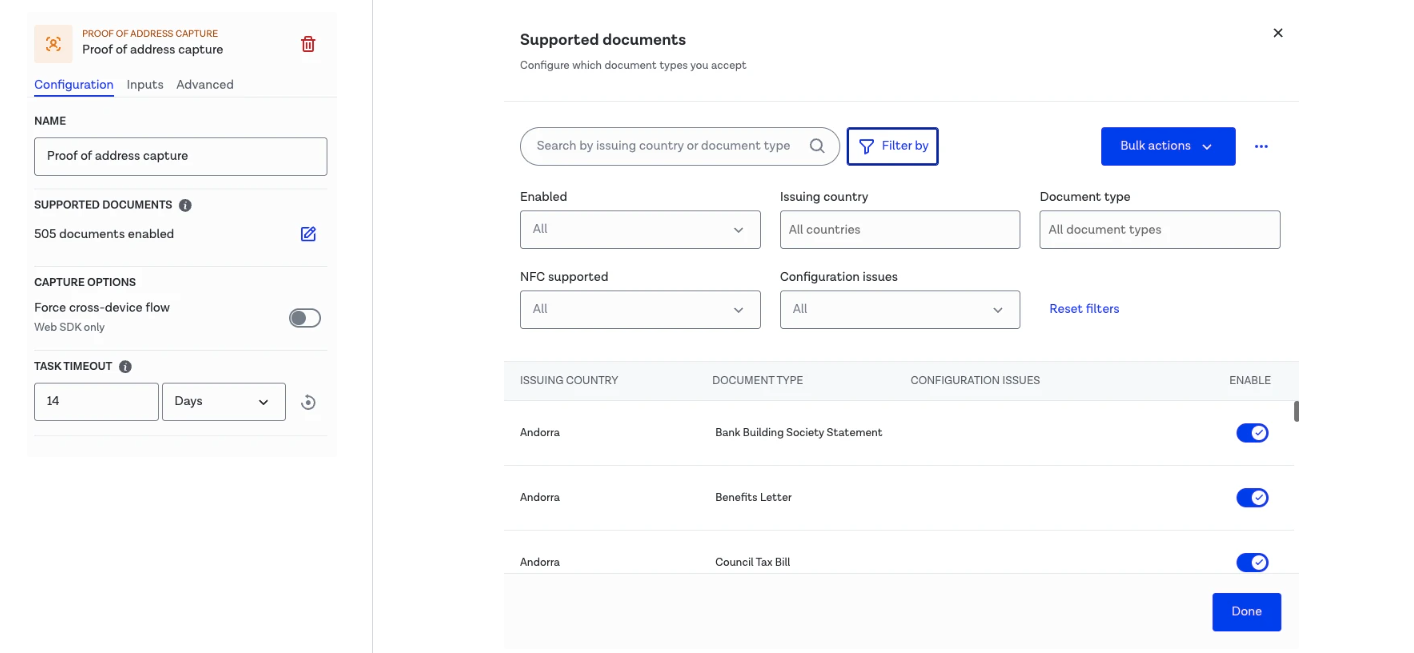
This configurability drives dynamic behavior in the capture flow:
- if multiple countries and document types are enabled, applicants will be prompted to select both at the start of the flow
- if a single country is configured, that country will be preselected for an applicant at the start of the flow
- if a single specific country and a single specific document type are configured, the selection step is skipped entirely and applicants are presented directly with document submission
Preferred country and document type configuration
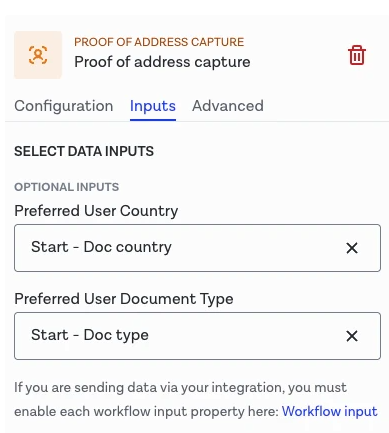
The Proof of Address capture experience can be further streamlined by designating the preferred country and document type using known applicant data. This information can be extracted from Workflow Input Data or attributes drawn from other Studio tasks earlier in the workflow (such as a Document Report task). This allows Workflow Studio to dynamically bypass parts of the capture flow and guide applicants in a more context-aware onboarding journey:
- if no preferred inputs are configured, the flow defaults to the behavior defined by the supported documents configuration
- if a preferred country is configured, the capture experience will start at the document selection step with the country already populated
- if both a preferred country and preferred document type are configured, the capture experience will skip all selection steps entirely and applicants are presented directly with document submission
The preferred country and document type can be configured in the Workflow Builder task configuration panel.
Proof of Address Report task results
If you want to obtain the specific outputs from the Proof of Address Report task via the Entrust Identity Verification API (for example, the overall report result or breakdown results), you can manage this by configuring the Workflow Output in the Studio Workflow Builder. You can also retrieve all associated output data from a Proof of Address report.
You can refer to our Studio product guide for more information on Workflow Output configuration. Once set up, the output can be consumed by making a Retrieve Workflow Run call to the API. Report results are found in the output property.
Workflow Run results can also be accessed on the results tab of your Studio Dashboard.


