

Query INE Database task
Start here
This guide presents a technical overview of the Query INE Database task, available for integration through Workflow Studio.
Query INE Database - solution overview
Financial service providers operating in Mexico are supervised and governed by the Comisión Nacional Bancaria y de Valores (CNBV), which enforces strict anti–money laundering (AML) and know your customer (KYC) regulations.
To help our customers navigate and comply with these regulations, Entrust offers an identity verification solution enabling regulated entities in Mexico to meet CNBV onboarding requirements. Full details of this market-ready solution can be found here in our dedicated product guide.
To complement Entrust's market-ready solution for Mexico, customers are also able to implement Mexican voter ID verification through our Query INE Database task.
Query INE Database task
The Query INE Database task verifies an applicant's Mexican voter ID (Credencial para Votar) against Mexico's National Electoral Institute (INE) database. It compares the identity data extracted from an identity document - and optionally a biometric face capture - with the official INE records.
Connecting to the INE Biometric Database requires prior approval from Mexico's National Electoral Institute (INE), granted only to authorized financial service providers. As part of this approval, INE issues dedicated credentials for accessing the database. Contact the support team to arrange these credentials and enable INE verification in both Sandbox and Production environments.
This task is only applicable to Mexican INE voter ID documents. The applicant must grant explicit consent for the INE database query before the task can run.
When included in a Studio workflow, the Query INE Database task takes as input the applicant's identity document information extracted during document capture and Optical Character Recognition (OCR) processing, together with an optional biometric face capture.
The task submits the applicant's identity data to Mexico's INE database, where each available data point (such as elector key, OCR number, the applicant’s name) is independently compared against the official record.
If a face capture has been provided, the applicant's photograph is also matched against the image stored in the INE database. Once all comparisons have been completed, the task produces an overall verification result along with a detailed breakdown of the outcome for each individual comparison.
Query INE Database task inputs
The table below outlines the applicant details (both mandatory and optional) that map as inputs to the Query INE Database task:
| Input | Required | Description |
|---|---|---|
ineConsentGranted | Yes | Applicant's consent to query the INE database. Must be true. |
versionNumber | Yes | The issue (version) number printed on the credential. |
mrzLine1 | No* | First MRZ line of the document; the OCR number and CIC are extracted from it. |
personalNumber | No* | OCR number, used when MRZ data is not available. |
documentNumber | No | CIC, only used when mrzLine1 is not provided. |
claveDeElector | No | The 18-character elector key. |
curp | No | The applicant's CURP. |
firstName | No | Applicant's first name. |
fatherName | No | Paternal surname. |
motherName | No | Maternal surname. |
registrationDate | No | Registration date (ISO-8601). |
issueDate | No | Issue date (ISO-8601). |
faceCapture | No | Face capture reference; enables the face comparison. |
* mrzLine1 takes precedence: when provided, the OCR number and CIC are extracted from it
and personalNumber / documentNumber are ignored. When mrzLine1 is not provided,
personalNumber is required (and documentNumber may supply the CIC). A mrzLine1 value
that does not contain a << separator followed by digits fails validation - there is no
fallback to personalNumber.
Several Query INE inputs can be populated using outputs from a preceding Document Report task or Document Report Instant task. The following tables describe the mappings between each task's outputs and the corresponding Query INE inputs.
Inputs from the Document Report task
| Document Report Output | Query INE input |
|---|---|
| document report -> properties -> Document numbers | Document Numbers |
| document report -> properties -> MRZ line1 | MRZ Line 1 |
| document report -> properties -> Version number | Version Number |
| document report -> properties -> Document number | Document Number |
| document report -> properties -> Father name | Father Name |
| document report -> properties -> First name | First Name |
| document report -> properties -> Issuing date | Issue Date |
| document report -> properties -> Mother name | Mother Name |
| document report -> properties -> Personal number | Personal Number |
Inputs from the Document Report Instant task
| Document Instant Output | Query INE input |
|---|---|
| document report instant -> properties -> MRZ line1 | MRZ Line 1 |
| document report instant -> properties -> Version number | Version Number |
| document report instant -> properties -> Clave de elector | Clave de elector |
| document report instant -> properties -> Curp | CURP |
| document report instant -> properties -> Document number | Document Number |
| document report instant -> properties -> Father name | Father Name |
| document report instant -> properties -> First name | First Name |
| document report instant -> properties -> Issuing date | Issue Date |
| document report instant -> properties -> Mother name | Mother Name |
| document report instant -> properties -> Personal number | Personal Number |
| document report instant -> properties -> First issue date | Registration Date |
Result logic
The task result is either:
clear- every applicable identity comparison (and the face comparison, if performed) matchedconsider- one or more comparisons did not match
Task breakdowns and property descriptions
| Breakdown or property | Description |
|---|---|
properties.registration_type | The registration type held by INE (string value returned by the provider; empty when not available) |
properties.lost_or_theft_report | The lost/theft report type held by INE (string value returned by the provider; empty when no report exists) |
breakdown.identity_data_comparison | Per-field match results. The issue_number, elector_key and ocr comparisons are always evaluated. The first_name, parental_surname, maternal_surname, registration_year, issue_year and curp comparisons are only included when the corresponding input was supplied |
breakdown.face_comparison | Face match result with score and threshold (present only when a face capture was supplied) |
Below is an example of the breakdowns returned by the Query INE Database task, including all supported fields returned in the properties attribute:
1{2 "result": "consider",3 "properties": {4 "registration_type": "VIGENTE",5 "lost_or_theft_report": ""6 },7 "breakdown": {8 "face_comparison": {9 "result": "clear",10 "breakdown": {11 "face_match": {12 "result": "clear",13 "properties": { "threshold": 0.9, "score": 0.97 }14 }15 }16 },17 "identity_data_comparison": {18 "result": "consider",19 "breakdown": {20 "first_name": { "result": "clear" },21 "elector_key": { "result": "consider" },22 "ocr": { "result": "clear" }23 }24 }25 }26}
Task configuration
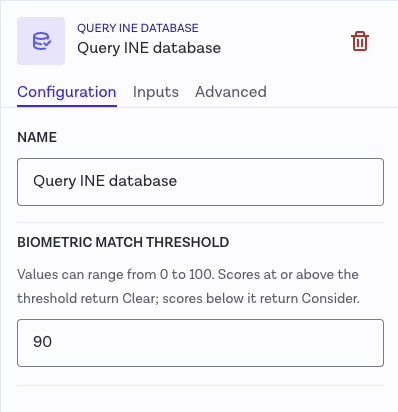
The minimum face-match score can be optionally configured for the Query INE Database task in the Workflow Builder:
| Option | Default | Description |
|---|---|---|
biometricMatchThreshold | 90 | Minimum face-match score (0–100) for the face comparison to be clear. Applies only to breakdown.face_comparison. This does not affect identity data comparisons |
The threshold and score in face_comparison are on a 0–1 scale. A biometricMatchThreshold of 90 (0–100 in configuration) is normalized to 0.9 in the output.
Errors
Both errors below are terminal: the task stops and returns an error instead of a result. They mean the request couldn't be processed as submitted, not that the service is down - so resubmitting the same request won't change the outcome.
| Error type | Meaning |
|---|---|
input_validation | A required input was missing or malformed (e.g. missing consent, invalid MRZ or date). |
configuration_validation | The task or client configuration is invalid (e.g. ine port not configured). |
These errors will be returned upon trying to run workflow.