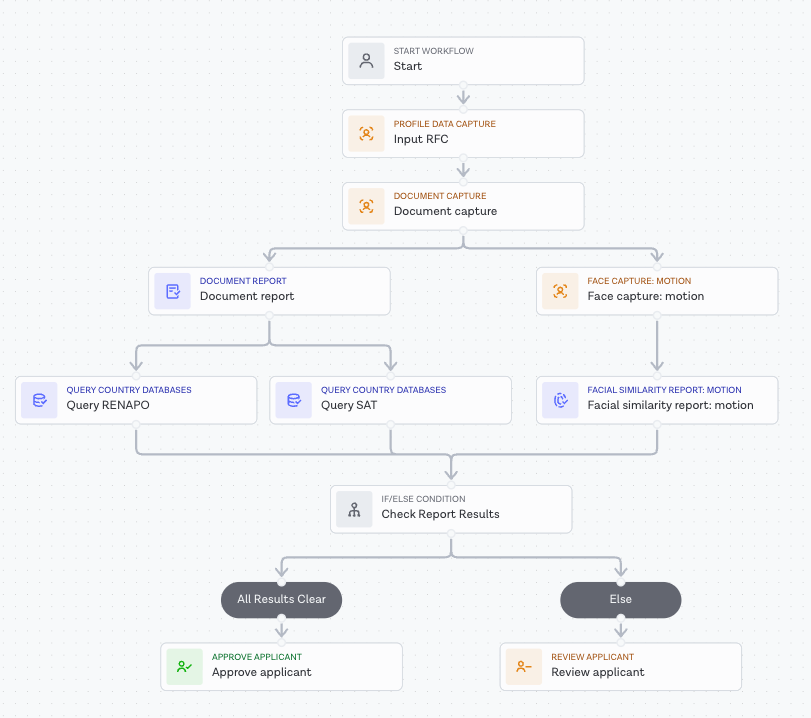

Market-ready workflow for Mexico
Introduction
Financial service providers operating in Mexico are supervised and governed by the Comisión Nacional Bancaria y de Valores (CNBV), which enforces strict anti–money laundering (AML) and know your customer (KYC) regulations.
To satisfy these compliance requirements, banks, fintechs, credit unions and other financial institutions must verify the identity of their customers when onboarding. This is done using an individual's Clave Única de Registro de Población (CURP) - a unique personal ID code issued by the Registro Nacional de Población (RENAPO) to every individual living in Mexico (both citizens and foreign residents). Additionally, businesses must also verify an individual's Registro Federal de Contribuyentes (RFC) - an official tax ID registered with the Servicio de Administración Tributaria (SAT).
To help our customers navigate and comply with these regulations, Entrust offers an identity verification solution enabling regulated entities in Mexico to meet CNBV onboarding requirements. This guide presents a technical overview for integrating this market-ready solution through Workflow Studio.
Entrust's market-ready solution for Mexico
To implement identity verification for onboarding in Mexico, two Query Country Databases tasks must be added to a Studio workflow. Each task can be configured for the use cases of CURP verification and RFC verification respectively by selecting the appropriate tenant in the Workflow Builder configuration panel.
To complete the flow with biometric validation against Mexico's National Electoral Institute (INE) database, the Query INE Database task can be added to the workflow alongside the two Query Country Databases tasks.
CURP verification
The Query Country Databases task for CURP verifies an individual's Clave Única de Registro de Población by querying RENAPO. The task validates that the submitted CURP exists in the government database and that it correctly matches the individual's registered demographic details, including their full name and date of birth. Before the query is performed, the task automatically validates the CURP format to ensure it is the correct 18-character length.
The Query Country Databases task for CURP has four mandatory task inputs – first name, last name, date of birth and the 18-character CURP. The task supports multiple input configurations depending on how applicant data is captured, catering for a range of flexible workflow designs.
Direct workflow input
When CURP data is provided directly to the workflow, the task consumes applicant details and the CURP as explicit Workflow Input Data:
| Input source | Field name | Description |
|---|---|---|
| applicant | First name | Applicant's first name |
| applicant | Last name | Applicant's first name |
| applicant | Date of birth | Applicant's date of birth |
| custom | CURP | 18-character CURP |
Please note: An applicant's CURP must be configured as Custom Input Data, with the field set to Applicant -> CURP.
Profile Data Capture task input
When CURP data is collected in a workflow via Profile Data Capture, the task automatically retrieves the CURP and maps it to the national_id_number field:
| Input source | Field name | Description |
|---|---|---|
| applicant | First name | Applicant's first name |
| applicant | Last name | Applicant's first name |
| applicant | Date of birth | Applicant's date of birth |
| applicant | Natonal ID number | 18-character CURP |
Document Report task input
When CURP data is extracted from a captured identity document, the task can take output data from a Document Report task, automatically mapping the CURP to the document_numbers field:
| Input source | Field name | Description |
|---|---|---|
| applicant | First name | Applicant's first name |
| applicant | Last name | Applicant's first name |
| applicant | Date of birth | Applicant's date of birth |
| Document Report | Document numbers | 18-character CURP |
CURP verification results
CURP verification returns a result of clear when all properties and breakdowns match. If any of the properties or breakdowns fail to match, the result will be consider.
1{2 "breakdown": {3 "address": {4 "breakdown": {},5 "properties": {},6 "result": "consider"7 },8 "complete_name": {9 "breakdown": {},10 "properties": {},11 "result": "clear"12 },13 "date_of_birth": {14 "breakdown": {},15 "properties": {},16 "result": "clear"17 },18 "national_id": {19 "breakdown": {},20 "properties": {},21 "result": "clear"22 }23 },24 "properties": {25 "reliability": 20,26 "tenant": "mexico_curp_by_renapo"27 },28 "raw_response": {29 "messages": [],30 "options": "identityVerify;messageVerbose",31 "reliability": 20,32 "transaction_id": "WS-7759534.2026.4.22.18.37.38...."33 },34 "result": "consider"35}
RFC verification
The Query Country Databases task for RFC validates an individual's Registro Federal de Contribuyentes by querying Mexico's official tax authority database (SAT). The task validates that the submitted RFC is registered with SAT and that it correctly matches the individual's registered demographic details, including their full name and date of birth. Thus confirming that the individual is recognized as a legitimate and active taxpayer. Before the query is performed, the task automatically validates the RFC format to ensure it is the correct 13-character length.
The Query Country Databases task for RFC has three mandatory task inputs – first name, last name and date of birth. The task supports multiple input configurations depending on how applicant data is captured, catering for a range of flexible workflow designs.
Direct workflow input
When RFC data is provided directly to the workflow, the task consumes applicant details and the RFC as explicit Workflow Input Data:
| Input source | Field name | Description |
|---|---|---|
| applicant | First name | Applicant's first name |
| applicant | Last name | Applicant's first name |
| applicant | Date of birth | Applicant's date of birth |
| custom | National ID number | 13-character RFC |
The 13-character RFC is optional, when it's not provided the task will automatically do its calculation and use it in the identity check, this calculated field is also present for inspection/validation in the task output within the properties as calculated_tax_number.
Please note: An applicant's RFC must be configured as Custom Input Data, with the field set to Applicant -> National ID number.
Profile Data Capture task input
When RFC data is collected in a workflow via Profile Data Capture, the task automatically retrieves the RFC and maps it to the national_id_number field:
| Input source | Field name | Description |
|---|---|---|
| applicant | First name | Applicant's first name |
| applicant | Last name | Applicant's first name |
| applicant | Date of birth | Applicant's date of birth |
| applicant | National ID number | 13-character RFC |
RFC verification results
RFC verification returns a result of clear when all properties and breakdowns match. If any of the properties or breakdowns fail to match, the result will be consider.
1{2 "breakdown": {3 "address": {4 "breakdown": {},5 "properties": {},6 "result": "consider"7 },8 "complete_name": {9 "breakdown": {},10 "properties": {},11 "result": "clear"12 },13 "date_of_birth": {14 "breakdown": {},15 "properties": {},16 "result": "clear"17 },18 "national_id": {19 "breakdown": {},20 "properties": {},21 "result": "clear"22 }23 },24 "properties": {25 "reliability": 20,26 "tenant": "mexico_rfc_by_sat",27 "calculated_tax_number": "XXXXXXXXXXXXX"28 },29 "raw_response": {30 "messages": [],31 "options": "identityVerify;messageVerbose",32 "reliability": 20,33 "transaction_id": "WS-7611911.2026.5.8.17.41.54.9..."34 },35 "result": "consider"36}
Studio workflow example
Below you will find an illustrated example of a Studio workflow running CURP and RFC verifications: