

Biometric Passkey: Core API integration
Introduction
This guide is for engineers integrating your backend with the Biometric Passkey Core API. It covers the prerequisites, supported integration flows and the API contract concepts shared by every flow, webhook delivery, error handling, observability, and versioning.
The Core API is the API your backend calls. The Management API is a separate operations API used by your operations teams and is covered in Biometric Passkey: Dashboard and API management.
Please note: The Biometric Passkey API is exclusively for the management of biometric passkey credentials and is distinct and separate from the Entrust IDV API. For integrating with the Entrust IDV API, please refer to our documentation here.
Before you begin
Confirm the following before you start server-side integration:
- A Biometric Passkey backend is deployed in your infrastructure with TLS-terminating ingress that limits inbound access to your backend and the IDV webhook source. See Biometric Passkey: Deployment.
- Confirm your platform team has deployed the Core API with the required runtime configuration before sending traffic to it. This guide names the integration-facing values that shape API behavior; the deployment guide covers release bundles, chart values, runtime Secrets, and infrastructure setup. See Configuration values used by Core API flows.
- Your application has a registered passkey relying party (RP), owned by your backend or your IDP. Biometric Passkey does not act as the RP and does not perform WebAuthn cryptographic verification.
- Your backend has a stable per-user identifier that you will pass as
external_user_id. The value is opaque to Biometric Passkey and must use URL-safe characters only:A-Z,a-z,0-9,.,_,~, and-. If your canonical user identifier uses other characters, map it to a stable URL-safe surrogate before calling the Core API. - Your mobile applications have integrated the Biometric Passkey SDK. The SDK and any browser client talk to your backend, not to the Core API directly. See Biometric Passkey: SDK integration.
Integration architecture
For the component model, ownership split, and the diagram, see Integration overview: Integration architecture.
API basics
Request and response conventions
| Item | Details |
|---|---|
| Transport | All request and response bodies are JSON. Timestamps are RFC 3339 UTC strings. |
| Identifiers | Your application supplies a stable URL-safe per-user identifier (external_user_id); the Core API mints a per-flow session identifier when a new flow is opened. Treat all identifiers as opaque strings. |
| Opaque tokens | The Core API issues short-lived tokens to bind specific transitions inside a flow (finalize_token, handoff_token, continuation_token, recovery_token). Treat returned tokens as opaque; do not parse, log, or persist them beyond the in-flight flow. Lifetimes are listed under Token lifetimes. |
| State machines | Each flow advances by explicit calls; sessions expire automatically per TTL. |
Request headers
X-Correlation-ID(optional, recommended) — an opaque identifier you assign to each end-user action. Biometric Passkey records it on backend logs and audit events so a single failure can be traced across your edge, your backend, and the management dashboard.Idempotency-Key(optional) — an opaque caller-chosen identifier accepted only by the flow-opening (start) endpoints. On those endpoints, Biometric Passkey combines the key with the request's business context to recognise a retry and return the existing in-flight attempt or session instead of opening a duplicate. Other endpoints replay through the path-bound session identifier or the flow state machine.
Configuration values used by Core API flows
The Core API request and response contract is independent of the deployment mechanism. Before you call the API, confirm these integration-facing values with the team that operates your Biometric Passkey backend:
| Area | Value to confirm | Integration impact |
|---|---|---|
| Core API origin | HTTPS origin for your deployed Core API | Your backend sends all /api/internal/v1/... requests to this origin. Browser and mobile clients do not call the Core API directly. |
| Registration workflow ID | Published Entrust Identity Verification workflow used for enrollment | Registration start requests use this workflow to perform identity verification and produce the encrypted biometric token stored for later checks. |
| Step-up workflow ID | Published Entrust Identity Verification workflow used for high-assurance authentication | Step-up start requests use this workflow for live biometric verification against the stored encrypted biometric token. |
| Recovery workflow ID | Published Entrust Identity Verification workflow used during account recovery | Recovery requests use this workflow to verify the recovering user before replacement credential creation. |
| IDV webhook route | Provider callback route for identity verification results | Flow status can remain pending until webhook delivery succeeds. Your backend does not call this route; it polls the flow status endpoints documented below. |
For the deployment-time configuration and infrastructure settings behind these values, see Biometric Passkey: Deployment.
Errors and retries
All errors return the same envelope:
1{2 "error": {3 "code": "string",4 "message": "string",5 "retryable": false,6 "details": { "field": "string" }7 }8}
error.details is optional. When present, it is a flat map of string values. Use it to identify the offending field name or a short machine-readable hint to your operators; do not rely on nested structures.
| Status | Typical causes | Recommended action |
|---|---|---|
| 400 validation | Missing field, malformed payload, invalid request body, or schema validation failure | Fix the client; do not retry the same request unchanged. |
| 403 forbidden | Caller ownership, auth context, or recovery-token context is not authorized for the requested resource | Check the user and flow binding; do not blindly retry. |
| 404 not found | The referenced session or user does not exist | Verify the identifier; do not retry. |
| 408 timeout | The request timed out or was canceled before completion | Retry the same logical request. |
| 409 conflict | Token already consumed, state transition not legal, expired session, or retryable wait state such as WORKFLOW_NOT_COMPLETED or RESOURCE_BUSY | Branch on error.code and error.retryable. Retry only when retryable is true; otherwise inspect state or restart the affected flow. |
| 422 unprocessable | Payload is well-formed but fails flow-specific semantic validation, such as an invalid passkey bundle, applicant input, workflow input, or prior-biometric input | Fix the supplied data or issue a fresh passkey bundle; do not retry the same payload unchanged. |
| 429 rate limited | Excessive request rate on recovery start or recovery IDV start (RECOVERY_RATE_LIMITED). Apply any broader request-rate policy at your ingress. | Honor Retry-After; back off and retry. |
| 500 internal | Unhandled server-side error inside the Core API, including temporary webhook processing delay | Retry with exponential backoff, preserving Idempotency-Key when the original request carried one. |
| 502 upstream | The identity verification provider is unavailable or returned an unexpected response | Retry with exponential backoff. Persistent 502 is an operational incident, not a client bug. |
The error.retryable boolean is the authoritative signal for safe retry. When retryable is true, retry with the same payload. Preserve the same Idempotency-Key only on endpoints that accept the header; path-bound session endpoints replay through the session identifier and flow state machine.
Two flow-specific cases are worth handling explicitly:
- Enrollment and recovery conflicts: a user can have at most one active enrollment attempt and at most one active recovery attempt at the same time, and recovery start is blocked while enrollment is in flight for the same user. Duplicate enrollment starts are rejected unless you replay the original start with the same
Idempotency-Key. Recovery start does not acceptIdempotency-Key; if an active recovery attempt already exists for the same user, Biometric Passkey returns200 OKwith that attempt and a fresh replay of the samerecovery_token. If recovery is blocked by an active enrollment attempt, the backend returns HTTP 409 witherror.code = "REGISTRATION_ATTEMPT_CONFLICT". Step-up authentication, both in-app and cross-platform, is not affected because sessions are scoped per request context, not per user. - Reserved identity verification workflow input: the
encrypted_biometric_tokenkey insideworkflow_input.custom_datais reserved by the Biometric Passkey backend, which supplies that workflow input on your behalf from either theprior_biometricfield at registration time or the user's stored biometric reference for step-up and recovery. If your request setsworkflow_input.custom_data.encrypted_biometric_token, the backend rejects it with HTTP 422 anderror.code = "IDV_WORKFLOW_INPUT_INVALID". Remove the key from your request payload and let the backend populate it.
Webhook delivery
Identity verification runs asynchronously. The identity verification provider delivers result events to your Biometric Passkey backend, which validates and processes them to advance flow status. Your backend does not implement or call this webhook; it is reached only by the provider.
What this means for your integration:
- You do not handle the webhook. When a result arrives, the affected flow advances on its own to its identity verification completed or failed state.
- Observe results by polling the per-flow status endpoint listed under Integration walkthrough. Polling is safe and idempotent; preserve
X-Correlation-IDacross polls to keep traces joinable. - Flow status can remain pending until a result is delivered, so treat status transitions as eventual rather than immediate.
Webhook signature verification and the provider-event freshness window are configured at deployment time. See Biometric Passkey: Deployment.
Logging, correlation, and observability
For every Core API request your backend issues:
- Send a single
X-Correlation-IDper logical end-user action. Reuse it across all backend requests, polling calls, and webhook handlers that belong to the same flow. - Log the request method, path, response status,
error.code(if any), and the correlation identifier. Do not log any field namedtokenor ending in_token, SDK IDV tokens, EBT ciphertext, WebAuthn payloads, or signatures. - Preserve the correlation identifier through your edge logs so a single user-visible failure can be traced end-to-end from your edge to the Core API to the identity verification provider and to the management dashboard.
Versioning and deprecation
The Core API uses a versioned path prefix that is decoupled from the deployment release cadence.
- The backend integration API is exposed under the path prefix
/api/internal/v1. Every endpoint documented in the endpoint groups below lives under this prefix. In this prefix,internalmeans browser and mobile clients do not call these endpoints directly; your backend is the caller. - Treat the hosted OpenAPI reference for your deployed release as the contract source. Your client must tolerate unknown response fields and unknown error codes by falling back to
error.retryable. - Pin your client to a single path prefix per environment. Confirm the supported prefix and any migration guidance for your release with your Entrust contact.
GET /api/healthis the liveness and health endpoint.GET /api/versionreturns the running server's build information for identifying which version a deployment is serving.
For supported backend release lines, SDK compatibility, upgrade planning, and the compatibility matrix, see Biometric Passkey: Version policy.
Integration walkthrough
This section covers the four flows your backend integrates against the Core API: registration, in-app step-up, cross-platform step-up, and account recovery. Each subsection has a sequence diagram, the endpoints your backend calls, the steps in order, and the failure paths to handle.
How every flow is shaped
All four flows follow the same pattern, so it is worth reading this once before the individual flows:
- Your backend is the only caller of the Core API. Your app and the SDK talk to your backend; they never call the Core API directly. Your backend forwards challenges and tokens out to the device and forwards the device's results back to the Core API.
- Your IDP owns the passkey; the Core API binds identity to it. The Core API is not a WebAuthn relying party and performs no WebAuthn cryptographic verification. Your IDP issues the challenge and verifies the attestation or assertion. The Core API ties an identity verification result to that passkey operation.
- Identity verification is asynchronous. The SDK captures identity on the device against Entrust Identity Verification. The provider returns the result to the Core API separately, and the flow advances on its own. Your backend observes progress by polling the flow's status endpoint; it never handles the provider callback.
- Completion is a prepare → commit → finalize handshake.
prepare-completebinds the device's attestation or assertion and returns a short-livedfinalize_token. Your backend commits on your IDP, then callsfinalize(orabort). These last calls usually run inside a single backend operation.
Every identifier and token below is opaque. Never parse, log in plaintext, or persist a token beyond the in-flight flow. Reuse external_user_id (your stable per-user identifier) across all flows for a given user; treat every Core-minted identifier (registration_attempt_id, km_passkey_session_id, cross_platform_session_id, recovery_attempt_id) as a per-flow handle.
Token lifetimes
| Token | Lifetime | Single-use | Notes |
|---|---|---|---|
finalize_token | 5 minutes | Yes | Returned by prepare-complete; consumed by finalize or abort. |
handoff_token | 10 minutes | Yes | Returned by cross-platform start; consumed by resume. Omitted on a start replay, so persist it when first issued. |
recovery_token | 10 minutes (recovery attempt TTL) | No | Reusable within the attempt; survives the continuation exchange. |
continuation_token | 10 minutes (recovery attempt TTL) | No | Reusable across recovery registration/start and prepare-complete within the attempt. |
Sessions and attempts expire on their own TTL: a cross-platform session lives 15 minutes and a recovery attempt lives 10 minutes. Registration and step-up attempts expire at the expires_at your IDP sets on the passkey bundle.
Registration
Enroll a user: verify their identity with a document and face capture, create a passkey, and bind the two together. Registration runs on a mobile device because it needs document and biometric capture.
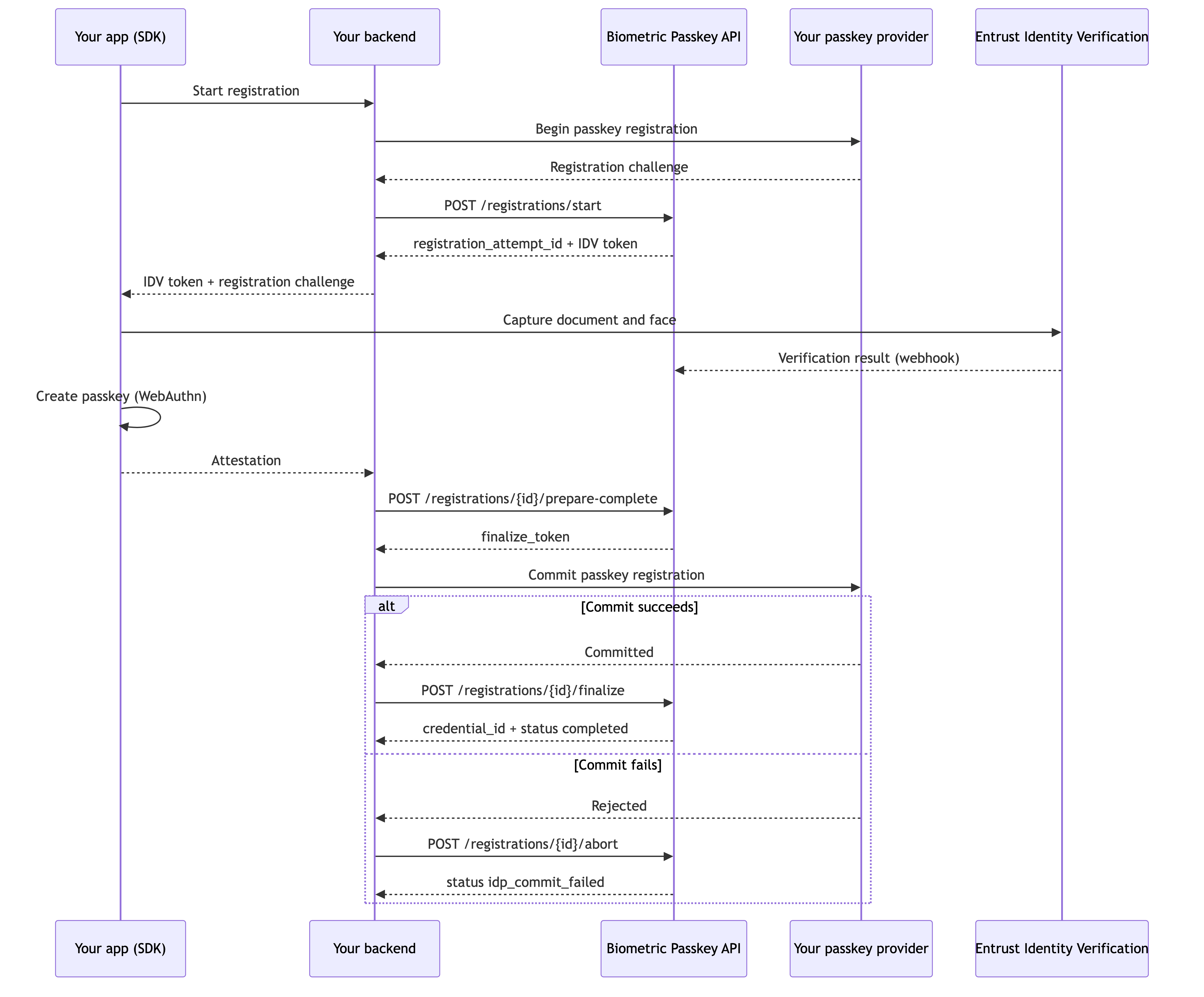
Steps
- Open the attempt. Ask your IDP for a passkey registration challenge, then call
POST /registrations/startwith the user'sexternal_user_id, theapplicantfields your identity verification workflow requires (at a minimumfirst_nameandlast_name), and the IDP-issuedpasskey_registrationbundle (challenge,user_handle,rp_id,expires_at). The Core API opens the attempt and returnsregistration_attempt_idand an IDV token. Forward the IDV token and the IDP'spublicKeyCreationOptionsto your app. Send anIdempotency-Keyso a network retry returns the same attempt instead of opening a duplicate. To re-enroll a user whose encrypted biometric token your backend already holds, also setprior_biometric.encrypted_biometric_tokenon this request; never setworkflow_input.custom_data.encrypted_biometric_token, which the Core API reserves. - Verify identity and create the passkey on the device. The SDK consumes the IDV token, captures the document and face against Entrust Identity Verification, and runs the WebAuthn ceremony locally. When the workflow completes, the provider notifies the Core API, which stores the user's biometric reference and advances the attempt to
idv_completed. The SDK returns theattestation_objectandclient_data_jsonto your backend. You may pollGET /registrations/{id}, but you do not have to — the next step reports a clear error if the result has not arrived yet. - Bind the credential. Call
POST /registrations/{id}/prepare-completewith the attestation. The Core API extracts and stores the WebAuthncredential_id, binds it to the attempt, and returns afinalize_tokenvalid for 5 minutes. - Commit and finalize. Commit the passkey on your IDP, then call
POST /registrations/{id}/finalizewith thefinalize_tokento activate the credential. On IDP commit failure, callPOST /registrations/{id}/abortwith the samefinalize_tokenand anerror_code; the attempt ends inidp_commit_failed. To close an attempt the user backs out of beforeprepare-complete, callPOST /registrations/{id}/cancel.
The attempt advances idv_in_progress → idv_completed → idp_commit_pending → completed. Failure surfaces as idp_commit_failed, failed, cancelled, or expired.
Endpoints
| Method | Endpoint | When your backend calls it |
|---|---|---|
| POST | Start a registration attempt | Always, once per attempt |
| GET | Get registration status | Optional, to poll progress |
| POST | Prepare registration completion | Always, after the SDK returns the attestation |
| POST | Finalize registration | On IDP commit success |
| POST | Abort prepared registration | On IDP commit failure after prepare-complete |
| POST | Cancel registration | Optional, when the user backs out before prepare-complete |
Failure handling
| Trigger | What to do | Resulting state |
|---|---|---|
User backs out before prepare-complete | Cancel registration | cancelled |
| Identity verification fails or returns an unapproved result | Nothing; the attempt fails on its own | failed with an error_code reflecting the outcome |
finalize returns ENCRYPTED_BIOMETRIC_TOKEN_MISSING (409) | Do not retry the token. Reconcile identity verification delivery and start a new attempt if enrollment should continue. | failed; the prepared credential is marked registration_failed |
IDP commit fails after prepare-complete | Abort prepared registration | idp_commit_failed |
finalize_token reused or stale | Do not retry blindly; fetch status and reconcile | FINALIZE_TOKEN_INVALID (409) |
| Attempt TTL elapses | Nothing | expired |
In-app step-up
Re-verify an already-enrolled user for a high-assurance action inside your mobile app: a live face capture against the user's stored biometric reference, plus a fresh WebAuthn assertion.
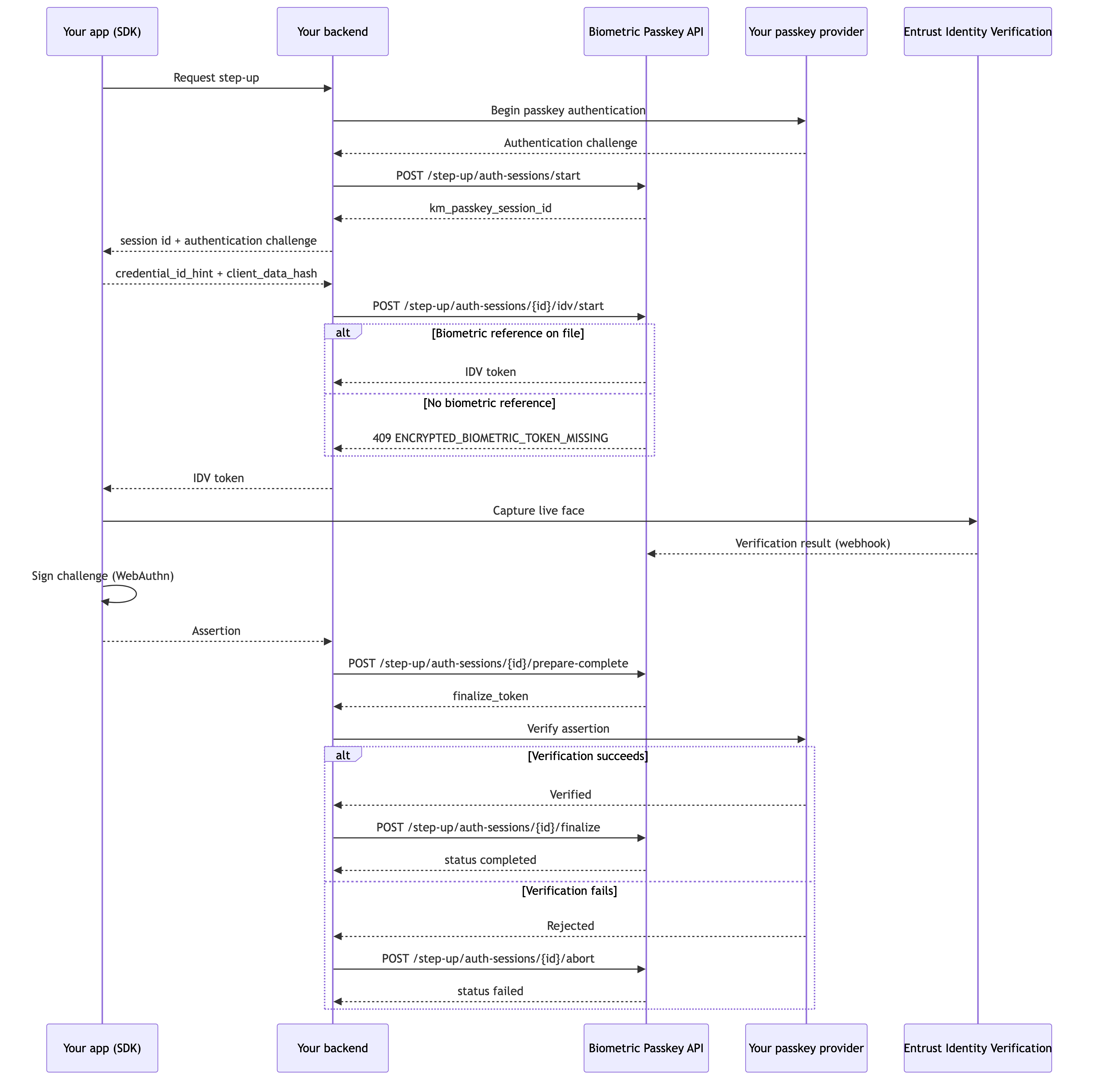
Steps
- Open the session. Ask your IDP for a passkey authentication challenge, then call
POST /step-up/auth-sessions/startwith the user'sexternal_user_idand thepasskey_authenticationbundle (challenge,rp_id,expires_at). The Core API returnskm_passkey_session_id. The user must already have an enrolled credential; if not, start returns404 PASSKEY_NOT_FOUNDand you must route them through registration. Forward the session id and the IDP'spublicKeyRequestOptionsto your app. - Start identity verification. The SDK computes a
credential_id_hint(the credential it will use) and aclient_data_hash(over the exact client data it will later sign) and returns both to your backend. CallPOST /step-up/auth-sessions/{id}/idv/startwith those two values. The Core API supplies the user's stored biometric reference to the workflow and returns an IDV token for the SDK. If the user has no usable biometric reference, this returnsENCRYPTED_BIOMETRIC_TOKEN_MISSING(409) and you must route them to recovery. - Capture and sign on the device. The SDK runs the live face capture against Entrust Identity Verification and the WebAuthn ceremony, then returns the assertion (
client_data_json,authenticator_data,signature) to your backend. - Bind, verify, and finalize. Call
POST /step-up/auth-sessions/{id}/prepare-completewith the assertion to get afinalize_token(valid 5 minutes). Verify the assertion on your IDP, then callPOST /step-up/auth-sessions/{id}/finalizeto mark the step-upcompleted. On IDP failure, callPOST /step-up/auth-sessions/{id}/abortwith the samefinalize_tokenand anerror_code; the session ends infailed.
The session advances created → idv_in_progress → idv_completed → auth_finalizing → completed. Failure surfaces as failed, cancelled, or expired.
Endpoints
| Method | Endpoint | When your backend calls it |
|---|---|---|
| POST | Start a step-up auth session | Always, once per session |
| POST | Start in-app step-up IDV | Always, to obtain the IDV token |
| GET | Get step-up auth session status | Optional, to poll progress |
| POST | Prepare step-up completion | Always, after the SDK returns the assertion |
| POST | Finalize step-up authentication | On IDP verification success |
| POST | Abort prepared step-up authentication | On IDP verification failure after prepare-complete |
Failure handling
| Trigger | What to do | Resulting state |
|---|---|---|
| User has no usable biometric reference | Route the user to recovery | idv/start returns ENCRYPTED_BIOMETRIC_TOKEN_MISSING (409) |
| Identity verification fails | Nothing; the session fails on its own | failed |
| Credential hint malformed or unknown | Do not retry the same values; recompute from the actual SDK output | idv/start returns INVALID_INPUT (400) or PASSKEY_NOT_FOUND (404) |
| Client-data hash does not match the later assertion | Restart with a fresh challenge | prepare-complete returns CLIENT_DATA_CONTINUITY_MISMATCH (409) |
| IDP assertion verification fails | Abort prepared step-up authentication | failed |
finalize_token reused or stale | Do not retry blindly; fetch status and reconcile | FINALIZE_TOKEN_INVALID (409) |
| Session TTL elapses | Nothing | expired |
Cross-platform step-up
Step up a high-assurance action that starts in a browser or desktop session where there is no camera. Your backend hands the action off to the user's enrolled mobile device, which performs the same step-up as above; the browser learns the outcome by polling.
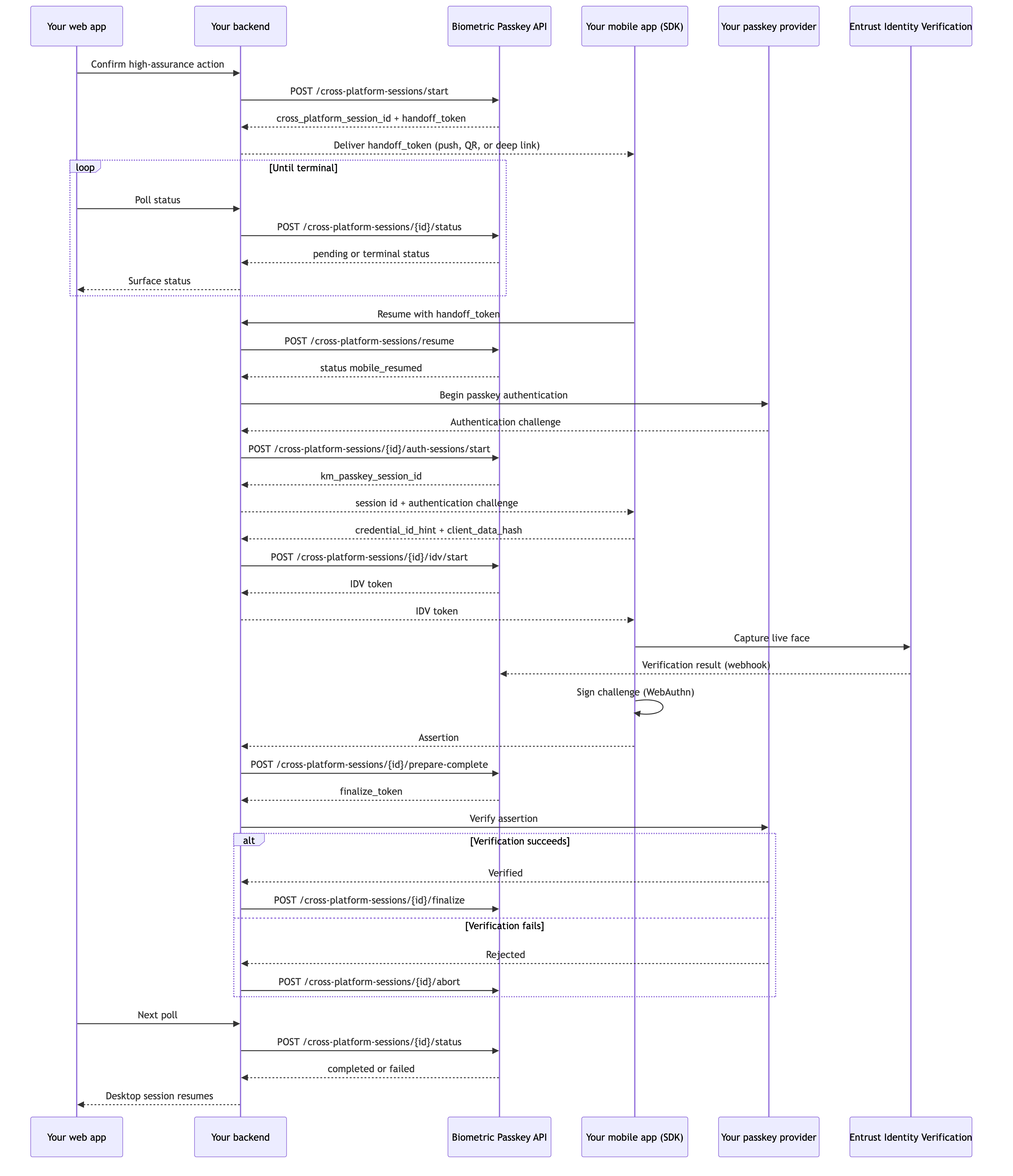
Steps
- Open the session and deliver the handoff token. From the browser side, call
POST /cross-platform-sessions/startwith the user'sexternal_user_idand aweb_context(session_idrequired, optionalactor_context_id) that binds the session to the originating browser session. The Core API returnscross_platform_session_idand a single-usehandoff_token(valid 10 minutes). Persist the handoff token when first issued — a start replay from the same browser context returns the existing session but omits the token. Deliver the token to the user's enrolled mobile device through a channel of your choice (push, QR, or deep link). - Poll status from the browser. While the user picks up their phone, the browser polls your backend, which calls
POST /cross-platform-sessions/{id}/statuswith the sameexternal_user_idandweb_contextthe session was created with. The Core API re-validates ownership on every poll and collapses all in-progress states intopending, surfacing only the terminal statescompleted,failed,expired, andcancelled. Both session expiry and handoff-token expiry surface asexpired. - Resume on mobile. When the user opens the handoff on the device, the mobile app returns the
handoff_tokento your backend. CallPOST /cross-platform-sessions/resumewith the token. The Core API consumes it (single-use), moves the session tomobile_resumed, and returns the continuation context. The rest of the flow runs on the mobile device. - Run the mobile step-up. Ask your IDP for an authentication challenge, then call
POST /cross-platform-sessions/{id}/auth-sessions/startwith thepasskey_authenticationbundle. This call takes noexternal_user_idorweb_context— the Core API derives the owner from the session — and returns akm_passkey_session_id. The SDK computescredential_id_hintandclient_data_hash; callPOST /cross-platform-sessions/{id}/idv/startwithkm_passkey_session_id,credential_id_hint, andclient_data_hashto get the IDV token. The SDK runs the live face capture and the WebAuthn ceremony and returns the assertion. On these cross-platform endpoints,km_passkey_session_idtravels in the request body, not the path. - Bind, verify, and finalize. Call
POST /cross-platform-sessions/{id}/prepare-completewith the assertion to get afinalize_token. Verify the assertion on your IDP, then callPOST /cross-platform-sessions/{id}/finalize; on IDP failure callPOST /cross-platform-sessions/{id}/abortwith the samefinalize_tokenand anerror_code. The browser's next status poll then surfaces the terminal state. To close a session the user backs out of beforeprepare-complete, callPOST /cross-platform-sessions/{id}/cancel.
The session advances created → handoff_issued → mobile_resumed → idv_in_progress → idv_completed → auth_finalizing → completed. Failure surfaces as failed, expired, or cancelled.
Endpoints
| Method | Endpoint | When your backend calls it |
|---|---|---|
| POST | Start a cross-platform session | Always, once per session |
| POST | Get cross-platform session status | Always, while the browser awaits completion |
| POST | Resume cross-platform session on mobile | Always, once, on mobile pickup |
| POST | Start cross-platform auth session | Always, after resume |
| POST | Start cross-platform IDV | Always, after auth-sessions/start |
| POST | Prepare cross-platform completion | Always, after the SDK returns the assertion |
| POST | Finalize cross-platform authentication | On IDP verification success |
| POST | Abort prepared cross-platform authentication | On IDP verification failure after prepare-complete |
| POST | Cancel cross-platform session | Optional, when the user backs out before prepare-complete |
Failure handling
| Trigger | What to do | Resulting state |
|---|---|---|
| User does not pick up the handoff before TTL | Nothing | Session and handoff token both expired; the poll surfaces expired |
| Handoff token already consumed (replay) | Nothing; the original resume stays in effect | resume returns a conflict |
| User has no usable biometric reference | Route the user to recovery | The mobile leg cannot continue; branch on the returned error.code |
User rejects the action on the device before prepare-complete | Cancel cross-platform session | cancelled |
| IDP assertion verification fails | Abort prepared cross-platform authentication | failed |
finalize_token reused or stale | Do not retry blindly; fetch status and reconcile | FINALIZE_TOKEN_INVALID (409) |
Account recovery
Restore access for a user who lost their device: re-verify them with a live face capture against their stored biometric reference, then enroll a replacement passkey. Recovery starts from your own lower-assurance recovery channel.
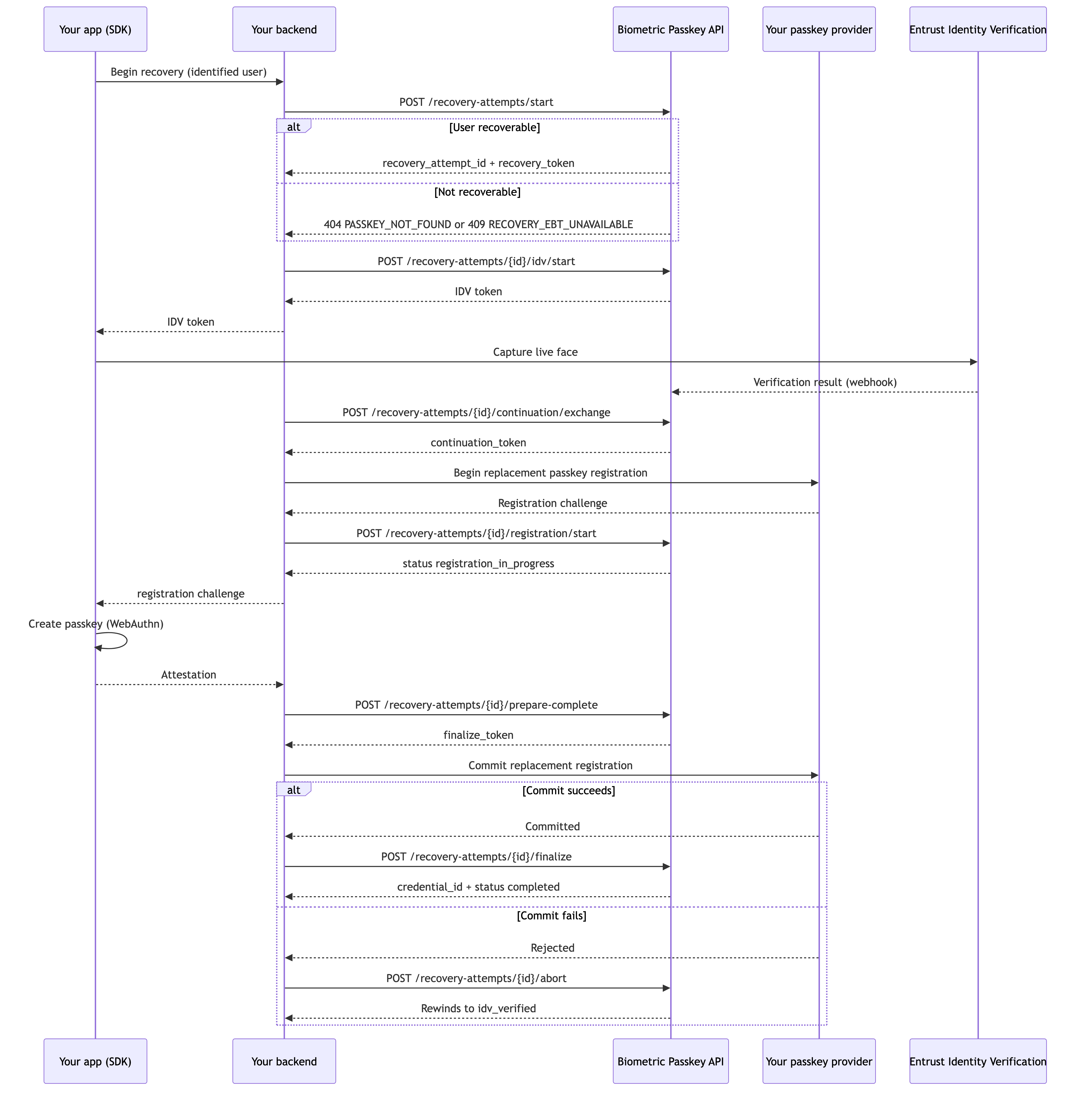
Steps
- Open the attempt. Identify the recovering user through your own recovery channel first; do not call the Core API until you have one authoritative
external_user_id. CallPOST /recovery-attempts/startwith thatexternal_user_id. The Core API checks the user exists, has an active credential, and has a usable biometric reference, then returnsrecovery_attempt_idand arecovery_token. If the user or active credential is missing it returns404 PASSKEY_NOT_FOUND; if there is no usable biometric reference it returnsRECOVERY_EBT_UNAVAILABLE(409). In either case, route the user to fresh enrollment or operator remediation. The Core API selects the stored biometric reference internally — you do not supply a credential or biometric selector. - Verify identity. Call
POST /recovery-attempts/{id}/idv/startwith therecovery_tokento get the IDV token. (Recovery takes therecovery_tokenhere instead of a credential hint and client-data hash, because there is no assertion to bind yet.) The SDK runs a live face capture against Entrust Identity Verification; on success the attempt moves toidv_verified. Your backend never sees the biometric reference in plaintext. - Exchange the continuation token and open the replacement registration. Once the attempt reaches
idv_verified, callPOST /recovery-attempts/{id}/continuation/exchangewith therecovery_token. The Core API echoes the authoritativeexternal_user_idand issues acontinuation_token; the exchange does not invalidate therecovery_token, and a replay returns the existingcontinuation_token. Ask your IDP for a replacement registration challenge, then callPOST /recovery-attempts/{id}/registration/startwith thecontinuation_tokenand thepasskey_registrationbundle. The attempt moves toregistration_in_progressand the SDK creates the new passkey on the device. - Bind, commit, and finalize, with optional retry. Call
POST /recovery-attempts/{id}/prepare-completewith thecontinuation_tokenand the attestation to get afinalize_token. Commit the replacement on your IDP, then callPOST /recovery-attempts/{id}/finalize. On IDP failure, callPOST /recovery-attempts/{id}/abortwith anerror_code(and thefinalize_tokenif one was issued); the attempt rewinds toidv_verified, so you can callregistration/startagain with the samecontinuation_tokento retry without repeating the face capture. Afterfinalizesucceeds, use the Management endpoints to revoke the user's prior credentials if your policy requires it.
The attempt advances created → idv_in_progress → idv_verified → registration_in_progress → idp_commit_pending → completed. Failure surfaces as failed, cancelled, or expired. Unlike the other flows, recovery abort is a non-terminal rewind, not a terminal state.
Endpoints
| Method | Endpoint | When your backend calls it |
|---|---|---|
| POST | Start a recovery attempt | Always, once per attempt |
| GET | Get recovery attempt status | Optional, to poll progress |
| POST | Start recovery IDV | Always, to obtain the IDV token |
| POST | Exchange recovery continuation | Always, after IDV reaches idv_verified |
| POST | Start recovery registration | Always, with continuation_token |
| POST | Prepare recovery completion | Always, after the SDK returns the attestation |
| POST | Finalize recovery | On IDP commit success |
| POST | Abort prepared recovery registration | On IDP commit failure after prepare-complete |
| POST | Cancel recovery attempt | Optional, when the user backs out before prepare-complete |
Failure handling
| Trigger | What to do | Resulting state |
|---|---|---|
| User or active credential is missing | Route the user to fresh enrollment | start returns PASSKEY_NOT_FOUND (404) |
| Active credential exists but no usable biometric reference | Route the user to fresh enrollment or remediation | start returns RECOVERY_EBT_UNAVAILABLE (409) |
| Recovery identity verification fails | Nothing; the attempt fails on its own | failed |
| Invalid, unknown, or expired recovery token | Do not retry; fetch status and reconcile | RECOVERY_TOKEN_INVALID (403) |
| Invalid, unknown, or expired continuation token | Do not retry; fetch status and reconcile | CONTINUATION_TOKEN_INVALID (409) |
IDP commit fails after prepare-complete | Abort prepared recovery registration | Rewinds to idv_verified; retry with the same continuation_token |
finalize_token reused or stale | Do not retry blindly; fetch status and reconcile | FINALIZE_TOKEN_INVALID (409) |
User backs out before prepare-complete | Cancel recovery attempt | cancelled |
| Attempt TTL elapses | Nothing | expired |
Registration endpoints
These endpoints cover the initial enrollment flow: starting a registration attempt, polling status, preparing the IDP-side passkey completion, finalizing (or aborting) the prepared completion, and cancelling an in-flight attempt.
Start a registration attempt
Starts a new enrollment attempt for a user. Your backend supplies the IDP-issued passkey registration challenge bundle and the user's applicant profile. Biometric Passkey records the attempt, starts the identity verification session against Entrust Identity Verification, and returns a registration_attempt_id your backend uses for the rest of the flow.
Use this endpoint when your application has decided to enroll a new user (or to add a new device-bound credential for an existing user) and your backend or IDP has already generated the passkey registration challenge.
Request headers
| Header | Required | Description |
|---|---|---|
| Idempotency-Key | Recommended | Required for safe retry. Reuse the same key when retrying the same logical attempt. |
| X-Correlation-ID | Recommended | Single end-to-end correlation identifier for the logical user action. |
Request body
| Parameter | Type | Required | Description |
|---|---|---|---|
| external_user_id | string | yes | Your stable per-user identifier. Opaque to Biometric Passkey. |
| applicant | object | yes | Applicant profile fields (first_name, last_name, optional dob, email, phone_number, address) forwarded to Entrust Identity Verification. |
| passkey_registration | object | yes | IDP-issued passkey registration challenge bundle: challenge, user_handle, rp_id, expires_at. |
| workflow_input | object | optional | Forwarded to the Entrust Identity Verification workflow run. May carry custom_data and tags. |
| device | object | optional | Mobile device metadata (platform, device_label). |
| prior_biometric | object | optional | Pointer to a prior biometric reference, when re-enrolling an existing user. |
Response
Returns 201 Created on a new attempt; returns 200 OK when an active attempt can replay the original IDV start bundle for the same retry context.
| Attribute | Type | Description |
|---|---|---|
| registration_attempt_id | uuid | Opaque attempt identifier. Use in all subsequent calls in this flow. |
| status | enum | One of created, idv_in_progress, idv_completed, idp_commit_pending, idp_commit_failed, completed, failed, cancelled, expired, cleaned_up. |
| idv | object | token and workflow_run_id for the in-flight Entrust Identity Verification workflow run. The SDK consumes token to drive the on-device capture. |
| expires_at | string (date-time) | Attempt TTL. After this time the attempt transitions to expired automatically. |
Errors
| Status | Description |
|---|---|
| 400 | Missing or malformed input. |
| 409 | A conflicting active attempt exists, or an active attempt cannot replay its IDV start bundle for the same retry context. |
| 422 | The passkey_registration bundle is inconsistent (for example, expires_at is in the past). |
| 502 | Entrust Identity Verification was unreachable; safe to retry with the same Idempotency-Key. |
All errors return the standard error envelope. Branch on error.code; consult error.retryable.
1POST /api/internal/v1/registrations/start HTTP/1.12Host: <YOUR_BIOMETRIC_PASSKEY_BASE_URL>3Authorization: Bearer <YOUR_SERVICE_CREDENTIAL>4Content-Type: application/json5Idempotency-Key: <UNIQUE_IDEMPOTENCY_KEY>6X-Correlation-ID: <YOUR_CORRELATION_ID>78{9 "external_user_id": "u_8c1f0a3e",10 "applicant": {11 "first_name": "Jane",12 "last_name": "Doe",13 "dob": "1981-12-10",14 "email": "jane.doe@example.com"15 },16 "passkey_registration": {17 "challenge": "<BASE64URL_CHALLENGE>",18 "user_handle": "<BASE64URL_USER_HANDLE>",19 "rp_id": "passkeys.example.com",20 "expires_at": "2026-05-27T12:05:00Z"21 },22 "device": {23 "platform": "ios",24 "device_label": "iPhone 15"25 }26}
Get registration status
Returns the current state of a registration attempt. Use this endpoint to poll attempt progress while the on-device identity verification is running, to confirm a terminal state after the SDK reports completion, or to read the bound credential_id after the attempt finishes.
Request headers
| Header | Required | Description |
|---|---|---|
| X-Correlation-ID | Recommended | Single end-to-end correlation identifier for the logical user action. |
Path parameters
| Parameter | Type | Description |
|---|---|---|
| registration_attempt_id | uuid | The attempt identifier returned by Start a registration attempt. |
Response
Returns 200 OK with the current attempt snapshot.
| Attribute | Type | Description |
|---|---|---|
| registration_attempt_id | uuid | Echoes the path parameter. |
| external_user_id | string | The user this attempt belongs to. |
| status | enum | One of created, idv_in_progress, idv_completed, idp_commit_pending, idp_commit_failed, completed, failed, cancelled, expired, cleaned_up. |
| workflow_run_id | string | null | Entrust Identity Verification workflow run identifier, when started. |
| credential_id | string | null | WebAuthn/passkey credential bound at completion. Does not identify or scope the user's EBT. |
| error_code | string | null | Set on terminal failure states. |
| expires_at | string (date-time) | Attempt TTL. |
| updated_at | string (date-time) | Last modification timestamp on the attempt. |
Errors
| Status | Description |
|---|---|
| 404 | No registration attempt with this registration_attempt_id exists. |
All errors return the standard error envelope. Branch on error.code; consult error.retryable.
1GET /api/internal/v1/registrations/<REGISTRATION_ATTEMPT_ID> HTTP/1.12Host: <YOUR_BIOMETRIC_PASSKEY_BASE_URL>3Authorization: Bearer <YOUR_SERVICE_CREDENTIAL>4X-Correlation-ID: <YOUR_CORRELATION_ID>
Prepare registration completion
Submits the WebAuthn attestation captured on device. Biometric Passkey records the attestation against the attempt, transitions the attempt to idp_commit_pending, and returns a one-time finalize_token that the matching finalize or abort request must consume.
Call this endpoint once your mobile app has returned the authenticator attestation and your backend is ready to prepare the IDP commit. If the same prepare-complete request is retried while its token remains valid, Biometric Passkey returns the existing finalize_token when the WebAuthn binding is unchanged. Complete the attempt by calling finalize on IDP success or abort on IDP failure.
Request headers
| Header | Required | Description |
|---|---|---|
| X-Correlation-ID | Recommended | Single end-to-end correlation identifier for the logical user action. |
Path parameters
| Parameter | Type | Description |
|---|---|---|
| registration_attempt_id | uuid | The attempt identifier returned by Start a registration attempt. |
Request body
| Parameter | Type | Required | Description |
|---|---|---|---|
| attestation_object | string | yes | The raw attestation object from the authenticator (unpadded base64url). |
| client_data_json | string | yes | Unpadded base64url encoding of the raw clientDataJSON bytes. |
Response
Returns 200 OK with the issued finalize_token and the updated attempt status.
| Attribute | Type | Description |
|---|---|---|
| registration_attempt_id | uuid | Echoes the path parameter. |
| status | enum | Typically idp_commit_pending after a successful prepare-complete. |
| finalize_token | string | Opaque one-time token consumed by the matching finalize or abort request. |
| expires_at | string (date-time) | Finalize-token expiry. The finalize_token is invalidated at this time. |
Errors
| Status | Description |
|---|---|
| 404 | No registration attempt with this registration_attempt_id exists. |
| 409 | The attempt is not in a state that accepts a prepare-complete (for example, it is already finalized, aborted, or expired). |
All errors return the standard error envelope. Branch on error.code; consult error.retryable.
1POST /api/internal/v1/registrations/<REGISTRATION_ATTEMPT_ID>/prepare-complete HTTP/1.12Host: <YOUR_BIOMETRIC_PASSKEY_BASE_URL>3Authorization: Bearer <YOUR_SERVICE_CREDENTIAL>4Content-Type: application/json5X-Correlation-ID: <YOUR_CORRELATION_ID>67{8 "attestation_object": "<BASE64URL_ATTESTATION_OBJECT>",9 "client_data_json": "<BASE64URL_CLIENT_DATA_JSON>"10}
Finalize registration
Completes the Biometric Passkey side of a prepared registration once your IDP has accepted the passkey registration. The first successful finalize consumes the finalize_token issued by prepare-complete and transitions the attempt to completed.
Call this endpoint after your IDP has committed the credential on its side. If the IDP commit fails instead, call abort with the same finalize_token. Retrying after the attempt is terminal returns the current terminal snapshot.
Request headers
| Header | Required | Description |
|---|---|---|
| X-Correlation-ID | Recommended | Single end-to-end correlation identifier for the logical user action. |
Path parameters
| Parameter | Type | Description |
|---|---|---|
| registration_attempt_id | uuid | The attempt identifier returned by Start a registration attempt. |
Request body
| Parameter | Type | Required | Description |
|---|---|---|---|
| finalize_token | string | yes | The one-time token returned by prepare-complete. |
Response
Returns 200 OK once the attempt has been transitioned to completed.
| Attribute | Type | Description |
|---|---|---|
| registration_attempt_id | uuid | Echoes the path parameter. |
| status | enum | completed on success. |
| credential_id | string | null | WebAuthn/passkey credential bound to the user at completion. Does not identify or scope the user's EBT. |
| completed_at | string (date-time) | null | Completion timestamp. |
Errors
| Status | Description |
|---|---|
| 404 | No registration attempt with this registration_attempt_id exists. |
| 409 | The attempt is not prepared, the finalize_token is unknown, invalid, or expired, or the current state cannot be finalized. |
All errors return the standard error envelope. Branch on error.code; consult error.retryable.
1POST /api/internal/v1/registrations/<REGISTRATION_ATTEMPT_ID>/finalize HTTP/1.12Host: <YOUR_BIOMETRIC_PASSKEY_BASE_URL>3Authorization: Bearer <YOUR_SERVICE_CREDENTIAL>4Content-Type: application/json5X-Correlation-ID: <YOUR_CORRELATION_ID>67{8 "finalize_token": "<OPAQUE_FINALIZE_TOKEN>"9}
Abort prepared registration
Closes a prepared registration attempt when your IDP fails to commit the passkey on its side. The first successful abort releases the finalize_token issued by prepare-complete and transitions the attempt to idp_commit_failed with the supplied error_code.
Use this endpoint after a successful prepare-complete when you need to record an IDP commit failure. If the IDP commit succeeds instead, call finalize with the same finalize_token. To close an in-flight attempt without recording an IDP commit failure, use cancel.
Request headers
| Header | Required | Description |
|---|---|---|
| X-Correlation-ID | Recommended | Single end-to-end correlation identifier for the logical user action. |
Path parameters
| Parameter | Type | Description |
|---|---|---|
| registration_attempt_id | uuid | The attempt identifier returned by Start a registration attempt. |
Request body
| Parameter | Type | Required | Description |
|---|---|---|---|
| finalize_token | string | yes | The one-time token returned by prepare-complete. |
| error_code | string | yes | A short machine-readable reason your backend recorded for the IDP commit failure. |
Response
Returns 200 OK with the current attempt status; typically idp_commit_failed after the first successful abort.
| Attribute | Type | Description |
|---|---|---|
| registration_attempt_id | uuid | Echoes the path parameter. |
| status | enum | Typically idp_commit_failed after a successful abort. |
Errors
Errors return the standard error envelope. Branch on error.code; consult error.retryable.
1POST /api/internal/v1/registrations/<REGISTRATION_ATTEMPT_ID>/abort HTTP/1.12Host: <YOUR_BIOMETRIC_PASSKEY_BASE_URL>3Authorization: Bearer <YOUR_SERVICE_CREDENTIAL>4Content-Type: application/json5X-Correlation-ID: <YOUR_CORRELATION_ID>67{8 "finalize_token": "<OPAQUE_FINALIZE_TOKEN>",9 "error_code": "idp_commit_failed"10}
Cancel registration
Cancels an in-progress registration attempt. Use this endpoint when the user backs out of the enrollment, when your application decides to abandon the attempt, or when your backend detects an upstream condition that makes finishing the attempt unsafe.
First successful cancel wins; subsequent cancel retries return the prior terminal result, so this endpoint is safe to call as part of cleanup. If a finalize token has already been issued, cancel releases it and marks the attempt cancelled; use abort instead when you need to record an IDP commit failure.
Request headers
| Header | Required | Description |
|---|---|---|
| X-Correlation-ID | Recommended | Single end-to-end correlation identifier for the logical user action. |
Path parameters
| Parameter | Type | Description |
|---|---|---|
| registration_attempt_id | uuid | The attempt identifier returned by Start a registration attempt. |
Response
Returns 200 OK with the attempt's terminal status. Cancel takes no request body.
| Attribute | Type | Description |
|---|---|---|
| registration_attempt_id | uuid | Echoes the path parameter. |
| status | enum | Typically cancelled on the first successful cancel; subsequent calls return the prior terminal status. |
Errors
Errors return the standard error envelope. Branch on error.code; consult error.retryable.
1POST /api/internal/v1/registrations/<REGISTRATION_ATTEMPT_ID>/cancel HTTP/1.12Host: <YOUR_BIOMETRIC_PASSKEY_BASE_URL>3Authorization: Bearer <YOUR_SERVICE_CREDENTIAL>4X-Correlation-ID: <YOUR_CORRELATION_ID>
In-app step-up endpoints
This group covers step-up authentication that happens entirely on the user's mobile device: starting a step-up auth session, starting step-up IDV, polling session status, preparing the IDP-side assertion completion, and finalizing or aborting the prepared completion.
Start a step-up auth session
Starts an in-app step-up authentication session for an enrolled user. Your backend supplies the IDP-issued passkey assertion challenge bundle; Biometric Passkey creates a step-up session, returns a km_passkey_session_id, and your backend then drives the biometric verification and the assertion completion against this session.
Use this endpoint when your application has decided that a user action requires a high-value step-up, and your backend or IDP has already generated the passkey assertion challenge.
Request headers
| Header | Required | Description |
|---|---|---|
| Idempotency-Key | Recommended | Required for safe retry. Reuse the same key when retrying the same logical step-up. |
| X-Correlation-ID | Recommended | Single end-to-end correlation identifier for the logical user action. |
Request body
| Parameter | Type | Required | Description |
|---|---|---|---|
| external_user_id | string | yes | Your stable per-user identifier. Must already be enrolled. |
| passkey_authentication | object | yes | IDP-issued passkey assertion challenge bundle: challenge, rp_id, expires_at. |
| workflow_input | object | optional | Forwarded to the Entrust Identity Verification workflow run. May carry custom_data and tags. |
Response
Returns 201 Created on a new session; returns 200 OK on an idempotent replay.
| Attribute | Type | Description |
|---|---|---|
| km_passkey_session_id | uuid | Opaque session identifier. Use in all subsequent calls in this flow. |
| status | enum | One of created, idv_in_progress, idv_completed, auth_finalizing, completed, failed, cancelled, expired. |
| expires_at | string (date-time) | Session TTL. After this time the session transitions to expired automatically. |
Errors
| Status | Description |
|---|---|
| 400 | Missing or malformed input. |
| 404 | The user identified by external_user_id is not enrolled. |
| 409 | An existing active session cannot be replayed in this request context. |
| 422 | The passkey_authentication bundle is inconsistent. |
All errors return the standard error envelope. Branch on error.code; consult error.retryable.
1POST /api/internal/v1/step-up/auth-sessions/start HTTP/1.12Host: <YOUR_BIOMETRIC_PASSKEY_BASE_URL>3Authorization: Bearer <YOUR_SERVICE_CREDENTIAL>4Content-Type: application/json5Idempotency-Key: <UNIQUE_IDEMPOTENCY_KEY>6X-Correlation-ID: <YOUR_CORRELATION_ID>78{9 "external_user_id": "u_8c1f0a3e",10 "passkey_authentication": {11 "challenge": "<BASE64URL_CHALLENGE>",12 "rp_id": "passkeys.example.com",13 "expires_at": "2026-05-27T12:05:00Z"14 },15 "workflow_input": {16 "tags": ["step-up", "transfer-authorization"]17 }18}
Start in-app step-up IDV
Starts the on-device biometric verification subphase for an active step-up auth session. Your backend supplies the selected WebAuthn credential identifier and the matching client_data_hash; Biometric Passkey returns an Entrust Identity Verification SDK token your backend forwards to the SDK to drive the biometric capture.
Call this endpoint after the user has selected a passkey credential and the authenticator has produced the client_data_hash for the assertion. On success the session transitions to idv_in_progress.
Request headers
| Header | Required | Description |
|---|---|---|
| X-Correlation-ID | Recommended | Single end-to-end correlation identifier for the logical user action. |
Path parameters
| Parameter | Type | Description |
|---|---|---|
| km_passkey_session_id | uuid | The session identifier returned by Start a step-up auth session. |
Request body
| Parameter | Type | Required | Description |
|---|---|---|---|
| credential_id_hint | string | yes | WebAuthn/passkey credential selector for the assertion flow. Does not identify or scope the user's EBT. |
| client_data_hash | string | yes | Unpadded base64url encoding of the SHA-256 of the raw clientDataJSON bytes. |
Response
Returns 200 OK with the SDK token and the updated session status.
| Attribute | Type | Description |
|---|---|---|
| km_passkey_session_id | uuid | Echoes the path parameter. |
| status | enum | Typically idv_in_progress after a successful start. |
| credential_id | string | The credential selected for the assertion flow. Does not identify or scope the user's EBT. |
| idv | object | token and workflow_run_id for the in-flight Entrust Identity Verification workflow run. |
| expires_at | string (date-time) | Session TTL. |
Errors
| Status | Description |
|---|---|
| 400 | Missing or malformed input. |
| 404 | No step-up auth session with this km_passkey_session_id exists, or the selected credential is not found or is not active for the session user. |
| 409 | The session is not in a state that accepts IDV start, no usable EBT is available, or the session binding is incompatible. |
| 502 | Entrust Identity Verification was unreachable; safe to retry. |
All errors return the standard error envelope. Branch on error.code; consult error.retryable.
1POST /api/internal/v1/step-up/auth-sessions/<BIOMETRIC_PASSKEY_SESSION_ID>/idv/start HTTP/1.12Host: <YOUR_BIOMETRIC_PASSKEY_BASE_URL>3Authorization: Bearer <YOUR_SERVICE_CREDENTIAL>4Content-Type: application/json5X-Correlation-ID: <YOUR_CORRELATION_ID>67{8 "credential_id_hint": "<WEBAUTHN_CREDENTIAL_ID>",9 "client_data_hash": "<BASE64URL_SHA256_CLIENT_DATA_JSON>"10}
Get step-up auth session status
Returns the current state of a step-up auth session. Use this endpoint to poll session progress while the on-device biometric verification is running, or to read the bound credential_id after the session finishes.
Request headers
| Header | Required | Description |
|---|---|---|
| X-Correlation-ID | Recommended | Single end-to-end correlation identifier for the logical user action. |
Path parameters
| Parameter | Type | Description |
|---|---|---|
| km_passkey_session_id | uuid | The session identifier returned by Start a step-up auth session. |
Response
Returns 200 OK with the current session snapshot.
| Attribute | Type | Description |
|---|---|---|
| km_passkey_session_id | uuid | Echoes the path parameter. |
| external_user_id | string | The user this session belongs to. |
| status | enum | One of created, idv_in_progress, idv_completed, auth_finalizing, completed, failed, cancelled, expired. |
| workflow_run_id | string | null | Entrust Identity Verification workflow run identifier, when started. |
| credential_id | string | null | WebAuthn/passkey credential used for the assertion. Does not identify or scope the user's EBT. |
| error_code | string | null | Set on terminal failure states. |
| expires_at | string (date-time) | Session TTL. |
| updated_at | string (date-time) | Last modification timestamp on the session. |
Errors
| Status | Description |
|---|---|
| 404 | No step-up auth session with this km_passkey_session_id exists. |
All errors return the standard error envelope. Branch on error.code; consult error.retryable.
1GET /api/internal/v1/step-up/auth-sessions/<BIOMETRIC_PASSKEY_SESSION_ID> HTTP/1.12Host: <YOUR_BIOMETRIC_PASSKEY_BASE_URL>3Authorization: Bearer <YOUR_SERVICE_CREDENTIAL>4X-Correlation-ID: <YOUR_CORRELATION_ID>
Prepare step-up completion
Submits the WebAuthn assertion captured on device for an active step-up auth session. Biometric Passkey records the assertion, transitions the session to auth_finalizing, and returns a one-time finalize_token for the matching finalize or abort request.
Request headers
| Header | Required | Description |
|---|---|---|
| X-Correlation-ID | Recommended | Single end-to-end correlation identifier for the logical user action. |
Path parameters
| Parameter | Type | Description |
|---|---|---|
| km_passkey_session_id | uuid | The session identifier returned by Start a step-up auth session. |
Request body
| Parameter | Type | Required | Description |
|---|---|---|---|
| credential_id | string | yes | WebAuthn/passkey credential returned by the authenticator. Must match the credential selected at IDV start. Does not identify or scope the user's EBT. |
| client_data_json | string | yes | Unpadded base64url encoding of the raw clientDataJSON bytes. |
| authenticator_data | string | yes | Unpadded base64url encoding of the raw authenticator data. |
| signature | string | yes | Unpadded base64url encoding of the raw assertion signature. |
Response
Returns 200 OK with the issued finalize_token and the updated session status.
| Attribute | Type | Description |
|---|---|---|
| km_passkey_session_id | uuid | Echoes the path parameter. |
| status | enum | Typically auth_finalizing after a successful prepare-complete. |
| finalize_token | string | Opaque one-time token consumed by the matching finalize or abort request. |
| expires_at | string (date-time) | Finalize-token expiry. The finalize_token is invalidated at this time. |
Errors
| Status | Description |
|---|---|
| 404 | No step-up auth session with this km_passkey_session_id exists. |
| 409 | The session is not in a state that accepts a prepare-complete, or the assertion does not match the credential and client-data binding established at IDV start. |
All errors return the standard error envelope. Branch on error.code; consult error.retryable.
1POST /api/internal/v1/step-up/auth-sessions/<BIOMETRIC_PASSKEY_SESSION_ID>/prepare-complete HTTP/1.12Host: <YOUR_BIOMETRIC_PASSKEY_BASE_URL>3Authorization: Bearer <YOUR_SERVICE_CREDENTIAL>4Content-Type: application/json5X-Correlation-ID: <YOUR_CORRELATION_ID>67{8 "credential_id": "<WEBAUTHN_CREDENTIAL_ID>",9 "client_data_json": "<BASE64URL_CLIENT_DATA_JSON>",10 "authenticator_data": "<BASE64URL_AUTHENTICATOR_DATA>",11 "signature": "<BASE64URL_ASSERTION_SIGNATURE>"12}
Finalize step-up authentication
Completes the Biometric Passkey side of a prepared step-up authentication once your IDP has accepted the assertion. The first successful finalize consumes the finalize_token issued by prepare-complete and transitions the session to completed.
Call this endpoint after your IDP has accepted the assertion on its side. If the IDP rejects the assertion instead, call abort with the same finalize_token. Retrying after the session is terminal returns the current terminal snapshot.
Request headers
| Header | Required | Description |
|---|---|---|
| X-Correlation-ID | Recommended | Single end-to-end correlation identifier for the logical user action. |
Path parameters
| Parameter | Type | Description |
|---|---|---|
| km_passkey_session_id | uuid | The session identifier returned by Start a step-up auth session. |
Request body
| Parameter | Type | Required | Description |
|---|---|---|---|
| finalize_token | string | yes | The one-time token returned by prepare-complete. |
| credential_id | string | yes | WebAuthn/passkey credential used for the completed assertion. Must match the credential selected at IDV start. |
Response
Returns 200 OK once the session has been transitioned to completed.
| Attribute | Type | Description |
|---|---|---|
| km_passkey_session_id | uuid | Echoes the path parameter. |
| status | enum | completed on success. |
| credential_id | string | WebAuthn/passkey credential used for the completed assertion. Does not identify or scope the user's EBT. |
| completed_at | string (date-time) | null | Completion timestamp. |
Errors
| Status | Description |
|---|---|
| 404 | No step-up auth session with this km_passkey_session_id exists. |
| 409 | The session is not prepared, the finalize_token is unknown, invalid, or expired, or the current state cannot be finalized. |
All errors return the standard error envelope. Branch on error.code; consult error.retryable.
1POST /api/internal/v1/step-up/auth-sessions/<BIOMETRIC_PASSKEY_SESSION_ID>/finalize HTTP/1.12Host: <YOUR_BIOMETRIC_PASSKEY_BASE_URL>3Authorization: Bearer <YOUR_SERVICE_CREDENTIAL>4Content-Type: application/json5X-Correlation-ID: <YOUR_CORRELATION_ID>67{8 "finalize_token": "<OPAQUE_FINALIZE_TOKEN>",9 "credential_id": "<WEBAUTHN_CREDENTIAL_ID>"10}
Abort prepared step-up authentication
Closes a prepared step-up auth session when your IDP rejects the assertion on its side, or when your backend otherwise needs to fail the session after prepare-complete. Releases the finalize_token issued by prepare-complete and transitions the session to failed with the supplied error_code.
Use this endpoint only after a successful prepare-complete. To finalize a successfully accepted assertion instead, call finalize with the same finalize_token.
Request headers
| Header | Required | Description |
|---|---|---|
| X-Correlation-ID | Recommended | Single end-to-end correlation identifier for the logical user action. |
Path parameters
| Parameter | Type | Description |
|---|---|---|
| km_passkey_session_id | uuid | The session identifier returned by Start a step-up auth session. |
Request body
| Parameter | Type | Required | Description |
|---|---|---|---|
| finalize_token | string | yes | The one-time token returned by prepare-complete. |
| error_code | string | yes | A short machine-readable reason your backend recorded for the IDP rejection. |
Response
Returns 200 OK with the session's terminal status.
| Attribute | Type | Description |
|---|---|---|
| km_passkey_session_id | uuid | Echoes the path parameter. |
| status | enum | Typically failed after a successful abort. |
Errors
Errors return the standard error envelope. Branch on error.code; consult error.retryable.
1POST /api/internal/v1/step-up/auth-sessions/<BIOMETRIC_PASSKEY_SESSION_ID>/abort HTTP/1.12Host: <YOUR_BIOMETRIC_PASSKEY_BASE_URL>3Authorization: Bearer <YOUR_SERVICE_CREDENTIAL>4Content-Type: application/json5X-Correlation-ID: <YOUR_CORRELATION_ID>67{8 "finalize_token": "<OPAQUE_FINALIZE_TOKEN>",9 "error_code": "idp_assertion_rejected"10}
Cross-platform step-up endpoints
This group covers step-up authentication that starts in a web browser and hands off to a mobile device for the biometric assertion: starting and polling the cross-platform session, resuming on mobile via the handoff token, starting the mobile auth session and IDV, preparing and finalizing (or aborting) the IDP-side completion, and cancelling the browser/mobile handoff.
Start a cross-platform session
Creates a browser/mobile handoff session for a known Biometric Passkey user and issues a one-time handoff_token your backend embeds in the mobile resume callback. Biometric Passkey binds the session to the stable browser ownership tuple (external_user_id, web_context) so that retries from the same browser context replay the same session deterministically. The active passkey and EBT checks happen later, when the mobile authentication and IDV subphases start.
Call this endpoint from the browser-side flow as soon as your application has decided that a user action requires a cross-platform step-up. If an active session already exists for the same external_user_id and web_context, Biometric Passkey returns 200 OK with the existing cross_platform_session_id; the handoff_token is omitted on replay. If your backend no longer has the original handoff token, cancel the session or let it expire before starting a new one.
Request headers
| Header | Required | Description |
|---|---|---|
| Idempotency-Key | Recommended | Accepted for safe retry. Replay is anchored to the (external_user_id, web_context) tuple rather than to the header alone. |
| X-Correlation-ID | Recommended | Single end-to-end correlation identifier for the logical user action. |
Request body
| Parameter | Type | Required | Description |
|---|---|---|---|
| external_user_id | string | yes | Your stable per-user identifier. The user must already exist in Biometric Passkey. |
| web_context | object | yes | Stable browser ownership tuple. Carries session_id and optional actor_context_id. |
| continuation_context | string | optional | Opaque caller-owned continuation data echoed back later only to your backend on prepare-complete and resume. |
Response
Returns 201 Created on a new session; returns 200 OK on a replay of an existing active session.
| Attribute | Type | Description |
|---|---|---|
| cross_platform_session_id | uuid | Opaque session identifier. Use in all subsequent calls in this flow. |
| status | enum | One of created, handoff_issued, mobile_resumed, idv_in_progress, idv_completed, auth_finalizing, completed, failed, expired, cancelled. |
| handoff_token | string | Opaque one-time mobile handoff token. Present only on newly created sessions; omitted on replay. |
| expires_at | string (date-time) | Session TTL. After this time the session transitions to expired automatically. |
Errors
| Status | Description |
|---|---|
| 400 | Missing or malformed input. |
| 403 | The supplied ownership context is not valid for the session or user; this can include an unknown external_user_id. |
| 409 | The stable browser tuple matches an active session but the supplied continuation context is incompatible. |
All errors return the standard error envelope. Branch on error.code; consult error.retryable.
1POST /api/internal/v1/cross-platform-sessions/start HTTP/1.12Host: <YOUR_BIOMETRIC_PASSKEY_BASE_URL>3Authorization: Bearer <YOUR_SERVICE_CREDENTIAL>4Content-Type: application/json5Idempotency-Key: <YOUR_IDEMPOTENCY_KEY>6X-Correlation-ID: <YOUR_CORRELATION_ID>78{9 "external_user_id": "u_8c1f0a3e",10 "web_context": {11 "session_id": "<YOUR_BROWSER_SESSION_ID>",12 "actor_context_id": "<YOUR_ACTOR_CONTEXT_ID>"13 },14 "continuation_context": "<OPAQUE_CONTINUATION_CONTEXT>"15}
Get cross-platform session status
Returns the coarse browser-polling state of a cross-platform session. Use this endpoint to drive the browser-side polling UI while the user completes the biometric assertion on the mobile device. The returned status is intentionally coarse: expired covers both overall session expiry and handoff-token expiry before consumption.
This endpoint is scoped to the browser ownership tuple: the request body must echo the external_user_id and web_context that the session was created with.
Request headers
| Header | Required | Description |
|---|---|---|
| X-Correlation-ID | Recommended | Single end-to-end correlation identifier for the logical user action. |
Path parameters
| Parameter | Type | Description |
|---|---|---|
| cross_platform_session_id | uuid | The session identifier returned by Start a cross-platform session. |
Request body
| Parameter | Type | Required | Description |
|---|---|---|---|
| external_user_id | string | yes | Must match the external_user_id the session was created with. |
| web_context | object | yes | Must match the web_context the session was created with. |
Response
Returns 200 OK with the current poll snapshot.
| Attribute | Type | Description |
|---|---|---|
| cross_platform_session_id | uuid | Echoes the path parameter. |
| status | enum | Coarse poll state: pending, completed, failed, expired, cancelled. |
| expires_at | string (date-time) | Cross-platform session TTL. |
| updated_at | string (date-time) | Last modification timestamp on the session. |
Errors
| Status | Description |
|---|---|
| 400 | Missing or malformed input. |
| 403 | The supplied external_user_id or web_context does not match the session's ownership tuple. |
| 404 | No cross-platform session with this cross_platform_session_id exists. |
All errors return the standard error envelope. Branch on error.code; consult error.retryable.
1POST /api/internal/v1/cross-platform-sessions/<CROSS_PLATFORM_SESSION_ID>/status HTTP/1.12Host: <YOUR_BIOMETRIC_PASSKEY_BASE_URL>3Authorization: Bearer <YOUR_SERVICE_CREDENTIAL>4Content-Type: application/json5X-Correlation-ID: <YOUR_CORRELATION_ID>67{8 "external_user_id": "u_8c1f0a3e",9 "web_context": {10 "session_id": "<YOUR_BROWSER_SESSION_ID>",11 "actor_context_id": "<YOUR_ACTOR_CONTEXT_ID>"12 }13}
Resume cross-platform session on mobile
Resumes a cross-platform session on the mobile device after your mobile callback has carried the one-time handoff_token from the browser leg. Biometric Passkey consumes the handoff token, binds the session to the resuming mobile context, and, when previously stored, echoes the opaque continuation_context back to your backend.
Treat the handoff token as a one-time exchange from your mobile-side backend. The first successful resume consumes the token; later calls with the same, expired, or unknown token are rejected.
Request headers
| Header | Required | Description |
|---|---|---|
| X-Correlation-ID | Recommended | Single end-to-end correlation identifier for the logical user action. |
Request body
| Parameter | Type | Required | Description |
|---|---|---|---|
| handoff_token | string | yes | The one-time token returned by Start a cross-platform session. |
Response
Returns 200 OK with the resumed session snapshot.
| Attribute | Type | Description |
|---|---|---|
| cross_platform_session_id | uuid | Cross-platform session bound to the resumed mobile context. |
| status | enum | Typically mobile_resumed after a successful resume. |
| expires_at | string (date-time) | Cross-platform session TTL. |
| continuation_context | string | Optional opaque caller-owned continuation data previously stored on the session. |
Errors
| Status | Description |
|---|---|
| 400 | Missing or malformed handoff_token. |
| 409 | The handoff token is unknown, already consumed, or expired. |
All errors return the standard error envelope. Branch on error.code; consult error.retryable.
1POST /api/internal/v1/cross-platform-sessions/resume HTTP/1.12Host: <YOUR_BIOMETRIC_PASSKEY_BASE_URL>3Authorization: Bearer <YOUR_SERVICE_CREDENTIAL>4Content-Type: application/json5X-Correlation-ID: <YOUR_CORRELATION_ID>67{8 "handoff_token": "<OPAQUE_HANDOFF_TOKEN>"9}
Start cross-platform auth session
Starts the mobile-side step-up auth session once the cross-platform session has been resumed on mobile and your backend or IDP has produced the passkey assertion challenge bundle. Biometric Passkey derives the owner directly from the cross_platform_session_id; the caller does not re-assert external_user_id on this call.
Call this endpoint after Resume cross-platform session on mobile and after your mobile callback indicates that the real IDP assertion may start. Idempotency-Key is accepted; replay still follows the underlying step-up session reuse rules when the (user_id, challenge_hash) tuple is compatible.
Request headers
| Header | Required | Description |
|---|---|---|
| Idempotency-Key | Recommended | Required for safe retry. Reuse the same key when retrying the same logical step-up. |
| X-Correlation-ID | Recommended | Single end-to-end correlation identifier for the logical user action. |
Path parameters
| Parameter | Type | Description |
|---|---|---|
| cross_platform_session_id | uuid | The session identifier returned by Start a cross-platform session. |
Request body
| Parameter | Type | Required | Description |
|---|---|---|---|
| passkey_authentication | object | yes | IDP-issued passkey assertion challenge bundle: challenge, rp_id, expires_at. |
| workflow_input | object | optional | Forwarded to the Entrust Identity Verification workflow run. May carry custom_data and tags. |
Response
Returns 201 Created on a new auth session; returns 200 OK on an idempotent replay.
| Attribute | Type | Description |
|---|---|---|
| cross_platform_session_id | uuid | Echoes the path parameter. |
| km_passkey_session_id | uuid | The underlying step-up session identifier used for the subsequent IDV, prepare-complete, finalize, and abort calls. |
| status | enum | Typically mobile_resumed immediately after a successful auth-session start. |
| expires_at | string (date-time) | Underlying step-up auth session expiry. |
Errors
| Status | Description |
|---|---|
| 400 | Missing or malformed input. |
| 403 | The caller is not authorized for this session. |
| 404 | No cross-platform session with this cross_platform_session_id exists. |
| 409 | The session is not in a state that accepts an auth-session start, or the underlying step-up replay context is incompatible. |
| 422 | The passkey_authentication bundle is inconsistent. |
All errors return the standard error envelope. Branch on error.code; consult error.retryable.
1POST /api/internal/v1/cross-platform-sessions/<CROSS_PLATFORM_SESSION_ID>/auth-sessions/start HTTP/1.12Host: <YOUR_BIOMETRIC_PASSKEY_BASE_URL>3Authorization: Bearer <YOUR_SERVICE_CREDENTIAL>4Content-Type: application/json5Idempotency-Key: <YOUR_IDEMPOTENCY_KEY>6X-Correlation-ID: <YOUR_CORRELATION_ID>78{9 "workflow_input": {10 "custom_data": { "transaction_id": "txn_91a2" },11 "tags": ["high-value"]12 },13 "passkey_authentication": {14 "challenge": "<BASE64URL_ASSERTION_CHALLENGE>",15 "rp_id": "auth.example.com",16 "expires_at": "2026-05-27T13:05:00Z"17 }18}
Start cross-platform IDV
Starts the on-device biometric verification subphase for the mobile leg of a cross-platform session. Your backend supplies the selected WebAuthn credential identifier and the matching client_data_hash; Biometric Passkey returns an Entrust Identity Verification SDK token your backend forwards to the SDK to drive the biometric capture.
Call this endpoint after Start cross-platform auth session and after the user has selected a passkey credential on the mobile device. On success the cross-platform session transitions to idv_in_progress.
Request headers
| Header | Required | Description |
|---|---|---|
| X-Correlation-ID | Recommended | Single end-to-end correlation identifier for the logical user action. |
Path parameters
| Parameter | Type | Description |
|---|---|---|
| cross_platform_session_id | uuid | The session identifier returned by Start a cross-platform session. |
Request body
| Parameter | Type | Required | Description |
|---|---|---|---|
| km_passkey_session_id | uuid | yes | The underlying step-up session identifier returned by Start cross-platform auth session. |
| credential_id_hint | string | yes | WebAuthn/passkey credential selector for the assertion flow. Does not identify or scope the user's EBT. |
| client_data_hash | string | yes | Unpadded base64url encoding of the SHA-256 of the raw clientDataJSON bytes. |
Response
Returns 200 OK with the SDK token and the updated session status.
| Attribute | Type | Description |
|---|---|---|
| cross_platform_session_id | uuid | Echoes the path parameter. |
| km_passkey_session_id | uuid | Echoes the underlying step-up session identifier. |
| status | enum | Typically idv_in_progress after a successful start. |
| credential_id | string | The credential selected for the assertion flow. Does not identify or scope the user's EBT. |
| idv | object | token and workflow_run_id for the in-flight Entrust Identity Verification workflow run. |
| expires_at | string (date-time) | Underlying step-up auth session expiry. |
Errors
| Status | Description |
|---|---|
| 400 | Missing or malformed input. |
| 404 | No cross-platform session with this cross_platform_session_id exists, or the selected credential is not found or is not active for the session user. |
| 409 | The session is not in a state that accepts IDV start, no usable EBT is available, or the session binding is incompatible. |
| 502 | Entrust Identity Verification was unreachable; safe to retry. |
All errors return the standard error envelope. Branch on error.code; consult error.retryable.
1POST /api/internal/v1/cross-platform-sessions/<CROSS_PLATFORM_SESSION_ID>/idv/start HTTP/1.12Host: <YOUR_BIOMETRIC_PASSKEY_BASE_URL>3Authorization: Bearer <YOUR_SERVICE_CREDENTIAL>4Content-Type: application/json5X-Correlation-ID: <YOUR_CORRELATION_ID>67{8 "km_passkey_session_id": "3a5b7c9d-1e2f-4a3b-8c4d-5e6f7a8b9c0d",9 "credential_id_hint": "<WEBAUTHN_CREDENTIAL_ID>",10 "client_data_hash": "<BASE64URL_SHA256_CLIENT_DATA_JSON>"11}
Prepare cross-platform completion
Submits the WebAuthn assertion captured on the mobile device for an active cross-platform session. Biometric Passkey records the assertion, transitions the session to auth_finalizing, returns a one-time finalize_token for the matching finalize or abort request, and, when previously stored, echoes the opaque continuation_context back to your backend.
Request headers
| Header | Required | Description |
|---|---|---|
| X-Correlation-ID | Recommended | Single end-to-end correlation identifier for the logical user action. |
Path parameters
| Parameter | Type | Description |
|---|---|---|
| cross_platform_session_id | uuid | The session identifier returned by Start a cross-platform session. |
Request body
| Parameter | Type | Required | Description |
|---|---|---|---|
| km_passkey_session_id | uuid | yes | The underlying step-up session identifier returned by Start cross-platform auth session. |
| credential_id | string | yes | WebAuthn/passkey credential returned by the authenticator. Must match the credential selected at IDV start. |
| client_data_json | string | yes | Unpadded base64url encoding of the raw clientDataJSON bytes. |
| authenticator_data | string | yes | Unpadded base64url encoding of the raw authenticator data. |
| signature | string | yes | Unpadded base64url encoding of the raw assertion signature. |
Response
Returns 200 OK with the issued finalize_token and the updated session status.
| Attribute | Type | Description |
|---|---|---|
| cross_platform_session_id | uuid | Echoes the path parameter. |
| km_passkey_session_id | uuid | Echoes the underlying step-up session identifier. |
| status | enum | Typically auth_finalizing after a successful prepare-complete. |
| finalize_token | string | Opaque one-time token consumed by the matching finalize or abort request. |
| expires_at | string (date-time) | Finalize-token expiry. The finalize_token is invalidated at this time. |
| continuation_context | string | Optional opaque caller-owned continuation data previously stored on the session. |
Errors
| Status | Description |
|---|---|
| 404 | No cross-platform session with this cross_platform_session_id exists. |
| 409 | The session is not in a state that accepts a prepare-complete, or the assertion does not match the credential and client-data binding established at IDV start. |
All errors return the standard error envelope. Branch on error.code; consult error.retryable.
1POST /api/internal/v1/cross-platform-sessions/<CROSS_PLATFORM_SESSION_ID>/prepare-complete HTTP/1.12Host: <YOUR_BIOMETRIC_PASSKEY_BASE_URL>3Authorization: Bearer <YOUR_SERVICE_CREDENTIAL>4Content-Type: application/json5X-Correlation-ID: <YOUR_CORRELATION_ID>67{8 "km_passkey_session_id": "3a5b7c9d-1e2f-4a3b-8c4d-5e6f7a8b9c0d",9 "credential_id": "<WEBAUTHN_CREDENTIAL_ID>",10 "client_data_json": "<BASE64URL_CLIENT_DATA_JSON>",11 "authenticator_data": "<BASE64URL_AUTHENTICATOR_DATA>",12 "signature": "<BASE64URL_ASSERTION_SIGNATURE>"13}
Finalize cross-platform authentication
Completes the Biometric Passkey side of a prepared cross-platform authentication once your IDP has accepted the assertion. The first successful finalize consumes the finalize_token issued by prepare-cross-platform-completion and transitions the cross-platform session to completed.
Call this endpoint after your IDP has accepted the assertion on its side. If the IDP rejects the assertion instead, call abort with the same finalize_token. Retrying after the session is terminal returns the current terminal snapshot.
Request headers
| Header | Required | Description |
|---|---|---|
| X-Correlation-ID | Recommended | Single end-to-end correlation identifier for the logical user action. |
Path parameters
| Parameter | Type | Description |
|---|---|---|
| cross_platform_session_id | uuid | The session identifier returned by Start a cross-platform session. |
Request body
| Parameter | Type | Required | Description |
|---|---|---|---|
| km_passkey_session_id | uuid | yes | The underlying step-up session identifier returned by Start cross-platform auth session. |
| finalize_token | string | yes | The one-time token returned by prepare-cross-platform-completion. |
| credential_id | string | yes | WebAuthn/passkey credential used for the completed assertion. Must match the credential selected at IDV start. |
Response
Returns 200 OK once the cross-platform session has been transitioned to completed.
| Attribute | Type | Description |
|---|---|---|
| cross_platform_session_id | uuid | Echoes the path parameter. |
| km_passkey_session_id | uuid | Echoes the underlying step-up session identifier. |
| status | enum | completed on success. |
| completed_at | string (date-time) | null | Completion timestamp. |
Errors
Errors return the standard error envelope. Branch on error.code; consult error.retryable.
1POST /api/internal/v1/cross-platform-sessions/<CROSS_PLATFORM_SESSION_ID>/finalize HTTP/1.12Host: <YOUR_BIOMETRIC_PASSKEY_BASE_URL>3Authorization: Bearer <YOUR_SERVICE_CREDENTIAL>4Content-Type: application/json5X-Correlation-ID: <YOUR_CORRELATION_ID>67{8 "km_passkey_session_id": "3a5b7c9d-1e2f-4a3b-8c4d-5e6f7a8b9c0d",9 "finalize_token": "<OPAQUE_FINALIZE_TOKEN>",10 "credential_id": "<WEBAUTHN_CREDENTIAL_ID>"11}
Abort prepared cross-platform authentication
Closes a prepared cross-platform session when your IDP rejects the assertion on its side, or when your backend otherwise needs to fail the session after prepare-complete. Releases the finalize_token issued by prepare-cross-platform-completion and transitions the session to failed with the supplied error_code.
Use this endpoint only after a successful prepare-complete. To finalize a successfully accepted assertion instead, call finalize with the same finalize_token.
Request headers
| Header | Required | Description |
|---|---|---|
| X-Correlation-ID | Recommended | Single end-to-end correlation identifier for the logical user action. |
Path parameters
| Parameter | Type | Description |
|---|---|---|
| cross_platform_session_id | uuid | The session identifier returned by Start a cross-platform session. |
Request body
| Parameter | Type | Required | Description |
|---|---|---|---|
| km_passkey_session_id | uuid | yes | The underlying step-up session identifier returned by Start cross-platform auth session. |
| finalize_token | string | yes | The one-time token returned by prepare-cross-platform-completion. |
| error_code | string | yes | A short machine-readable reason your backend recorded for the IDP rejection. |
Response
Returns 200 OK with the session's terminal status.
| Attribute | Type | Description |
|---|---|---|
| cross_platform_session_id | uuid | Echoes the path parameter. |
| km_passkey_session_id | uuid | Echoes the underlying step-up session identifier. |
| status | enum | Typically failed after a successful abort. |
Errors
Errors return the standard error envelope. Branch on error.code; consult error.retryable.
1POST /api/internal/v1/cross-platform-sessions/<CROSS_PLATFORM_SESSION_ID>/abort HTTP/1.12Host: <YOUR_BIOMETRIC_PASSKEY_BASE_URL>3Authorization: Bearer <YOUR_SERVICE_CREDENTIAL>4Content-Type: application/json5X-Correlation-ID: <YOUR_CORRELATION_ID>67{8 "km_passkey_session_id": "3a5b7c9d-1e2f-4a3b-8c4d-5e6f7a8b9c0d",9 "finalize_token": "<OPAQUE_FINALIZE_TOKEN>",10 "error_code": "idp_assertion_rejected"11}
Cancel cross-platform session
Cancels the browser/mobile handoff for the current browser context. Use this endpoint when the user backs out of the browser-side flow, when your application decides to retire the cross-platform session, or when the browser context is being torn down. This call is scoped to the browser ownership tuple: the request body must echo the external_user_id and web_context the session was created with.
Request headers
| Header | Required | Description |
|---|---|---|
| X-Correlation-ID | Recommended | Single end-to-end correlation identifier for the logical user action. |
Path parameters
| Parameter | Type | Description |
|---|---|---|
| cross_platform_session_id | uuid | The session identifier returned by Start a cross-platform session. |
Request body
| Parameter | Type | Required | Description |
|---|---|---|---|
| external_user_id | string | yes | Must match the external_user_id the session was created with. |
| web_context | object | yes | Must match the web_context the session was created with. |
Response
Returns 200 OK with the session's terminal status.
| Attribute | Type | Description |
|---|---|---|
| cross_platform_session_id | uuid | Echoes the path parameter. |
| status | enum | Typically cancelled after a successful cancel. |
Errors
| Status | Description |
|---|---|
| 400 | Missing or malformed input. |
| 403 | The supplied external_user_id or web_context does not match the session's ownership tuple. |
| 404 | No cross-platform session with this cross_platform_session_id exists. |
All errors return the standard error envelope. Branch on error.code; consult error.retryable.
1POST /api/internal/v1/cross-platform-sessions/<CROSS_PLATFORM_SESSION_ID>/cancel HTTP/1.12Host: <YOUR_BIOMETRIC_PASSKEY_BASE_URL>3Authorization: Bearer <YOUR_SERVICE_CREDENTIAL>4Content-Type: application/json5X-Correlation-ID: <YOUR_CORRELATION_ID>67{8 "external_user_id": "u_8c1f0a3e",9 "web_context": {10 "session_id": "<YOUR_BROWSER_SESSION_ID>",11 "actor_context_id": "<YOUR_ACTOR_CONTEXT_ID>"12 }13}
Recovery endpoints
These endpoints drive the logged-out-device recovery flow: starting a recovery attempt for a known user, polling status, starting recovery IDV, exchanging the recovery token for a post-IDV continuation token, binding a replacement passkey registration, preparing and finalizing (or aborting) the IDP-side completion, and cancelling an in-flight attempt.
Start a recovery attempt
Starts or replays a logged-out-device recovery attempt for an already-enrolled user identified by external_user_id. Biometric Passkey creates the attempt, returns an opaque recovery_token your backend uses to start recovery identity verification and exchange continuation context, and returns the attempt and registration TTLs. This endpoint does not accept Idempotency-Key; replay is anchored to the active recovery attempt for the same user.
Use this endpoint when a previously enrolled user signs in on a new device and must re-establish a passkey credential before they can step up. If an active recovery attempt already exists for the same user, Biometric Passkey returns 200 OK with the existing attempt and a fresh replay of the same recovery_token.
Request headers
| Header | Required | Description |
|---|---|---|
| X-Correlation-ID | Recommended | Single end-to-end correlation identifier for the logical user action. |
Request body
| Parameter | Type | Required | Description |
|---|---|---|---|
| external_user_id | string | yes | Your stable per-user identifier. Must already be enrolled. |
Response
Returns 201 Created for a new attempt; returns 200 OK on replay of an active attempt for the same user.
| Attribute | Type | Description |
|---|---|---|
| recovery_attempt_id | uuid | Opaque attempt identifier. Use in all subsequent calls in this flow. |
| status | enum | One of created, idv_in_progress, idv_verified, registration_in_progress, idp_commit_pending, completed, failed, cancelled, expired. |
| recovery_token | string | Opaque token your backend uses with recovery IDV start and continuation exchange. Do not forward it to the SDK; recovery IDV start returns the SDK idv.token. |
| attempt_expires_at | string (date-time) | Overall attempt TTL. |
| passkey_registration_expires_at | string (date-time) | null | Passkey-registration subphase TTL; null until the registration subphase has started. |
Errors
| Status | Description |
|---|---|
| 400 | Missing or malformed input. |
| 404 | No Biometric Passkey user or active credential exists for the supplied external_user_id. |
| 409 | An active credential exists but no usable EBT is available for recovery, or enrollment is already in flight for the same user. |
| 429 | The user has exceeded the recovery-attempt rate or abuse limit; consult the Retry-After header. |
All errors return the standard error envelope. Branch on error.code; consult error.retryable.
1POST /api/internal/v1/recovery-attempts/start HTTP/1.12Host: <YOUR_BIOMETRIC_PASSKEY_BASE_URL>3Authorization: Bearer <YOUR_SERVICE_CREDENTIAL>4Content-Type: application/json5X-Correlation-ID: <YOUR_CORRELATION_ID>67{8 "external_user_id": "u_8c1f0a3e"9}
Get recovery attempt status
Returns the current state of a recovery attempt. Use this endpoint to poll attempt progress while recovery identity verification is running, or to read the replacement credential identifier after the attempt finishes.
Request headers
| Header | Required | Description |
|---|---|---|
| X-Correlation-ID | Recommended | Single end-to-end correlation identifier for the logical user action. |
Path parameters
| Parameter | Type | Description |
|---|---|---|
| recovery_attempt_id | uuid | The attempt identifier returned by Start a recovery attempt. |
Response
Returns 200 OK with the current attempt snapshot.
| Attribute | Type | Description |
|---|---|---|
| recovery_attempt_id | uuid | Echoes the path parameter. |
| external_user_id | string | The user this attempt belongs to. |
| status | enum | One of created, idv_in_progress, idv_verified, registration_in_progress, idp_commit_pending, completed, failed, cancelled, expired. |
| replacement_biometric_passkey_credential_id | uuid | null | Identifier of the replacement credential bound at completion. |
| workflow_run_id | string | null | Entrust Identity Verification workflow run identifier, when started. |
| error_code | string | null | Set on terminal failure states. |
| created_at | string (date-time) | Attempt creation timestamp. |
| attempt_expires_at | string (date-time) | Overall attempt TTL. |
| passkey_registration_expires_at | string (date-time) | null | Passkey-registration subphase TTL. |
| completed_at | string (date-time) | null | Completion timestamp on terminal success. |
| updated_at | string (date-time) | Last modification timestamp on the attempt. |
Errors
| Status | Description |
|---|---|
| 404 | No recovery attempt with this recovery_attempt_id exists. |
All errors return the standard error envelope. Branch on error.code; consult error.retryable.
1GET /api/internal/v1/recovery-attempts/<RECOVERY_ATTEMPT_ID> HTTP/1.12Host: <YOUR_BIOMETRIC_PASSKEY_BASE_URL>3Authorization: Bearer <YOUR_SERVICE_CREDENTIAL>4X-Correlation-ID: <YOUR_CORRELATION_ID>
Start recovery IDV
Exchanges the recovery_token issued at Start a recovery attempt for an Entrust Identity Verification SDK token. Your backend forwards the SDK token to the mobile SDK, which then drives the on-device recovery identity verification capture.
Call this endpoint once you have received the recovery_token and your application is ready to start the on-device capture. The attempt must be in a state that accepts IDV start; on first success the attempt transitions to idv_in_progress. If the same call is retried while the attempt is already idv_in_progress and the SDK token remains available, Biometric Passkey returns the existing SDK token.
Request headers
| Header | Required | Description |
|---|---|---|
| X-Correlation-ID | Recommended | Single end-to-end correlation identifier for the logical user action. |
Path parameters
| Parameter | Type | Description |
|---|---|---|
| recovery_attempt_id | uuid | The attempt identifier returned by Start a recovery attempt. |
Request body
| Parameter | Type | Required | Description |
|---|---|---|---|
| recovery_token | string | yes | The opaque token returned by Start a recovery attempt. |
Response
Returns 200 OK with the SDK token and the updated attempt status.
| Attribute | Type | Description |
|---|---|---|
| recovery_attempt_id | uuid | Echoes the path parameter. |
| status | enum | Typically idv_in_progress after a successful start. |
| idv | object | token and workflow_run_id for the in-flight Entrust Identity Verification workflow run. |
| attempt_expires_at | string (date-time) | Overall attempt TTL. |
Errors
| Status | Description |
|---|---|
| 400 | Missing or malformed input. |
| 403 | The supplied recovery_token does not match the attempt or has been revoked. |
| 404 | No recovery attempt with this recovery_attempt_id exists. |
| 409 | The attempt is not in a state that accepts or replays an IDV start, the replay SDK token is unavailable, the stored EBT is missing, or the provider applicant binding is missing. |
| 429 | Rate or abuse limit exceeded; consult the Retry-After header. |
| 502 | Entrust Identity Verification was unreachable; safe to retry. |
All errors return the standard error envelope. Branch on error.code; consult error.retryable.
1POST /api/internal/v1/recovery-attempts/<RECOVERY_ATTEMPT_ID>/idv/start HTTP/1.12Host: <YOUR_BIOMETRIC_PASSKEY_BASE_URL>3Authorization: Bearer <YOUR_SERVICE_CREDENTIAL>4Content-Type: application/json5X-Correlation-ID: <YOUR_CORRELATION_ID>67{8 "recovery_token": "<OPAQUE_RECOVERY_TOKEN>"9}
Exchange recovery continuation
Exchanges the original recovery_token for an opaque post-IDV continuation_token once recovery identity verification has succeeded. The exchange also returns the authoritative external_user_id, which your backend uses to scope ownership before it issues the replacement passkey registration challenge.
Call this endpoint after the SDK signals that recovery IDV is complete. If an exchange has already happened, the same continuation_token is returned with 200 OK, so the call is safe to replay.
Request headers
| Header | Required | Description |
|---|---|---|
| X-Correlation-ID | Recommended | Single end-to-end correlation identifier for the logical user action. |
Path parameters
| Parameter | Type | Description |
|---|---|---|
| recovery_attempt_id | uuid | The attempt identifier returned by Start a recovery attempt. |
Request body
| Parameter | Type | Required | Description |
|---|---|---|---|
| recovery_token | string | yes | The opaque token returned by Start a recovery attempt. |
Response
Returns 201 Created when the continuation token is issued for the first time; returns 200 OK on replay of an already-issued continuation token.
| Attribute | Type | Description |
|---|---|---|
| recovery_attempt_id | uuid | Echoes the path parameter. |
| external_user_id | string | Authoritative user identifier for owner resolution on the next subphase. |
| continuation_token | string | Opaque post-IDV token used by Start recovery registration and Prepare recovery completion. |
| status | enum | Typically idv_verified after a successful exchange. |
| attempt_expires_at | string (date-time) | Overall attempt TTL. |
Errors
| Status | Description |
|---|---|
| 400 | Missing or malformed input. |
| 403 | The supplied recovery_token does not match the attempt or has been revoked. |
| 404 | No recovery attempt with this recovery_attempt_id exists. |
| 409 | The attempt has not yet completed recovery IDV, or has reached a terminal state. |
All errors return the standard error envelope. Branch on error.code; consult error.retryable.
1POST /api/internal/v1/recovery-attempts/<RECOVERY_ATTEMPT_ID>/continuation/exchange HTTP/1.12Host: <YOUR_BIOMETRIC_PASSKEY_BASE_URL>3Authorization: Bearer <YOUR_SERVICE_CREDENTIAL>4Content-Type: application/json5X-Correlation-ID: <YOUR_CORRELATION_ID>67{8 "recovery_token": "<OPAQUE_RECOVERY_TOKEN>"9}
Start recovery registration
Binds the replacement passkey registration challenge to the recovery attempt after recovery identity verification has succeeded. Your backend supplies the IDP-issued passkey registration bundle and the post-IDV continuation_token; Biometric Passkey records the binding and returns a placeholder replacement_biometric_passkey_credential_id for the subsequent prepare-complete and finalize calls.
Call this endpoint after Exchange recovery continuation. On replay of an active recovery registration subphase, the same response is returned with 200 OK.
Request headers
| Header | Required | Description |
|---|---|---|
| X-Correlation-ID | Recommended | Single end-to-end correlation identifier for the logical user action. |
Path parameters
| Parameter | Type | Description |
|---|---|---|
| recovery_attempt_id | uuid | The attempt identifier returned by Start a recovery attempt. |
Request body
| Parameter | Type | Required | Description |
|---|---|---|---|
| continuation_token | string | yes | The opaque post-IDV token returned by Exchange recovery continuation. |
| passkey_registration | object | yes | IDP-issued passkey registration challenge bundle: challenge, user_handle, rp_id, expires_at. |
| device | object | optional | Mobile device metadata (platform, device_label). |
Response
Returns 201 Created for the first successful start; returns 200 OK when the active recovery registration subphase is replayed.
| Attribute | Type | Description |
|---|---|---|
| recovery_attempt_id | uuid | Echoes the path parameter. |
| replacement_biometric_passkey_credential_id | uuid | Placeholder identifier reserved for the replacement credential. |
| continuation_token | string | Echoes the supplied continuation_token for traceability. |
| status | enum | Typically registration_in_progress after a successful start. |
| attempt_expires_at | string (date-time) | Overall attempt TTL. |
| passkey_registration_expires_at | string (date-time) | Passkey-registration subphase TTL. |
Errors
| Status | Description |
|---|---|
| 400 | Missing or malformed input. |
| 404 | No recovery attempt with this recovery_attempt_id exists. |
| 409 | The attempt is not in a state that accepts a registration start. |
| 422 | The passkey_registration bundle is inconsistent (for example, expires_at is in the past). |
All errors return the standard error envelope. Branch on error.code; consult error.retryable.
1POST /api/internal/v1/recovery-attempts/<RECOVERY_ATTEMPT_ID>/registration/start HTTP/1.12Host: <YOUR_BIOMETRIC_PASSKEY_BASE_URL>3Authorization: Bearer <YOUR_SERVICE_CREDENTIAL>4Content-Type: application/json5X-Correlation-ID: <YOUR_CORRELATION_ID>67{8 "continuation_token": "<OPAQUE_CONTINUATION_TOKEN>",9 "passkey_registration": {10 "challenge": "<BASE64URL_CHALLENGE>",11 "user_handle": "<BASE64URL_USER_HANDLE>",12 "rp_id": "passkeys.example.com",13 "expires_at": "2026-05-27T13:05:00Z"14 },15 "device": {16 "platform": "ios",17 "device_label": "iPhone 15"18 }19}
Prepare recovery completion
Submits the WebAuthn attestation captured on device for the replacement credential. Biometric Passkey transitions the attempt to idp_commit_pending and returns a one-time finalize_token for the matching finalize or abort request.
Request headers
| Header | Required | Description |
|---|---|---|
| X-Correlation-ID | Recommended | Single end-to-end correlation identifier for the logical user action. |
Path parameters
| Parameter | Type | Description |
|---|---|---|
| recovery_attempt_id | uuid | The attempt identifier returned by Start a recovery attempt. |
Request body
| Parameter | Type | Required | Description |
|---|---|---|---|
| continuation_token | string | yes | The opaque post-IDV token returned by Exchange recovery continuation. |
| attestation_object | string | yes | The raw attestation object from the authenticator (unpadded base64url). |
| client_data_json | string | yes | Unpadded base64url encoding of the raw clientDataJSON bytes. |
Response
Returns 200 OK with the issued finalize_token and the updated attempt status.
| Attribute | Type | Description |
|---|---|---|
| recovery_attempt_id | uuid | Echoes the path parameter. |
| status | enum | Typically idp_commit_pending after a successful prepare-complete. |
| finalize_token | string | Opaque one-time token consumed by the matching finalize or abort request. |
| attempt_expires_at | string (date-time) | Overall attempt TTL. |
| passkey_registration_expires_at | string (date-time) | Passkey-registration subphase TTL. |
Errors
| Status | Description |
|---|---|
| 400 | Missing or malformed input. |
| 404 | No recovery attempt with this recovery_attempt_id exists. |
| 409 | The attempt is not in a state that accepts a prepare-complete. |
All errors return the standard error envelope. Branch on error.code; consult error.retryable.
1POST /api/internal/v1/recovery-attempts/<RECOVERY_ATTEMPT_ID>/prepare-complete HTTP/1.12Host: <YOUR_BIOMETRIC_PASSKEY_BASE_URL>3Authorization: Bearer <YOUR_SERVICE_CREDENTIAL>4Content-Type: application/json5X-Correlation-ID: <YOUR_CORRELATION_ID>67{8 "continuation_token": "<OPAQUE_CONTINUATION_TOKEN>",9 "attestation_object": "<BASE64URL_ATTESTATION_OBJECT>",10 "client_data_json": "<BASE64URL_CLIENT_DATA_JSON>"11}
Finalize recovery
Completes the Biometric Passkey side of a prepared recovery registration once your IDP has accepted the replacement passkey registration. The first successful finalize consumes the finalize_token issued by prepare-complete and transitions the attempt to completed.
Call this endpoint after your IDP has committed the replacement credential on its side. If the IDP commit fails instead, call abort with the same finalize_token. Retrying after the attempt is completed returns the completed snapshot.
Request headers
| Header | Required | Description |
|---|---|---|
| X-Correlation-ID | Recommended | Single end-to-end correlation identifier for the logical user action. |
Path parameters
| Parameter | Type | Description |
|---|---|---|
| recovery_attempt_id | uuid | The attempt identifier returned by Start a recovery attempt. |
Request body
| Parameter | Type | Required | Description |
|---|---|---|---|
| finalize_token | string | yes | The one-time token returned by prepare-complete. |
Response
Returns 200 OK once the attempt has been transitioned to completed.
| Attribute | Type | Description |
|---|---|---|
| recovery_attempt_id | uuid | Echoes the path parameter. |
| status | enum | completed on success. |
| credential_id | string | null | Replacement WebAuthn/passkey credential bound to the user at completion. Does not identify or scope the user's EBT. |
| completed_at | string (date-time) | null | Completion timestamp. |
Errors
| Status | Description |
|---|---|
| 400 | Missing or malformed input. |
| 404 | No recovery attempt with this recovery_attempt_id exists. |
| 409 | The attempt is not prepared, the finalize_token is unknown, invalid, or expired, or the current state cannot be finalized. |
All errors return the standard error envelope. Branch on error.code; consult error.retryable.
1POST /api/internal/v1/recovery-attempts/<RECOVERY_ATTEMPT_ID>/finalize HTTP/1.12Host: <YOUR_BIOMETRIC_PASSKEY_BASE_URL>3Authorization: Bearer <YOUR_SERVICE_CREDENTIAL>4Content-Type: application/json5X-Correlation-ID: <YOUR_CORRELATION_ID>67{8 "finalize_token": "<OPAQUE_FINALIZE_TOKEN>"9}
Abort prepared recovery registration
Aborts the replacement passkey registration subphase when your IDP fails to commit the replacement passkey on its side. Biometric Passkey releases any issued finalize token, resets the pending replacement credential binding, records the supplied error_code, and returns the recovery attempt to idv_verified so a new replacement registration can be started.
Use this endpoint after the recovery registration subphase has started when you want to keep the verified recovery attempt and retry replacement registration. If a valid finalize token has been issued, include it on the abort request. If the IDP commit succeeds instead, call finalize with that finalize_token. To close the whole recovery attempt, use cancel.
Request headers
| Header | Required | Description |
|---|---|---|
| X-Correlation-ID | Recommended | Single end-to-end correlation identifier for the logical user action. |
Path parameters
| Parameter | Type | Description |
|---|---|---|
| recovery_attempt_id | uuid | The attempt identifier returned by Start a recovery attempt. |
Request body
| Parameter | Type | Required | Description |
|---|---|---|---|
| finalize_token | string | optional | The one-time token returned by prepare-complete, when present. |
| error_code | string | yes | A short machine-readable reason your backend recorded for the IDP commit failure. |
Response
Returns 200 OK with the current attempt status after the registration subphase is rewound.
| Attribute | Type | Description |
|---|---|---|
| recovery_attempt_id | uuid | Echoes the path parameter. |
| status | enum | Typically idv_verified after a successful abort. |
| attempt_expires_at | string (date-time) | Overall attempt TTL. |
| passkey_registration_expires_at | string (date-time) | null | Passkey-registration subphase TTL. |
Errors
| Status | Description |
|---|---|
| 400 | Missing or malformed input. |
| 404 | No recovery attempt with this recovery_attempt_id exists. |
| 409 | The attempt is not in a state that accepts an abort. |
All errors return the standard error envelope. Branch on error.code; consult error.retryable.
1POST /api/internal/v1/recovery-attempts/<RECOVERY_ATTEMPT_ID>/abort HTTP/1.12Host: <YOUR_BIOMETRIC_PASSKEY_BASE_URL>3Authorization: Bearer <YOUR_SERVICE_CREDENTIAL>4Content-Type: application/json5X-Correlation-ID: <YOUR_CORRELATION_ID>67{8 "finalize_token": "<OPAQUE_FINALIZE_TOKEN>",9 "error_code": "idp_commit_failed"10}
Cancel recovery attempt
Cancels the whole in-progress recovery attempt. First successful cancel wins; later cancel retries return the prior terminal result, so this endpoint is safe to call as part of cleanup. Use abort instead when you want to keep the verified recovery attempt and retry replacement registration.
Request headers
| Header | Required | Description |
|---|---|---|
| X-Correlation-ID | Recommended | Single end-to-end correlation identifier for the logical user action. |
Path parameters
| Parameter | Type | Description |
|---|---|---|
| recovery_attempt_id | uuid | The attempt identifier returned by Start a recovery attempt. |
Response
Returns 200 OK with the attempt's terminal status. Cancel takes no request body.
| Attribute | Type | Description |
|---|---|---|
| recovery_attempt_id | uuid | Echoes the path parameter. |
| status | enum | Typically cancelled on the first successful cancel; subsequent calls return the prior terminal status. |
| attempt_expires_at | string (date-time) | Overall attempt TTL. |
| passkey_registration_expires_at | string (date-time) | null | Passkey-registration subphase TTL. |
| completed_at | string (date-time) | null | Completion timestamp when the attempt has reached a terminal success state on replay. |
Errors
| Status | Description |
|---|---|
| 404 | No recovery attempt with this recovery_attempt_id exists. |
| 409 | A conflicting cancel or terminal transition is already in flight. |
All errors return the standard error envelope. Branch on error.code; consult error.retryable.
1POST /api/internal/v1/recovery-attempts/<RECOVERY_ATTEMPT_ID>/cancel HTTP/1.12Host: <YOUR_BIOMETRIC_PASSKEY_BASE_URL>3Authorization: Bearer <YOUR_SERVICE_CREDENTIAL>4X-Correlation-ID: <YOUR_CORRELATION_ID>
User endpoints
The User endpoints let your backend read or repair the Biometric Passkey user profile and its provider-applicant binding outside of an enrollment or recovery flow.
Get user by external user ID
Returns the Biometric Passkey user profile and the current provider-applicant binding snapshot for the user identified by your stable external_user_id. Use this endpoint to confirm a user is enrolled before driving a step-up flow, or to read the bound applicant identifiers for support tooling.
Request headers
| Header | Required | Description |
|---|---|---|
| X-Correlation-ID | Recommended | Single end-to-end correlation identifier for the logical user action. |
Path parameters
| Parameter | Type | Description |
|---|---|---|
| external_user_id | string | Your stable per-user identifier. |
Response
Returns 200 OK when the user is known to Biometric Passkey.
| Attribute | Type | Description |
|---|---|---|
| external_user_id | string | Echoes the path parameter. |
| first_name | string | Current applicant first name as last bound. |
| last_name | string | Current applicant last name as last bound. |
| idv_applicant | object | null | Current provider-applicant binding summary (provider_applicant_id, first_name, last_name) when bound; null if no provider applicant exists yet. |
| created_at | string (date-time) | User record creation timestamp. |
| updated_at | string (date-time) | Last modification timestamp on the user record or its provider-applicant binding. |
Errors
| Status | Description |
|---|---|
| 400 | The external_user_id path parameter is missing or malformed. |
| 404 | No Biometric Passkey user exists for the supplied external_user_id. |
All errors return the standard error envelope. Branch on error.code; consult error.retryable.
1GET /api/internal/v1/users/u_8c1f0a3e HTTP/1.12Host: <YOUR_BIOMETRIC_PASSKEY_BASE_URL>3Authorization: Bearer <YOUR_SERVICE_CREDENTIAL>4X-Correlation-ID: <YOUR_CORRELATION_ID>
Update provider applicant
Repairs or enriches the existing provider applicant bound to the user identified by external_user_id. Use this endpoint to correct an applicant field (for example a misspelled name or an updated address) without starting a new enrollment or recovery flow. Biometric Passkey forwards the patch to Entrust Identity Verification for the bound provider applicant.
Only the fields you include in applicant are modified; omitted fields are left untouched. This endpoint does not create a new applicant or rebind the user; if the user has no provider applicant yet, you must enroll or recover the user first.
Request headers
| Header | Required | Description |
|---|---|---|
| X-Correlation-ID | Recommended | Single end-to-end correlation identifier for the logical user action. |
Path parameters
| Parameter | Type | Description |
|---|---|---|
| external_user_id | string | Your stable per-user identifier. |
Request body
| Parameter | Type | Required | Description |
|---|---|---|---|
| applicant | object | yes | Patch object. Any subset of first_name, last_name, dob, email, phone_number, address. Omitted fields are left untouched. |
Response
Returns 200 OK once the patch has been accepted and forwarded to the provider applicant.
| Attribute | Type | Description |
|---|---|---|
| external_user_id | string | Echoes the path parameter. |
| status | enum | Always updated. |
| updated_at | string (date-time) | Timestamp of the applied update. |
Errors
| Status | Description |
|---|---|
| 400 | The path parameter or patch body is malformed. |
| 404 | No Biometric Passkey user exists for the supplied external_user_id. |
| 409 | The user has no provider applicant bound yet, or a conflicting update is already in flight. |
| 422 | The patch contains values that fail provider-side validation. |
| 502 | Entrust Identity Verification was unreachable; safe to retry. |
All errors return the standard error envelope. Branch on error.code; consult error.retryable.
1PUT /api/internal/v1/users/u_8c1f0a3e/applicant HTTP/1.12Host: <YOUR_BIOMETRIC_PASSKEY_BASE_URL>3Authorization: Bearer <YOUR_SERVICE_CREDENTIAL>4Content-Type: application/json5X-Correlation-ID: <YOUR_CORRELATION_ID>67{8 "applicant": {9 "email": "jane.doe@example.com",10 "phone_number": "+441632960123",11 "address": {12 "line1": "10 Downing Street",13 "town": "London",14 "postcode": "SW1A 2AA",15 "country": "GBR"16 }17 }18}


