

Biometric Passkey: Deployment
Introduction
This guide covers deployment and operations for the self-hosted Biometric Passkey backend. The production deployment path is Kubernetes with the packaged Helm chart from the backend release bundle. Docker Compose and direct Docker CLI examples are included only as simple startup options for evaluation or local integration checks.
Mobile SDK distribution is separate from backend deployment: Android is distributed through Maven Central, and iOS is distributed through the public GitHub Swift package repository. See Biometric Passkey: SDK integration. For supported release lines and cross-component upgrade planning, see Biometric Passkey: Version policy.
Deployment topology
The Biometric Passkey backend is delivered as a Helm chart plus container image archives that you run in your environment. In the default Helm deployment you run two long-lived application processes plus a migration job, all backed by a single PostgreSQL database:
| Component | Image | Role |
|---|---|---|
| Core API | biometric-passkey-core | Serves the flow API consumed by your backend. |
| Management runtime | biometric-passkey-management | Serves the browser-based management dashboard, browser-safe runtime configuration, and the Management API used by support tooling. |
| Migration job | biometric-passkey-migrate | Job that applies database migrations on install or upgrade. |
All three share a single PostgreSQL database. Outbound network access to Entrust Identity Verification is required.
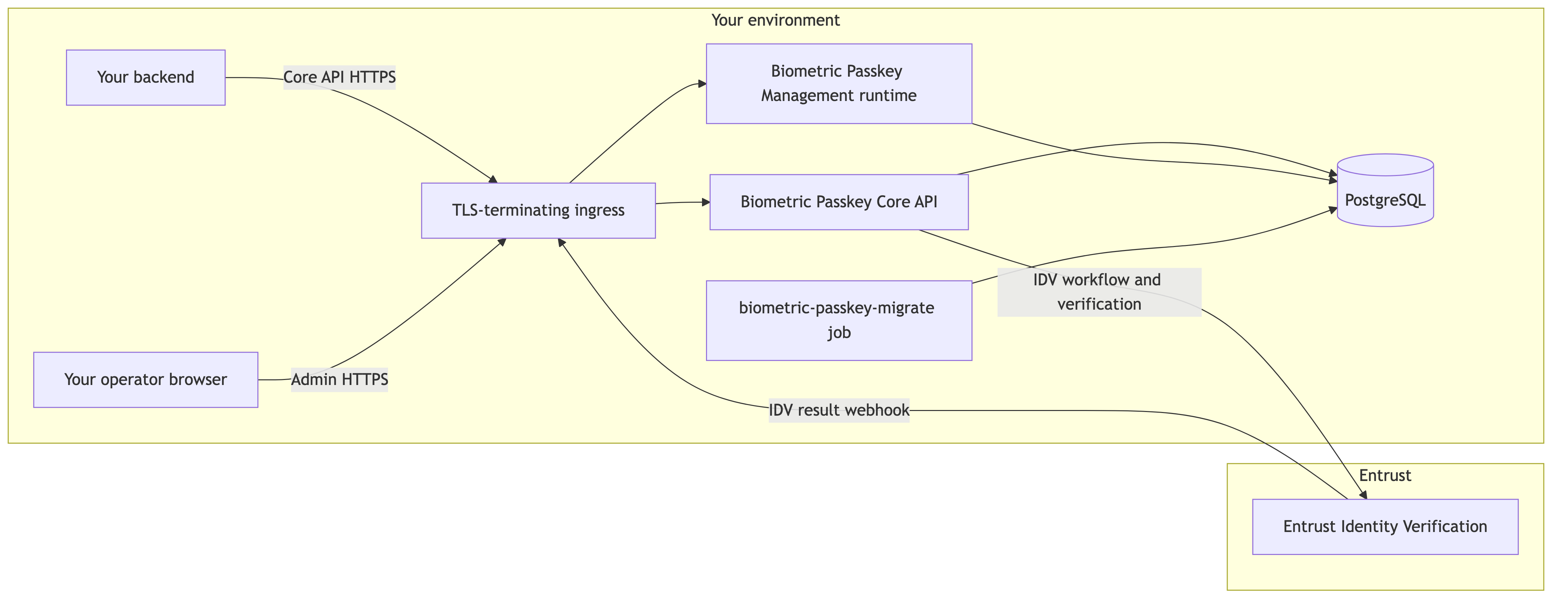
Deployment topology: the Core API, management runtime, and migration job run in your environment and share PostgreSQL. The management runtime serves the dashboard, /runtime-config.json, and /api/management/v1/** from the same management runtime. The application containers listen on internal HTTP ports; expose them through TLS-terminating ingress only.
The Helm chart creates Deployments, Services, a ServiceAccount, and an optional migration job. It does not install PostgreSQL, create Ingress or Gateway resources, create image registries, or create Secrets containing secret material. Long-lived service images (biometric-passkey-core, biometric-passkey-management) declare a Docker HEALTHCHECK; the biometric-passkey-migrate image is a job container and does not declare a health check.
Runtime prerequisites
| Requirement | Notes |
|---|---|
| Kubernetes and Helm | Production deployments use your Kubernetes cluster and Helm 3. |
| Container runtime | Any OCI runtime; production images are distroless and run as non-root with no shell. |
| PostgreSQL | PostgreSQL 16, 17, or 18. The migration job creates the required database objects. |
| Outbound network | HTTPS to Entrust Identity Verification. |
| Inbound network | HTTPS from your backend to the Core API; HTTPS from trusted operator browsers and approved automation clients to the management runtime; HTTPS from Entrust Identity Verification to the Core API webhook endpoint. |
| TLS termination | Terminate TLS at your ingress or service mesh. Application containers listen over HTTP on the configured internal port. |
| Secret store | A secret manager for keys, tokens, and webhook secrets. Do not load secrets from disk. |
Backend release bundle
Download production Biometric Passkey backend releases from TrustedCare. Each backend release package includes the Helm chart archive, three gzipped distroless image archives, and release metadata:
biometric-passkey-helm-chart-backend-vX.Y.Z.tgzbiometric-passkey-core-distroless-backend-vX.Y.Z.tar.gzbiometric-passkey-management-distroless-backend-vX.Y.Z.tar.gzbiometric-passkey-migrate-distroless-backend-vX.Y.Z.tar.gzchecksums.txtrelease-manifest.jsonrelease-notes.mdrelease-sbom.cdx.json
The release-sbom.cdx.json file is a CycloneDX SBOM for the backend release bundle. Ingest it into your dependency inventory, vulnerability-management, or procurement-review process according to your security policy.
The backend release package delivered through TrustedCare contains the artifact filenames, image digests, chart version, and backend version for your deployment. Use the chart archive and image archives from the same backend release bundle. Backend images are delivered as loadable archives, not as pullable registry references. Mobile SDKs use separate public package channels: Maven Central for Android and the public GitHub Swift package repository for iOS.
Helm chart deployment
Verify release checksums before loading images or installing the chart:
1sha256sum -c checksums.txt
Inspect the manifest and keep it with your deployment record:
1jq . release-manifest.json
Load each image archive, tag it for your registry, and push it:
1load_and_push() {2 archive="$1"3 target="$2"45 load_output="$(gzip -dc "$archive" | docker load)"6 printf '%s\n' "$load_output"78 loaded_ref="$(printf '%s\n' "$load_output" | sed -n 's/^Loaded image: //p; s/^Loaded image ID: //p' | tail -n 1)"9 test -n "$loaded_ref"1011 docker tag "$loaded_ref" "$target"12 docker push "$target"13}1415load_and_push biometric-passkey-core-distroless-backend-vX.Y.Z.tar.gz \16 registry.example.com/biometric-passkey-core:X.Y.Z1718load_and_push biometric-passkey-management-distroless-backend-vX.Y.Z.tar.gz \19 registry.example.com/biometric-passkey-management:X.Y.Z2021load_and_push biometric-passkey-migrate-distroless-backend-vX.Y.Z.tar.gz \22 registry.example.com/biometric-passkey-migrate:X.Y.Z
Always pin to an immutable version tag in production. Do not use a floating tag.
Create the namespace and Secrets outside the chart:
1kubectl create namespace biometric-passkey23kubectl -n biometric-passkey create secret generic biometric-passkey-database \4 --from-literal=password='<postgres-password>'56kubectl -n biometric-passkey create secret generic biometric-passkey-secrets \7 --from-literal=data-encryption-key='<unpadded-base64url-encoded-32-byte-key>'89kubectl -n biometric-passkey create secret generic biometric-passkey-onfido \10 --from-literal=api-token='<onfido-api-token>' \11 --from-literal=webhook-secret='<onfido-webhook-secret>'
Do not put secret values directly in values.yaml. The data encryption key protects sensitive database values and must be an unpadded base64url-encoded 32-byte AES-256-GCM key. The key ID stored with protected database values is configured with Helm value dataEncryption.keyId and defaults to default. Keep the key and key ID stable after initial deployment; this release does not support in-place rotation of this key.
After supported Secret updates, restart the workloads that consume the Secret so Kubernetes refreshes the environment values:
1kubectl -n biometric-passkey rollout restart deploy/biometric-passkey-core23# If management.enabled=true:4kubectl -n biometric-passkey rollout restart deploy/biometric-passkey-management
Create biometric-passkey-values.yaml:
1images:2 core:3 repository: registry.example.com/biometric-passkey-core4 tag: X.Y.Z5 management:6 repository: registry.example.com/biometric-passkey-management7 tag: X.Y.Z8 migrate:9 repository: registry.example.com/biometric-passkey-migrate10 tag: X.Y.Z1112database:13 host: postgres.example.com14 port: 543215 name: biometric_passkey16 user: biometric_passkey17 sslmode: require1819secrets:20 database:21 name: biometric-passkey-database22 passwordKey: password23 dataEncryption:24 name: biometric-passkey-secrets25 key: data-encryption-key26 onfido:27 name: biometric-passkey-onfido28 apiTokenKey: api-token29 webhookSecretKey: webhook-secret3031dataEncryption:32 keyId: default3334idv:35 mode: onfido36 registrationWorkflowId: biometric-passkey-registration37 stepUpWorkflowId: biometric-passkey-step-up38 recoveryVerifyWorkflowId: biometric-passkey-recovery-verify39 onfido:40 region: eu41 webhookMaxAge: 15m4243core:44 replicas: 24546resources:47 core:48 requests:49 cpu: 250m50 memory: 256Mi51 limits:52 cpu: "1"53 memory: 512Mi5455migrations:56 enabled: true57 useHelmHooks: true
Render the chart before installing:
1helm template biometric-passkey ./biometric-passkey-helm-chart-backend-vX.Y.Z.tgz \2 -n biometric-passkey \3 -f biometric-passkey-values.yaml
Install the chart:
1helm install biometric-passkey ./biometric-passkey-helm-chart-backend-vX.Y.Z.tgz \2 -n biometric-passkey \3 -f biometric-passkey-values.yaml \4 --wait \5 --timeout 10m
Check the rollout and health:
1kubectl -n biometric-passkey get pods,jobs,svc2kubectl -n biometric-passkey rollout status deploy/biometric-passkey-core3kubectl -n biometric-passkey port-forward svc/biometric-passkey-core 3000:80 >/tmp/biometric-passkey-core-port-forward.log 2>&1 &4core_pf_pid=$!5trap 'kill "$core_pf_pid" 2>/dev/null || true' EXIT6sleep 27curl -fsS http://127.0.0.1:3000/api/health
If management is enabled, also check the management runtime:
1kubectl -n biometric-passkey rollout status deploy/biometric-passkey-management2kubectl -n biometric-passkey port-forward svc/biometric-passkey-management 3001:80 >/tmp/biometric-passkey-management-port-forward.log 2>&1 &3management_pf_pid=$!4trap 'kill "$management_pf_pid" 2>/dev/null || true' EXIT5sleep 26curl -fsS http://127.0.0.1:3001/api/health7curl -fsS http://127.0.0.1:3001/runtime-config.json
The chart creates Kubernetes Services only. Configure your Ingress, Gateway API, service mesh, or load balancer resources separately. Route inbound IDV callbacks to POST /api/public/v1/providers/onfido/webhooks on the Core service.
Enable management runtime
The management runtime is disabled by default. It serves the browser management dashboard, the generated /runtime-config.json response, and /api/management/v1/** routes from the same management runtime and Kubernetes Service. Enable it only after you choose an HTTPS admin origin, register the public OIDC client, and configure the JWT issuer, audience, JWKS URL, and UI client settings.
Register these fixed dashboard redirect paths in your OIDC provider for the admin origin you expose through ingress:
| Setting | Value |
|---|---|
| Redirect URI | https://<your-management-origin>/auth/callback |
| Post-logout redirect URI | https://<your-management-origin>/login |
The example below requests the full dashboard scope set used by operators who need user search, user deletion, passkey lifecycle actions, flow review, and audit review. The packaged Helm values default to a smaller bootstrap set: openid, profile, email, management.users.read, and management.users.delete. Expand or reduce management.ui.scopes to match each operator role.
1management:2 enabled: true3 replicas: 14 auth:5 jwksUrl: https://issuer.example.com/.well-known/jwks.json6 issuer: https://issuer.example.com/7 audience: biometric-passkey-management-api8 scopeClaim: scope9 scopePrefix: ""10 clockSkew: 30s11 ui:12 clientId: biometric-passkey-management-ui13 scopes:14 - openid15 - profile16 - email17 - management.users.read18 - management.users.delete19 - management.credentials.read20 - management.credentials.suspend21 - management.credentials.activate22 - management.credentials.revoke23 - management.flows.read24 - management.audit.read
The management.ui.scopes list is what the dashboard requests at sign-in. Grant the same scopes to the operator in your OIDC provider. Keep this list in canonical management.* form; if your OIDC provider issues namespaced scopes, set management.auth.scopePrefix and let the runtime prefix dashboard requests and strip the prefix during API authorization.
The management backend generates /runtime-config.json from these values:
| Runtime config field | Helm value |
|---|---|
oidc.authority | management.auth.issuer |
oidc.clientId | management.ui.clientId |
oidc.audience | management.auth.audience |
oidc.scopes | management.ui.scopes, with management.auth.scopePrefix applied to management.* entries when set |
oidc.scopeClaim | management.auth.scopeClaim |
oidc.scopePrefix | management.auth.scopePrefix |
apiBaseUrl | Empty for same-origin Management API calls in the supported topology |
The generated runtime config response is a browser-readable configuration. Do not put client secrets, refresh-token material, private keys, or operator-specific values in management runtime configuration.
The management runtime does not run audit partition maintenance. The chart always renders BIOMETRIC_PASSKEY_AUDIT_PARTITION_MAINTENANCE_ENABLED=false for management pods.
Customize chart attributes
Keep chart configuration in biometric-passkey-values.yaml. Use values files instead of repeated --set flags for production.
Common values you own are:
| Area | Values |
|---|---|
| Image registry references | images.core, images.management, images.migrate, imagePullSecrets |
| External PostgreSQL | database, secrets.database |
| Secret references | secrets.database, secrets.dataEncryption, secrets.onfido |
| Identity verification | idv.mode, idv.*WorkflowId, idv.onfido |
| Core workload | core, resources.core, probes.core |
| Management workload | management, resources.management, probes.management |
| Migration job | migrations, resources.migrate |
| Services | service |
| Runtime hardening | serviceAccount, podSecurityContext, containerSecurityContext, writableTmp |
| Audit partitions | auditPartition |
Keep the Helm release name, nameOverride, and fullnameOverride stable after installation unless the intent is to recreate Kubernetes resources under new names.
Use tags or digests for release images:
1images:2 core:3 repository: registry.example.com/biometric-passkey-core4 tag: X.Y.Z5 management:6 repository: registry.example.com/biometric-passkey-management7 tag: X.Y.Z8 migrate:9 repository: registry.example.com/biometric-passkey-migrate10 digest: sha256:<digest>
Use imagePullSecrets when the registry requires Kubernetes image-pull credentials:
1imagePullSecrets:2 - name: registry-credentials
Configure your PostgreSQL connection through database and secrets.database:
1database:2 host: postgres.example.com3 port: 54324 name: biometric_passkey5 user: biometric_passkey6 sslmode: require7 pool:8 maxOpenConns: 89 maxIdleConns: 410 connMaxLifetime: 5m11 connMaxIdleTime: 1m
Set replica counts and resources per workload:
1core:2 replicas: 334management:5 replicas: 267resources:8 core:9 requests:10 cpu: 500m11 memory: 512Mi12 limits:13 cpu: "2"14 memory: 1Gi15 management:16 requests:17 cpu: 250m18 memory: 256Mi19 limits:20 cpu: "1"21 memory: 512Mi
The chart uses /api/health for liveness and readiness probes:
1probes:2 core:3 readiness:4 initialDelaySeconds: 55 periodSeconds: 106 timeoutSeconds: 57 failureThreshold: 38 management:9 readiness:10 initialDelaySeconds: 511 periodSeconds: 1012 timeoutSeconds: 513 failureThreshold: 3
Configure labels, annotations, node selectors, tolerations, affinity, or topology spread constraints per workload:
1core:2 podLabels:3 workload: biometric-passkey-core4 nodeSelector:5 kubernetes.io/os: linux6 tolerations: []7 affinity: {}8 topologySpreadConstraints: []
The same keys are available under management and migrations.
Service defaults are ClusterIP Services:
1service:2 type: ClusterIP3 core:4 port: 805 annotations: {}6 management:7 port: 808 annotations: {}
Use extraEnv for deployment-specific runtime environment variables, such as proxy settings:
1core:2 extraEnv:3 - name: HTTPS_PROXY4 value: http://proxy.example.com:80805 - name: NO_PROXY6 value: .svc,.cluster.local,127.0.0.1,localhost
Use extraEnvFrom to import an existing ConfigMap or Secret:
1core:2 extraEnvFrom:3 - configMapRef:4 name: biometric-passkey-extra-config
The same keys are available under management and migrations.
The chart runs containers as non-root, applies the RuntimeDefault seccomp profile, disables service account token automount by default, disallows privilege escalation, drops Linux capabilities, and keeps the root filesystem read-only. A small writable /tmp emptyDir is mounted by default:
1writableTmp:2 enabled: true3 sizeLimit: 64Mi
Migrations in Helm
By default, migrations run as a Helm hook before install and upgrade:
1migrations:2 enabled: true3 useHelmHooks: true
Pre-install hooks run before regular chart resources are created. By default, hook migrations use the namespace default ServiceAccount with token automount disabled on the Pod. To use a dedicated ServiceAccount for hook migrations, pre-create it and set:
1migrations:2 serviceAccountName: biometric-passkey-migrations
If database migrations are managed by a separate release process, disable the Helm hook:
1migrations:2 enabled: false
When migrations are disabled in Helm, apply database migrations before upgrading the Core and Management workloads.
Configuration
The backend is configured by environment variables. Group them by category and load secrets from your secret manager. The table below describes runtime behavior. The packaged Helm chart renders these environment variables from chart values, and some chart values intentionally use production-oriented defaults that differ from the raw runtime default.
Database
| Variable | Required | Default | Notes |
|---|---|---|---|
| PORT | No | 3000 | HTTP listen port for the Core API or management runtime process. The Helm chart sets this from core.containerPort or management.containerPort. |
| DB_HOST | Yes | None | PostgreSQL host. May include a port; DB_PORT overrides the parsed port when set. |
| DB_PORT | No | 5432 | PostgreSQL port. |
| DB_USER | Yes | None | Database user. The packaged Helm chart uses this same user for the migration job, Core API, and management runtime. |
| DB_PASSWORD | No | Empty | PostgreSQL password. Set it unless your PostgreSQL authentication policy permits passwordless connections. Secret. |
| DB_NAME | Yes | None | PostgreSQL database name. |
| DB_SSLMODE | No | disable | PostgreSQL TLS mode. The Helm chart values default this to require; use a production-appropriate TLS mode for remote databases. |
| DB_MAX_OPEN_CONNS | No | 4 | Maximum open connections. Tune for your PostgreSQL instance. |
| DB_MAX_IDLE_CONNS | No | 4 | Maximum idle connections. Must not exceed DB_MAX_OPEN_CONNS when DB_MAX_OPEN_CONNS is greater than zero. |
| DB_CONN_MAX_LIFETIME | No | 5m | Maximum connection lifetime. Uses Go duration syntax. |
| DB_CONN_MAX_IDLE_TIME | No | 1m | Maximum idle time for a connection. Uses Go duration syntax. |
Identity verification (IDV)
| Variable | Required | Default | Notes |
|---|---|---|---|
| BIOMETRIC_PASSKEY_IDV_PROVIDER_MODE | No | onfido | Supported values are onfido and synthetic. Use onfido for production. synthetic is intended only for non-production environments. |
| BIOMETRIC_PASSKEY_IDV_REGISTRATION_WORKFLOW_ID | Yes for Core API | None | Workflow identifier for enrollment IDV. The Helm chart values include an example value; replace it with the workflow ID for your deployment. |
| BIOMETRIC_PASSKEY_IDV_STEP_UP_WORKFLOW_ID | Yes for Core API | None | Workflow identifier for step-up biometric verification. The Helm chart values include an example value; replace it with the workflow ID for your deployment. |
| BIOMETRIC_PASSKEY_IDV_RECOVERY_VERIFY_WORKFLOW_ID | Yes for Core API | None | Workflow identifier for recovery on a new device. The Helm chart values include an example value; replace it with the workflow ID for your deployment. |
| BIOMETRIC_PASSKEY_IDV_ONFIDO_API_TOKEN | Required when BIOMETRIC_PASSKEY_IDV_PROVIDER_MODE=onfido | None | API token for the IDV provider. Secret. |
| BIOMETRIC_PASSKEY_IDV_ONFIDO_WEBHOOK_SECRET | Required when BIOMETRIC_PASSKEY_IDV_PROVIDER_MODE=onfido | None | Webhook signing secret for inbound IDV result callbacks. Secret. |
| BIOMETRIC_PASSKEY_IDV_ONFIDO_REGION | No | eu | Region selector for the IDV provider. Supported values are eu, us, and ca. |
| BIOMETRIC_PASSKEY_IDV_ONFIDO_BASE_URL | No | Empty | Regional base URL override. When unset, the backend derives the base URL from the configured region. |
| BIOMETRIC_PASSKEY_IDV_ONFIDO_WEBHOOK_MAX_AGE | No | 15m | Maximum age accepted for webhook signatures. Uses Go duration syntax; use a tight window. |
Data encryption
| Variable | Required | Default | Notes |
|---|---|---|---|
| BIOMETRIC_PASSKEY_DATA_ENCRYPTION_KEY | Yes for Core API | None | Symmetric AES-256-GCM key, unpadded base64url-encoded from exactly 32 raw bytes. Secret. Used to protect sensitive database values. Keep stable after initial deployment. |
| BIOMETRIC_PASSKEY_DATA_ENCRYPTION_KEY_ID | No | default | Key identifier stored with protected database values. Use 64 characters or fewer from A-Z, a-z, 0-9, ., _, :, or -. |
Keep BIOMETRIC_PASSKEY_DATA_ENCRYPTION_KEY_ID stable for data encrypted with the current key. It is not secret material, but it should not be changed independently of a supported key rotation process.
Management runtime authentication
| Variable | Required | Default | Notes |
|---|---|---|---|
| BIOMETRIC_PASSKEY_MANAGEMENT_AUTH_ISSUER | Yes for management runtime | None | Expected JWT issuer for Management API tokens and the issuer emitted to the dashboard in /runtime-config.json. |
| BIOMETRIC_PASSKEY_MANAGEMENT_AUTH_AUDIENCE | Yes for management runtime | None | Expected JWT audience for Management API tokens and the audience requested by the dashboard when present. |
| BIOMETRIC_PASSKEY_MANAGEMENT_AUTH_JWKS_URL | Yes for management runtime | None | JWKS URL for verifying Management API tokens. |
| BIOMETRIC_PASSKEY_MANAGEMENT_AUTH_SCOPE_CLAIM | No | scope | JWT claim name carrying scope values. |
| BIOMETRIC_PASSKEY_MANAGEMENT_AUTH_SCOPE_PREFIX | No | Empty | Optional prefix applied to dashboard scope requests and stripped from accepted management scopes during API authorization. |
| BIOMETRIC_PASSKEY_MANAGEMENT_AUTH_CLOCK_SKEW | No | 30s | Allowed clock skew for JWT validation. Uses Go duration syntax; use a small value. |
| BIOMETRIC_PASSKEY_MANAGEMENT_UI_CLIENT_ID | Yes for management runtime | None | Public client identifier emitted to the dashboard in /runtime-config.json. |
| BIOMETRIC_PASSKEY_MANAGEMENT_UI_SCOPES | No | Runtime: openid profile email management.audit.read management.credentials.activate management.credentials.read management.credentials.revoke management.credentials.suspend management.flows.read management.users.delete management.users.read; Helm values: openid profile email management.users.read management.users.delete | Space-delimited scopes requested by the dashboard. Keep values in canonical management.* form. The runtime default applies only when the environment variable is unset; Helm installs render the management.ui.scopes value. |
Audit partition maintenance
| Variable | Required | Default | Notes |
|---|---|---|---|
| BIOMETRIC_PASSKEY_AUDIT_PARTITION_MAINTENANCE_ENABLED | No | Core API: true; management runtime: false when unset | Enables scheduled audit partition maintenance. The management runtime rejects startup when this value is true; the Helm chart always renders false for management pods. |
| BIOMETRIC_PASSKEY_AUDIT_PARTITION_RETENTION_MONTHS | No | 0 | Retention window in months. 0 disables retention-based partition dropping. |
Do not enable audit partition maintenance in the management container. If you use a shared env file, override BIOMETRIC_PASSKEY_AUDIT_PARTITION_MAINTENANCE_ENABLED=false for the management runtime or use service-specific env files.
Logging
| Variable | Required | Default | Notes |
|---|---|---|---|
| BIOMETRIC_PASSKEY_LOG_LEVEL | No | info | Log level. Supported values are debug, info, warn, and error; use info or warn in production. |
Treat all keys, tokens, and webhook secrets as secrets. Load them from your secret manager, not from disk or environment files committed to source control.
Database setup and migrations
The schema is owned by the migration job (biometric-passkey-migrate). With the packaged Helm chart, migrations.enabled=true and migrations.useHelmHooks=true run the migration job as a pre-install,pre-upgrade hook before runtime pods are installed or upgraded. Migration job runs are idempotent.
Recommended database posture:
- With Helm-managed migrations, grant the configured database user the permissions required to run migrations and serve application traffic. The chart uses the same database credential for the migration job, Core API, and management runtime.
- Right-size the connection pool to your PostgreSQL instance.
- Audit events are written to monthly partitions. Core API partition maintenance creates the current and future partition window automatically. Retention-based dropping runs only when
BIOMETRIC_PASSKEY_AUDIT_PARTITION_RETENTION_MONTHSis greater than zero and archived partitions have archive-manifest records.
If your database team needs separate schema-owner and runtime roles, apply migrations outside Helm with the schema-owner role and set:
1migrations:2 enabled: false
Always apply migrations with the new release version before promoting traffic to the new Core API and management runtime instances.
Simple startup options
Use Docker Compose or direct Docker CLI only for evaluation or local integration checks. Production deployments should use the packaged Helm chart on Kubernetes.
Docker Compose
1version: "3.9"23services:4 migrate:5 image: registry.example.com/biometric-passkey-migrate:X.Y.Z6 environment:7 DB_HOST: db8 DB_PORT: "5432"9 DB_USER: postgres10 DB_PASSWORD: postgres11 DB_NAME: biometric_passkey12 DB_SSLMODE: disable13 restart: "no"14 depends_on:15 db:16 condition: service_healthy1718 core:19 image: registry.example.com/biometric-passkey-core:X.Y.Z20 environment:21 DB_HOST: db22 DB_PORT: "5432"23 DB_USER: postgres24 DB_PASSWORD: postgres25 DB_NAME: biometric_passkey26 DB_SSLMODE: disable27 PORT: "3000"28 BIOMETRIC_PASSKEY_DATA_ENCRYPTION_KEY: AQIDBAUGBwgJCgsMDQ4PEBESExQVFhcYGRobHB0eHyA29 BIOMETRIC_PASSKEY_DATA_ENCRYPTION_KEY_ID: default30 BIOMETRIC_PASSKEY_IDV_PROVIDER_MODE: synthetic31 BIOMETRIC_PASSKEY_IDV_REGISTRATION_WORKFLOW_ID: biometric-passkey-registration32 BIOMETRIC_PASSKEY_IDV_STEP_UP_WORKFLOW_ID: biometric-passkey-step-up33 BIOMETRIC_PASSKEY_IDV_RECOVERY_VERIFY_WORKFLOW_ID: biometric-passkey-recovery-verify34 BIOMETRIC_PASSKEY_AUDIT_PARTITION_MAINTENANCE_ENABLED: "true"35 depends_on:36 migrate:37 condition: service_completed_successfully38 ports:39 - "8080:3000"40 restart: unless-stopped41 read_only: true42 cap_drop: ["ALL"]4344 db:45 image: postgres:1646 environment:47 POSTGRES_PASSWORD: postgres48 POSTGRES_DB: biometric_passkey49 healthcheck:50 test: ["CMD-SHELL", "pg_isready -U postgres -d biometric_passkey"]51 interval: 5s52 timeout: 5s53 retries: 10
The example uses synthetic IDV mode and an example data encryption key for local startup. Do not reuse that key or synthetic IDV mode for production.
The simple startup examples run the Core API only. To run the management container outside Helm, provide the same database settings plus BIOMETRIC_PASSKEY_MANAGEMENT_AUTH_ISSUER, BIOMETRIC_PASSKEY_MANAGEMENT_AUTH_AUDIENCE, BIOMETRIC_PASSKEY_MANAGEMENT_AUTH_JWKS_URL, and BIOMETRIC_PASSKEY_MANAGEMENT_UI_CLIENT_ID. The issuer and JWKS URL must use HTTPS. For direct local development only, loopback HTTP issuer and JWKS URLs are accepted.
Docker CLI
The same simple startup can be run without Compose after loading or retagging the release images:
1docker network create biometric-passkey-demo23docker run -d --name biometric-passkey-db \4 --network biometric-passkey-demo \5 -e POSTGRES_PASSWORD=postgres \6 -e POSTGRES_DB=biometric_passkey \7 postgres:1689until docker exec biometric-passkey-db pg_isready -U postgres -d biometric_passkey; do sleep 1; done1011docker run --rm \12 --network biometric-passkey-demo \13 -e DB_HOST=biometric-passkey-db \14 -e DB_PORT=5432 \15 -e DB_USER=postgres \16 -e DB_PASSWORD=postgres \17 -e DB_NAME=biometric_passkey \18 -e DB_SSLMODE=disable \19 registry.example.com/biometric-passkey-migrate:X.Y.Z2021docker run --rm --name biometric-passkey-core \22 --network biometric-passkey-demo \23 -p 8080:3000 \24 --read-only \25 --cap-drop=ALL \26 -e DB_HOST=biometric-passkey-db \27 -e DB_PORT=5432 \28 -e DB_USER=postgres \29 -e DB_PASSWORD=postgres \30 -e DB_NAME=biometric_passkey \31 -e DB_SSLMODE=disable \32 -e PORT=3000 \33 -e BIOMETRIC_PASSKEY_DATA_ENCRYPTION_KEY=AQIDBAUGBwgJCgsMDQ4PEBESExQVFhcYGRobHB0eHyA \34 -e BIOMETRIC_PASSKEY_DATA_ENCRYPTION_KEY_ID=default \35 -e BIOMETRIC_PASSKEY_IDV_PROVIDER_MODE=synthetic \36 -e BIOMETRIC_PASSKEY_IDV_REGISTRATION_WORKFLOW_ID=biometric-passkey-registration \37 -e BIOMETRIC_PASSKEY_IDV_STEP_UP_WORKFLOW_ID=biometric-passkey-step-up \38 -e BIOMETRIC_PASSKEY_IDV_RECOVERY_VERIFY_WORKFLOW_ID=biometric-passkey-recovery-verify \39 -e BIOMETRIC_PASSKEY_AUDIT_PARTITION_MAINTENANCE_ENABLED=true \40 registry.example.com/biometric-passkey-core:X.Y.Z
Check the running Core API:
1curl -fsS http://127.0.0.1:8080/api/health
Distroless images support running with --read-only --cap-drop=ALL and as a non-root user. Front any non-local stack with TLS-terminating ingress; do not expose application ports directly to the public internet.
Networking and ingress
- Place the Core API behind your existing API ingress. It must be reachable by your backend and by inbound webhook traffic from Entrust Identity Verification.
- Place the management runtime behind a separately restricted admin ingress reachable only from trusted operator networks and approved automation clients.
- Route the entire admin origin to the management Service, not only
/api/management/v1/**. The same origin serves the dashboard shell, static assets, OIDC callback routes,/runtime-config.json, health and version probes, and Management API routes. - Do not route Entrust Identity Verification webhook traffic to the management runtime. Webhook traffic belongs on the Core API route.
- Restrict egress to the Entrust Identity Verification endpoints required for your region.
- Apply rate limits at your ingress: token abuse and excessive identity verification attempts should not reach the application.
- Pin TLS at a minimum of TLS 1.2 (preferably TLS 1.3).
If your ingress uses path-based routing, route these management paths to the management Service:
| Path | Purpose |
|---|---|
/ and /assets/* | Dashboard HTML and static assets. |
/auth/callback and /login | OIDC sign-in and sign-out redirects. |
/runtime-config.json | Browser-safe runtime configuration generated by the management backend. |
/api/management/v1/* | Management API routes. |
/api/health and /api/version | Health and build-info probes. |
The management runtime is not currently supported under a subpath such as /admin; use a dedicated admin origin or root-level routing for the listed paths.
Observability and monitoring
- Ship structured JSON application logs from stdout to your aggregator. Each request carries a correlation identifier; preserve it through your edge and application logs to enable end-to-end tracing.
- Audit events are stored in PostgreSQL. Export or replicate those events to your security analytics pipeline according to your audit architecture.
- Configure liveness probes against
GET /api/healthfor both long-lived runtimes. The current health endpoint confirms that the HTTP process is serving; it is not a database or downstream readiness check. - Alert on:
- Sustained 5xx rate on the Core API.
- Sustained 5xx rate on the management runtime.
- Webhook delivery failures from Entrust Identity Verification.
- Migration job failures.
- PostgreSQL connection pool saturation.
- Audit partition maintenance failures.
Capacity and scaling
- Core API and management runtime instances are stateless and scale horizontally behind a load balancer.
- The dominant resources are PostgreSQL connections and outbound HTTPS to Entrust Identity Verification.
- Right-size the connection pool to your PostgreSQL instance.
- Run multiple replicas of each enabled long-lived service when your availability requirements require high availability.
Backup and restore
Specific RTO and RPO targets are agreed per deployment; consult your Entrust contact for committed values. The procedure below is the recommended baseline:
- Back up the PostgreSQL database daily at a minimum. Use point-in-time recovery (continuous WAL archiving) for production deployments.
- Back up the Kubernetes Secrets or external secret-manager entries needed to decrypt restored database values, including the Secret that provides
BIOMETRIC_PASSKEY_DATA_ENCRYPTION_KEYand its configured key ID. - Test restore at least quarterly into an isolated environment.
- Audit events are part of the database and are included in PostgreSQL backups.
- User-scoped EBT custody records are part of the database. Restoring the database restores those stored biometric-reference records; protect and restore backups with the same deployment encryption context and Entrust Identity Verification tenant configuration.
Key rotation
Key rotation cadence is agreed per deployment; consult your Entrust contact for committed values. Include the items below in your rotation plan:
BIOMETRIC_PASSKEY_DATA_ENCRYPTION_KEY— symmetric encryption key for backend database-stored ciphertexts.BIOMETRIC_PASSKEY_IDV_ONFIDO_API_TOKEN— IDV provider API token.BIOMETRIC_PASSKEY_IDV_ONFIDO_WEBHOOK_SECRET— IDV provider webhook signing secret.- PostgreSQL password for the configured database user. If you run migrations outside Helm with separate roles, include both the schema-owner and runtime-role passwords in your rotation plan.
- Management runtime JWKS / OIDC client configuration referenced by
BIOMETRIC_PASSKEY_MANAGEMENT_AUTH_*.
Rotate supported credentials on a defined schedule. Coordinate rotation through your secret manager, ingress, and deployment automation.
Do not rotate BIOMETRIC_PASSKEY_DATA_ENCRYPTION_KEY in this release. Protected database values include BIOMETRIC_PASSKEY_DATA_ENCRYPTION_KEY_ID, but this release still supports only one configured data encryption key and does not provide key rotation yet.
Upgrades
Use helm upgrade --install for repeatable installs and upgrades. Before upgrading, review the release notes and Biometric Passkey: Version policy. The compatibility matrix on that page is the source of truth for supported backend, database schema, Android SDK, and iOS SDK combinations.
Before you upgrade:
- Review the release notes for migration and configuration changes.
- Back up the PostgreSQL database according to your operational policy.
- Load and push the new Core, Management, and migration images to your registry.
- Update
biometric-passkey-values.yamlwith the new image tags or digests. - Keep the Helm release name stable.
- Do not change
nameOverrideorfullnameOverridefor an existing release unless you intentionally plan to recreate resources. - Keep the data encryption key unchanged.
Run the upgrade:
1helm upgrade --install biometric-passkey ./biometric-passkey-helm-chart-backend-vX.Y.Z.tgz \2 -n biometric-passkey \3 -f biometric-passkey-values.yaml \4 --wait \5 --timeout 10m
For production, consider --atomic if your rollback policy allows Helm to roll back Kubernetes resource changes automatically after a failed upgrade:
1helm upgrade --install biometric-passkey ./biometric-passkey-helm-chart-backend-vX.Y.Z.tgz \2 -n biometric-passkey \3 -f biometric-passkey-values.yaml \4 --wait \5 --timeout 10m \6 --atomic
Helm rollback does not roll back database migrations. Handle database backup, restore, and downgrade through your own operational process.
Check the upgrade status:
1helm status biometric-passkey -n biometric-passkey2kubectl -n biometric-passkey rollout status deploy/biometric-passkey-core3kubectl -n biometric-passkey get pods,jobs,svc
If management is enabled:
1kubectl -n biometric-passkey rollout status deploy/biometric-passkey-management
Rollback
List the release history:
1helm history biometric-passkey -n biometric-passkey
Roll back Kubernetes resources to a previous revision:
1helm rollback biometric-passkey <revision> -n biometric-passkey --wait --timeout 10m
Rollback changes Kubernetes resources only. It does not reverse database migrations; restore the database separately if required.
Uninstall
1helm uninstall biometric-passkey -n biometric-passkey
The chart does not delete your PostgreSQL databases or externally created Secrets.
Troubleshooting
Show rendered manifests:
1helm template biometric-passkey ./biometric-passkey-helm-chart-backend-vX.Y.Z.tgz \2 -n biometric-passkey \3 -f biometric-passkey-values.yaml
Inspect pods and events:
1kubectl -n biometric-passkey get pods2kubectl -n biometric-passkey describe pod <pod-name>3kubectl -n biometric-passkey get events --sort-by=.lastTimestamp
Inspect logs:
1kubectl -n biometric-passkey logs deploy/biometric-passkey-core2kubectl -n biometric-passkey logs deploy/biometric-passkey-management
Inspect migration hook jobs:
1kubectl -n biometric-passkey get jobs2kubectl -n biometric-passkey logs job/<migration-job-name>
Start with these checks:
- Verify image tags or digests exist in your registry.
- Verify image pull credentials are configured when required.
- Verify database host, username, password Secret, database name, and SSL mode.
- Verify the data encryption key Secret is present and unchanged.
- Verify identity verification provider credentials are present when
idv.mode=onfido. - Verify your Ingress or Gateway routes webhooks to the Core service.
- If management is enabled, verify
management.auth.issuer,management.auth.audience,management.auth.jwksUrl, andmanagement.ui.clientIdare non-empty. - If the dashboard loads but sign-in fails, verify the OIDC redirect URI is registered as
https://<your-management-origin>/auth/callback. - If the dashboard cannot start authentication, verify the admin ingress routes
/runtime-config.jsonto the management Service and that the response containsoidc.authorityandoidc.clientId. - If a signed-in operator sees access denied, verify the operator's token contains the required
management.*scope and that any scope prefix is configured only inmanagement.auth.scopePrefix.
Disaster recovery
Your disaster recovery plan should cover:
- Database backup, restore, and point-in-time recovery (see Backup and restore).
- Re-deployment of the application from versioned images.
- Rotation of supported credentials, including the IDV provider webhook secret (see Key rotation).
- A documented failure-handling path for each release component, agreed with your Entrust contact.


