

Biometric Passkey: Dashboard and API management
Introduction
Biometric Passkey includes management tools for your support, fraud, and investigation teams, delivered as a browser-based management dashboard and a Management API. This guide covers what those teams can do day-to-day through either entry point; both share the same sign-in, authorization, and response-safety rules. For how the management dashboard and Management API are deployed and isolated from the rest of Biometric Passkey, see Biometric Passkey: Deployment.
Access control
Access to the management dashboard and the Management API is controlled by your OIDC provider. Biometric Passkey is registered there as a public OIDC client and does not maintain its own operator accounts; the access tokens your OIDC provider issues are presented to both the management dashboard and the Management API. The sub claim on the access token identifies the operator and is recorded on every audit event the operator's actions produce.
The deployment-time settings referenced below — the management dashboard's public origin, the backend audience identifier, and the JWKS URL — are chosen when you deploy Biometric Passkey. See Biometric Passkey: Deployment for the full configuration list.
OIDC client registration
Register Biometric Passkey in your OIDC provider with the following client configuration. The same registration covers both the management dashboard sign-in and direct Management API calls.
Throughout this section, <your-management-origin> is the public HTTPS origin you assign to the management runtime when you deploy it (for example https://passkey-admin.example.com). The management dashboard derives its redirect URIs from the browser origin it loads on, so both URIs below must be registered exactly as the OIDC provider will see them.
| Setting | Value |
|---|---|
| Client type | Public client (no client secret). |
| Grant type | Authorization Code with PKCE. |
| Redirect URI | https://<your-management-origin>/auth/callback |
| Post-logout redirect URI | https://<your-management-origin>/login |
| Audience | An identifier you choose (for example biometric-passkey-management-api). Declare it as the audience of the Biometric Passkey client in your OIDC provider, and configure the same value for the Management API audience when you deploy Biometric Passkey. The backend rejects tokens whose aud claim does not match exactly. |
| Allowed scopes | openid, profile, email, and the management.* scopes listed below. |
Both /auth/callback and /login are fixed paths owned by the management dashboard; register the full URIs verbatim. The management dashboard returns the operator to /login after sign-out.
Scopes
Every Management API route is gated by exactly one management.* scope. Scopes are independent: a write scope does not imply the matching read scope, and read access to one resource type does not imply read access to another. Scopes are granted to operators in your OIDC provider; Biometric Passkey enforces them on every request based on the access token claims.
| Scope | Grants |
|---|---|
management.users.read | Search the user directory, open user detail, and read user and passkey summary counts. |
management.users.delete | Delete a user's live local Biometric Passkey records. |
management.credentials.read | Read passkey metadata for a user. |
management.credentials.suspend | Suspend an active passkey. |
management.credentials.activate | Reactivate a suspended passkey. |
management.credentials.revoke | Permanently revoke a passkey. |
management.flows.read | Read registration, step-up, cross-platform, and recovery flow metadata. |
management.flows.cleanup | Clean up an in-progress registration attempt after a recovery completes. Available through the Management API only; not available in the management dashboard. |
management.audit.read | Read recent retained audit history. |
The OAuth scope identifiers keep the credentials naming for stability on the wire. The management dashboard labels the same resource for operators as passkey.
The management dashboard hides tabs, action buttons, and navigation entries for scopes the signed-in operator does not hold. An operator who navigates to a route whose required scope is not granted is shown an access-denied page.
If your OIDC provider attaches a fixed prefix to every scope it issues (for example bp_management.users.read instead of management.users.read), configure the same prefix for both authorization and dashboard sign-in. For the exact deployment settings, see Biometric Passkey: Deployment.
- Management API authorization: the backend strips the configured prefix before matching against the canonical
management.*scope set. - Management dashboard sign-in: the management backend emits the configured prefix as
oidc.scopePrefixin/runtime-config.json, and the dashboard prefixes canonicalmanagement.*scopes before requesting them at sign-in.
For how to call the Management API directly and the common errors that apply to every route, see Management API basics.
Management dashboard
The management dashboard gives support and investigation teams a guided way to investigate users, passkeys, authentication flows, and recent audit activity. It is built for day-to-day triage: start from a user, build context from the user's passkey and visible flow history, take limited passkey lifecycle actions when needed, and leave a retained audit trail for later review.
Find users and start triage
Most investigations start in the User directory. Search by the identifier your system knows as external_user_id, or by the user's first or last name, then open the matching user record.
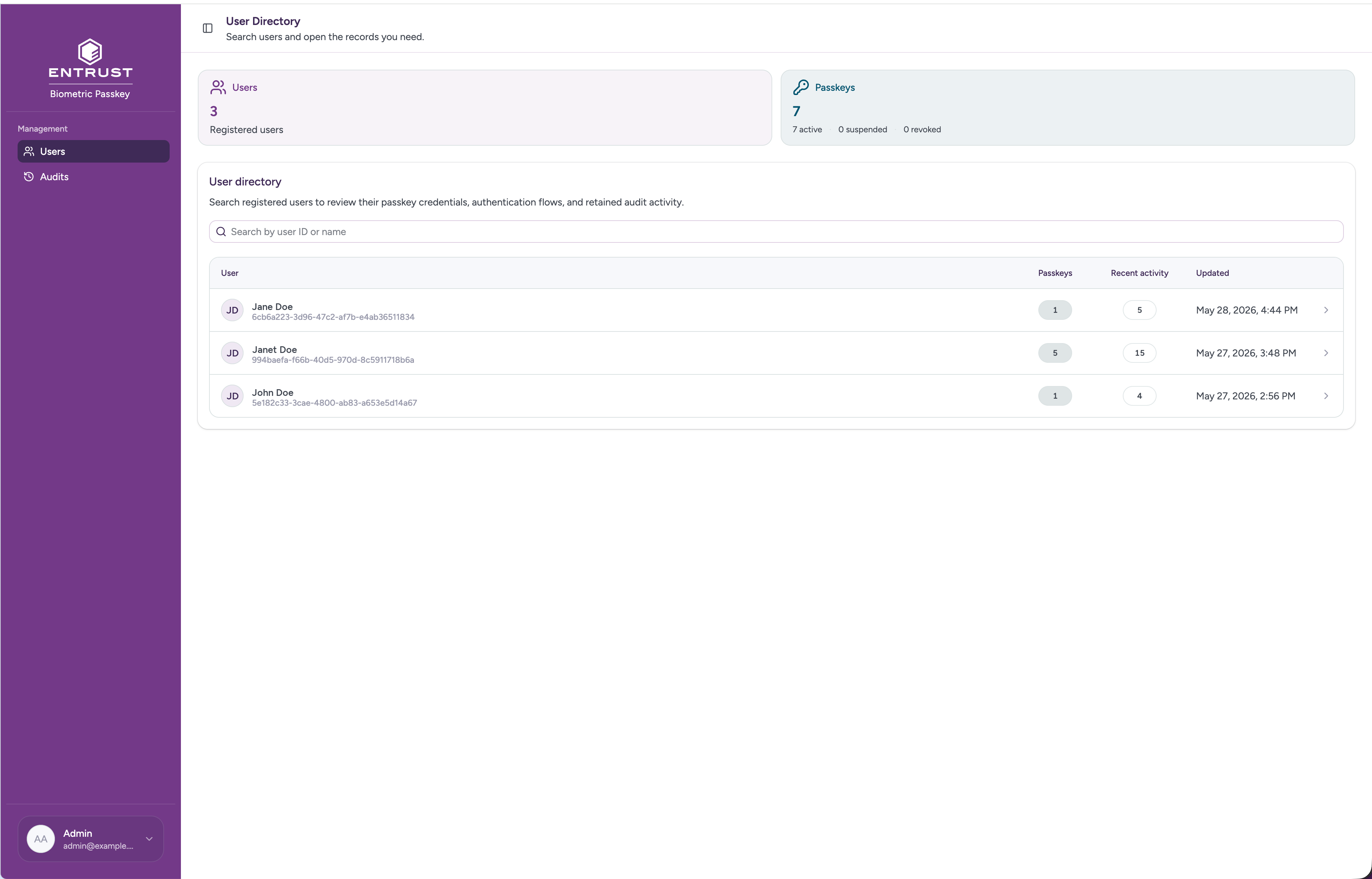
User search supports these match modes:
- exact or prefix match on
external_user_id - case-insensitive partial match on first and last name
Directory rows show enough context to choose the right record without opening every match: the user name and external ID, the number of passkeys on file, recent flow activity, and the last time the local user record changed.
Build user context
User detail pulls the operational context for one user into a single place. The header identifies the user, shows whether stored encrypted biometric token data is present, and records the workflow run that most recently wrote that token data when available.
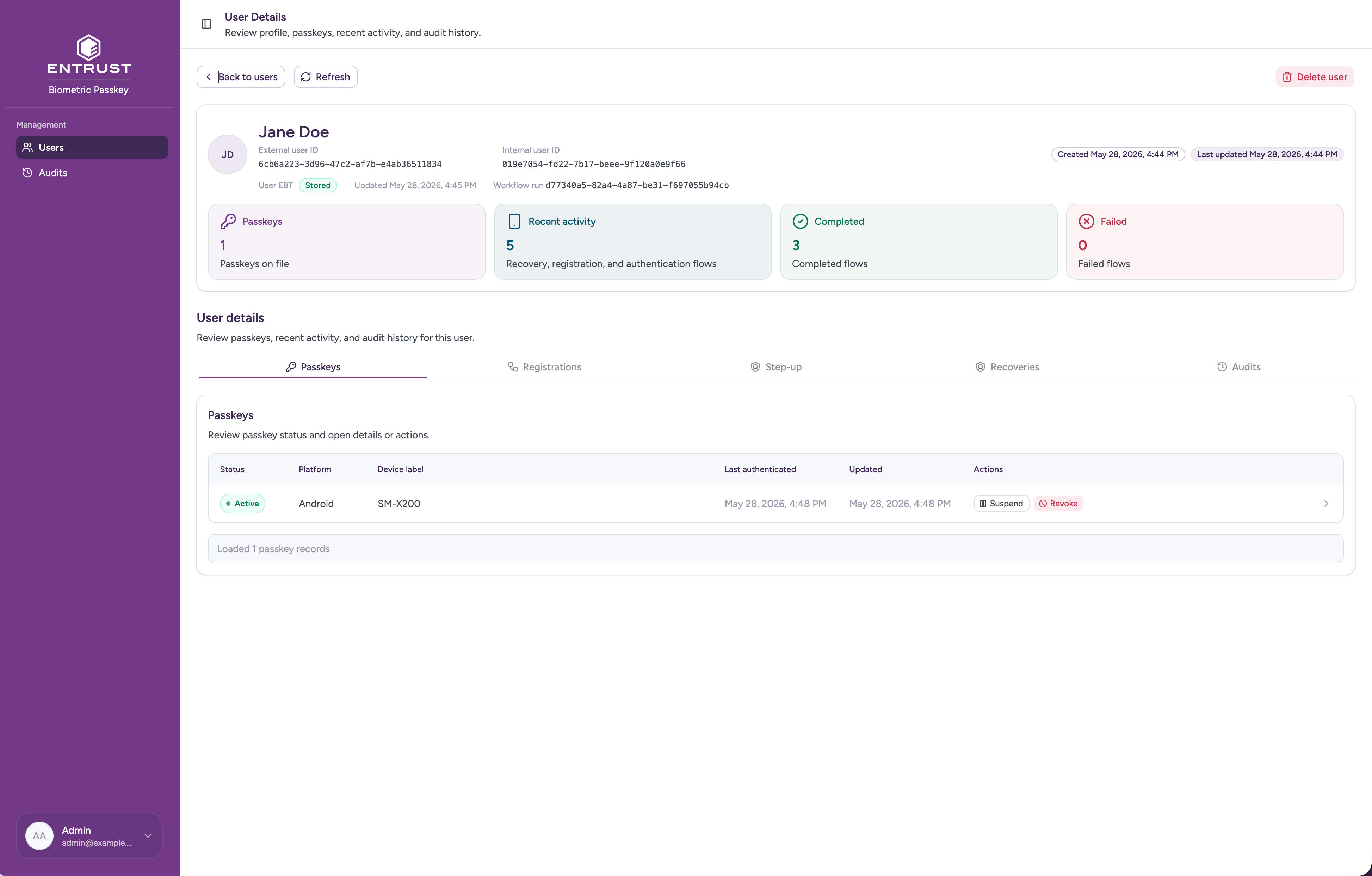
The summary cards help an operator decide where to look next: passkeys on file, recent registration/recovery/authentication activity, and visible completed or failed flow records. From the same page, the operator can review the user's passkeys, registration attempts, recoveries, step-up sessions, and retained audit activity. Cross-platform handoffs are visible through linked step-up details and audit context; dedicated cross-platform session lists are available through the Management API.
Review passkey status
The Passkeys tab shows the passkeys known for the user, including lifecycle state, platform, device label, last authentication time, and last update time. Open a passkey to understand whether it is currently usable for Biometric Passkey authentication and how it reached that state.
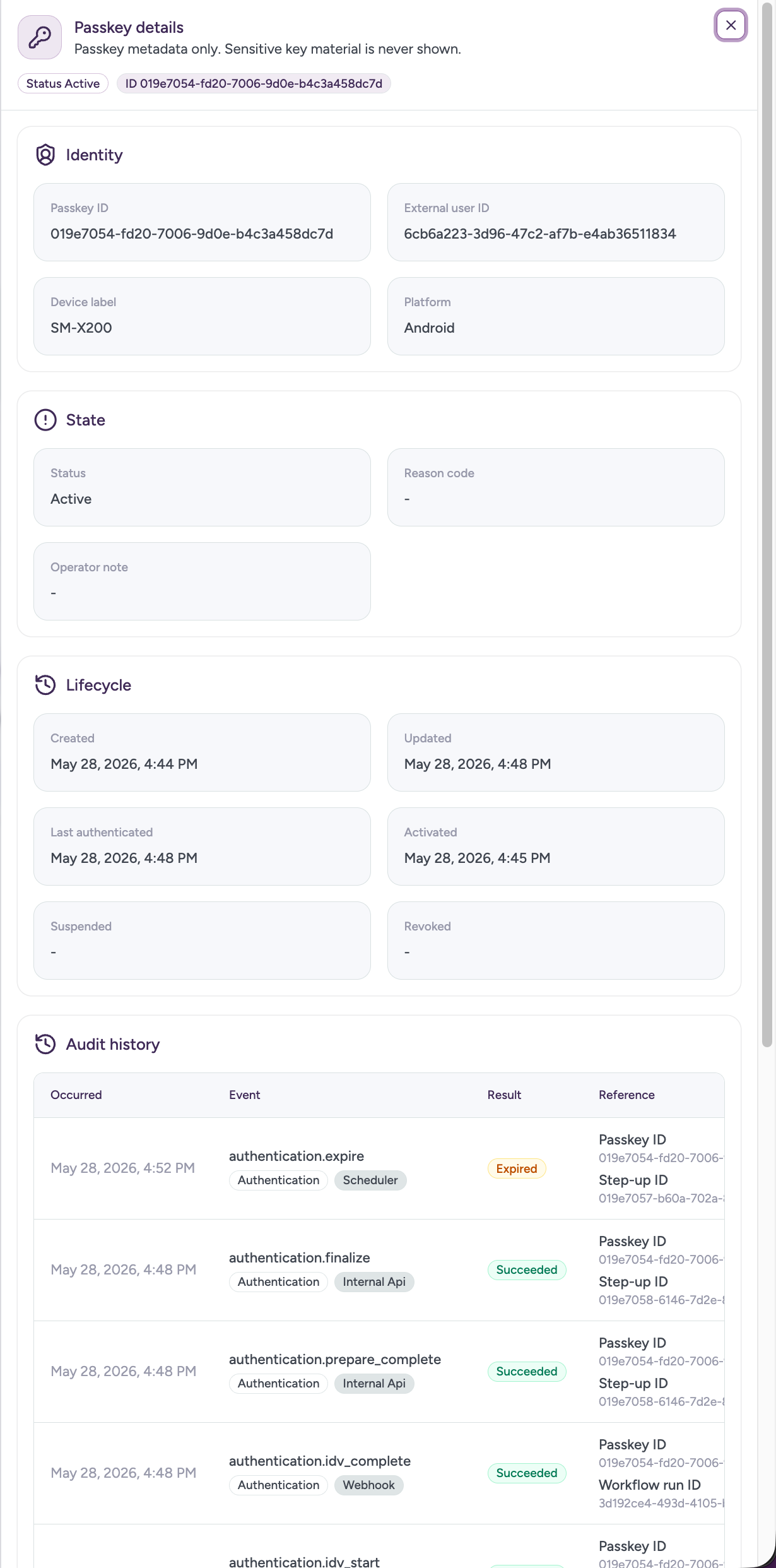
The passkey detail sheet shows limited operational metadata only: identity, state, lifecycle timestamps, the latest management action when one exists, and retained audit history for that passkey. Sensitive key material is never shown.
Act on a passkey
Use passkey lifecycle actions when a passkey should be temporarily blocked, restored, or permanently retired from Biometric Passkey authentication.
- Suspend changes an active passkey to
suspended. Suspended passkeys are excluded from normal authentication use until reactivated. - Activate changes a suspended passkey back to
active. - Revoke changes an active or suspended passkey to
revoked. Revoked passkeys are terminal and cannot be reactivated.
Each action requires a reason_code and accepts an optional reason_text operator note. Repeating the same action against a passkey already in the target state returns the current state, so retried operator actions do not create a second transition.
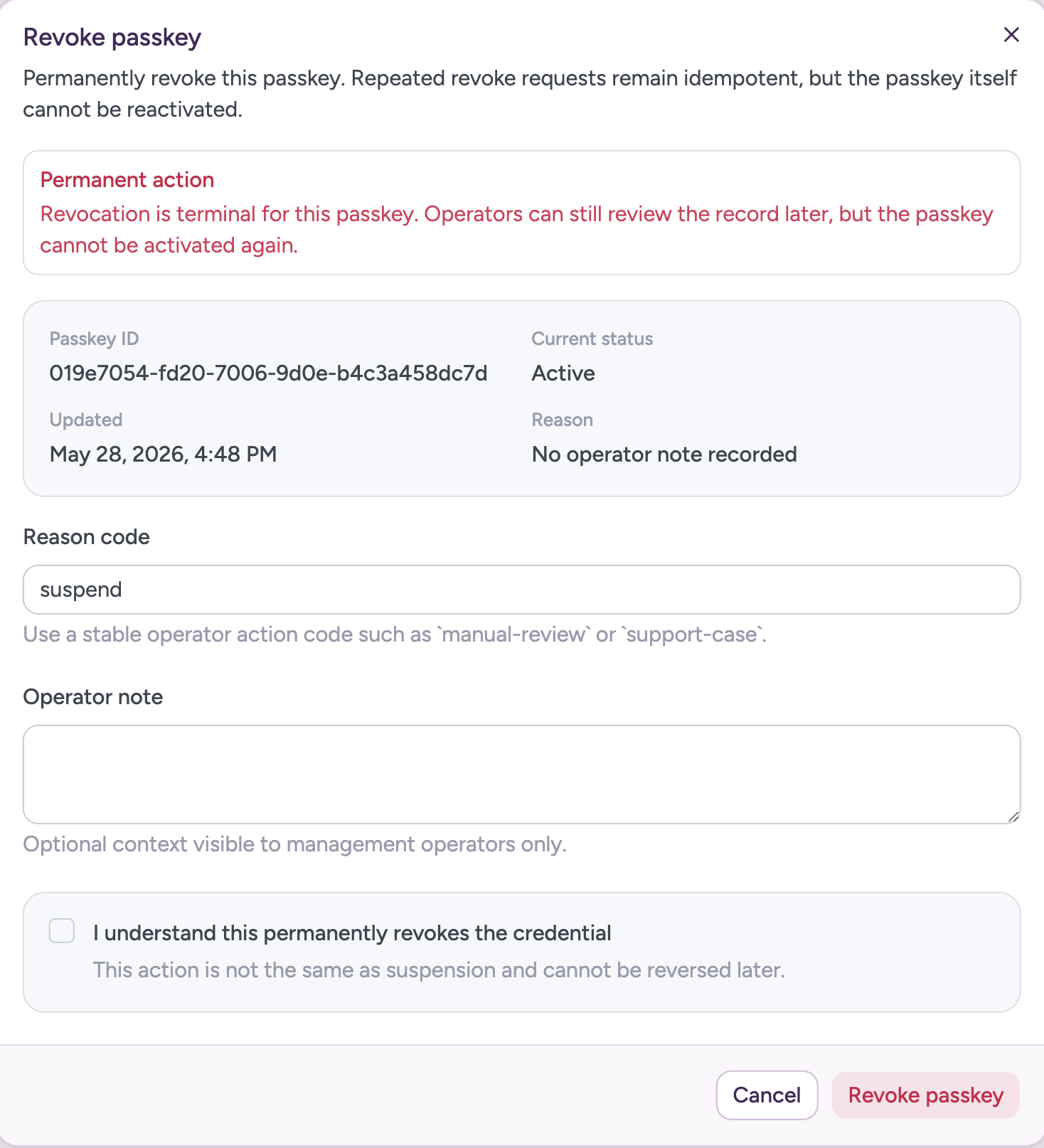
Passkey actions change the local Biometric Passkey credential state. Use your relying-party procedures for any account remediation that must happen outside Biometric Passkey.
Investigate user journeys
Flow history helps operators review how a user moved through enrollment, recovery, in-app step-up, or the step-up leg of a cross-platform handoff. Each flow row starts from the outcome and timing, then the detail sheet adds the identifiers and workflow references needed to connect the report to backend logs or case notes.
Flow detail sheets show metadata only: status, error code, lifecycle timestamps, workflow run references, linked passkeys where applicable, and the linked step-up session for cross-platform handoffs when available. Sensitive tokens, challenges, assertions, and raw WebAuthn payloads are not shown.
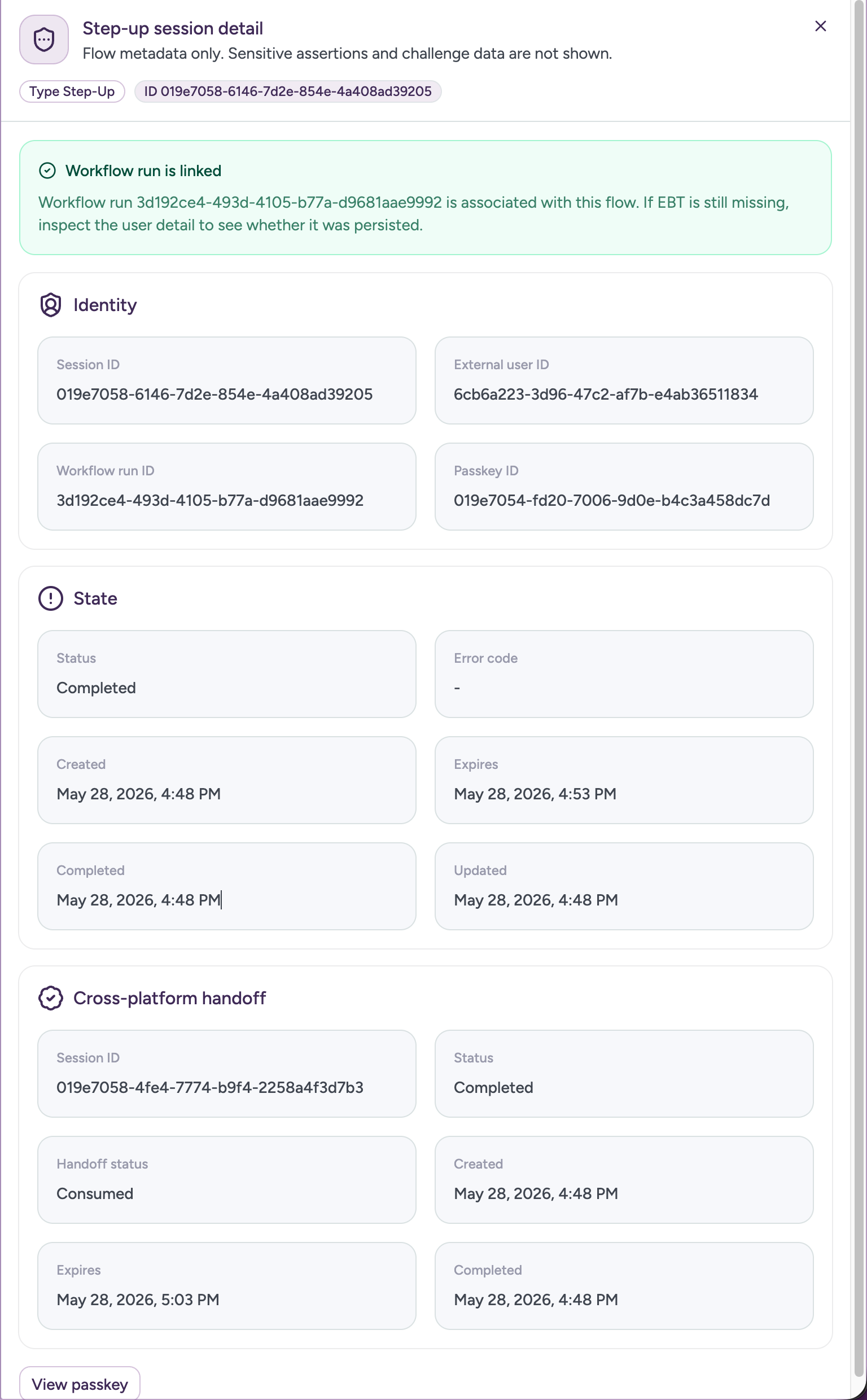
Dashboard flow investigation is read-oriented. Administrative cleanup for an in-progress registration is handled through the Management API and is covered in Clean up registration attempt.
Trace what happened
The Audits view is the cross-user investigation trail. Use it to answer who or what acted, which resource was involved, what the result was, and which correlation or workflow reference connects related events.
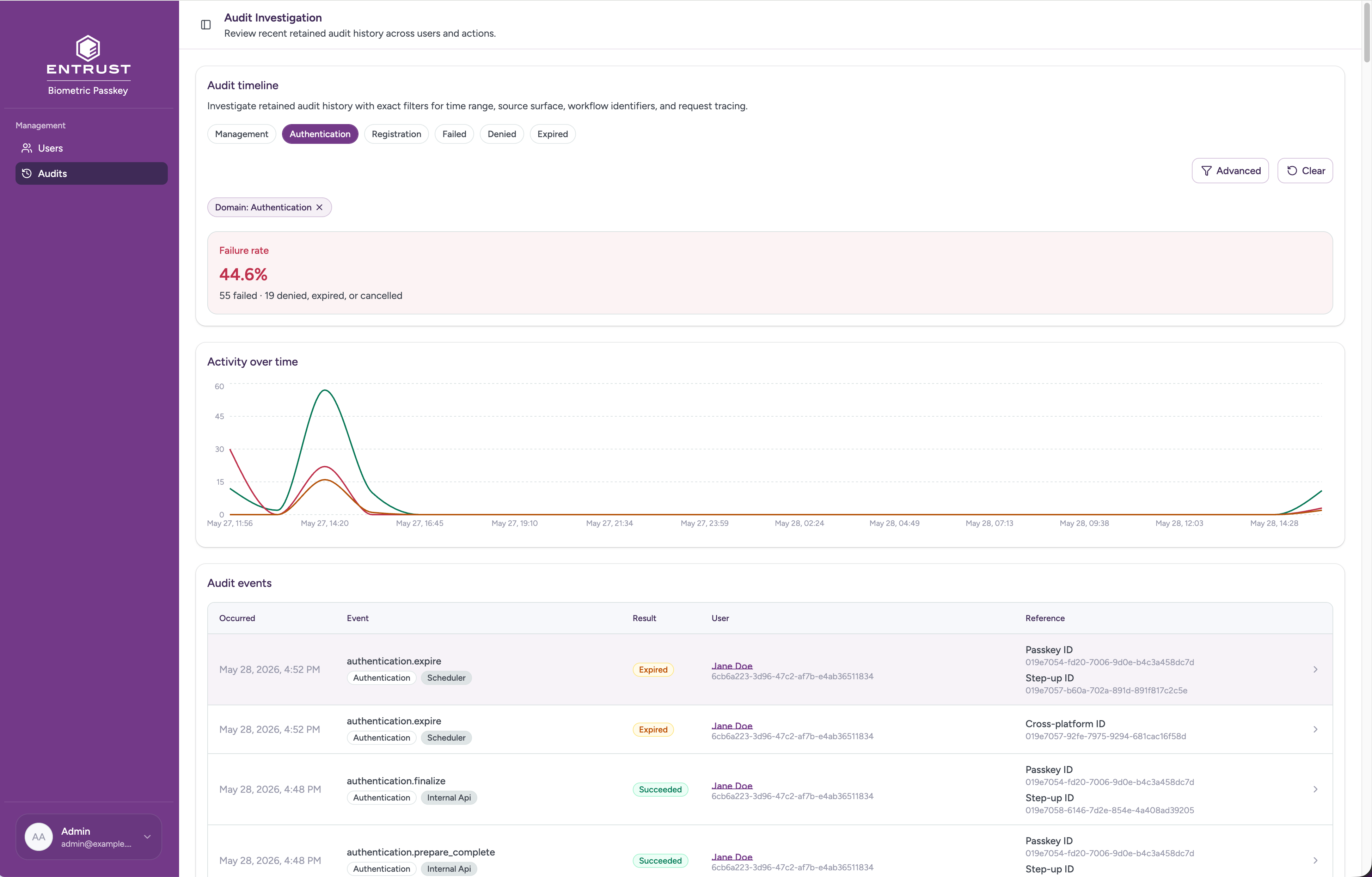
Quick filters cover the most common triage cuts: event domain and result. Advanced filters narrow the timeline by time range, source channel, event type, actor, correlation ID, registration attempt, step-up session, cross-platform session, or workflow run.
User detail and passkey detail also link back into retained audit history, so an operator can move from a specific user or passkey into the broader event trail without restarting the investigation.
Delete local user data
Use the dashboard delete action only when the local Biometric Passkey record for a user must be removed. The action is destructive, requires a reason code, and accepts an optional operator note so the retained audit trail explains why the deletion happened.
Deleting a user removes live local Biometric Passkey records for that user. Retained audit history is not deleted, and successful delete events snapshot the removed passkey identifiers for later investigation.
This dashboard action is not a replacement for account remediation in external systems. Use those systems' own procedures for records outside Biometric Passkey.
Management API basics
The Management API is served under the versioned base path /api/management/v1. Every request is authenticated and gated by a single management.* scope, as described in Calling the Management API.
These conventions apply to every route:
- Pagination — list endpoints are cursor-paginated;
limitdefaults to50and is capped at100, and you page by followingnext_cursor. - Timestamps — all timestamps are RFC 3339 UTC strings.
- Path identifiers — path parameters always use the internal Biometric Passkey UUIDs (
user_id,biometric_passkey_credential_id,registration_attempt_id,recovery_attempt_id,km_passkey_session_id,cross_platform_session_id). - WebAuthn credential ID — the raw WebAuthn
credential_idis a response field, not a path key.
Calling the Management API
The Management API accepts the same access tokens issued for the management dashboard. The access token is presented on every request in the Authorization header:
1GET /api/management/v1/users HTTP/1.12Host: <your-management-origin>3Authorization: Bearer <access_token>4X-Correlation-ID: <optional-correlation-id>
The token must be issued by the OIDC issuer Biometric Passkey is configured for, carry the configured audience, include valid exp, iat, and nbf time claims, and carry the management.* scope required by the route. The required scope for each route is documented with the endpoint below. X-Correlation-ID is optional and is preserved on every audit row the request produces; reuse it across related calls to keep an investigation trail.
Common errors
Two error codes are common to every Management API route. Other error codes are documented with the endpoint that emits them. All error responses share the same envelope:
1{2 "error": {3 "code": "INSUFFICIENT_SCOPE",4 "message": "The access token is missing a required management scope.",5 "retryable": false6 }7}
| Status | Code | Cause |
|---|---|---|
| 401 | MANAGEMENT_AUTH_REQUIRED | The Authorization header is missing, the bearer token is malformed or expired, or the token fails signature, issuer, or audience validation. |
| 403 | INSUFFICIENT_SCOPE | The token is valid but is missing the management.* scope required for the request. |
| 500 | INTERNAL_ERROR | Unexpected internal failure. |
Branch on error.code rather than parsing error.message. Consult error.retryable to decide whether to retry; 4xx codes are always non-retryable unless documented otherwise.
Response safety boundaries
Management API responses expose limited operational metadata only. They never include:
- encrypted biometric token (EBT) ciphertext
- finalize tokens
- cached SDK tokens
- handoff tokens, continuation tokens, recovery tokens
- raw attestation objects or raw assertion signatures
- raw
client_data_json - raw JWTs or bearer tokens
- raw WebAuthn challenge values
Audit details payloads are restricted to an allowlist of safe references: registration_attempt_id, recovery_attempt_id, step_up_auth_session_id, cross_platform_session_id, workflow_run_id, channel, provider_status, required_scope, resume_denial_reason, selected_recovery_credential_id, replacement_biometric_passkey_credential_id, idempotency_key_present, prior_biometric_used, and deleted_biometric_passkey_credential_ids.
Automation reuse
The same scoped Management API may be reused by your own automation for narrow post-recovery credential cleanup after a successful recovery finalize. A typical sequence is:
GET /api/management/v1/users?query=<external_user_id>— resolve the internaluser_idfrom your canonical user identifier. The caller must select exactly one returned user whoseexternal_user_idmatches the value you sent.GET /api/management/v1/users/{user_id}/credentials— enumerate the user's passkeys, excluding the replacement passkey just minted by recovery.POST /api/management/v1/credentials/{biometric_passkey_credential_id}/revoke— revoke each prior credential your recovery policy targets. Use a stablereason_codesuch asrecovery_replacedand reuse the recoveryX-Correlation-IDso the audit trail links the cleanup to the recovery event.
Use the matching scoped endpoint when your policy prefers to suspend rather than revoke prior credentials.
User endpoints
These endpoints cover summary counts and the user search, detail, and deletion workflow. The summary endpoint is grouped with users because it shares the management.users.read scope.
Get summary counts
Returns the total registered user count and passkey counts broken down by lifecycle state. Use this endpoint for support automation or reporting that needs the same counters. Required scope: management.users.read.
Request headers
| Header | Required | Description |
|---|---|---|
| X-Correlation-ID | Recommended | Single end-to-end correlation identifier for the request. |
Response
Returns 200 OK with the current counts.
| Attribute | Type | Description |
|---|---|---|
| user_count | integer (int64) | Total number of registered users. |
| passkeys.active | integer (int64) | Passkeys currently in the active lifecycle state. |
| passkeys.suspended | integer (int64) | Passkeys currently in the suspended lifecycle state. |
| passkeys.revoked | integer (int64) | Passkeys currently in the revoked lifecycle state. |
Passkey counts only include passkeys in the active, suspended, or revoked states. In-progress and terminal-failure states (pending_registration, registration_failed, cancelled, expired) are excluded.
Errors
Only the common errors documented in Common errors apply. All errors return the standard error envelope.
1GET /api/management/v1/summary HTTP/1.12Host: <YOUR_MANAGEMENT_BASE_URL>3Authorization: Bearer <YOUR_MANAGEMENT_ACCESS_TOKEN>4X-Correlation-ID: <YOUR_CORRELATION_ID>
Search users
Searches Biometric Passkey users by external_user_id or profile name and returns lightweight user summaries. Use this endpoint to back the user directory in the management dashboard or to resolve an external_user_id to its internal user_id from automation. Required scope: management.users.read.
Search semantics: exact or prefix match on external_user_id, and case-insensitive partial match on first and last name. Omitting query returns the directory ordered by newest local user record first.
Request headers
| Header | Required | Description |
|---|---|---|
| X-Correlation-ID | Recommended | Single end-to-end correlation identifier for the request. |
Query parameters
| Parameter | Type | Required | Description |
|---|---|---|---|
| query | string | optional | Search string applied to external_user_id, first name, and last name. |
| cursor | string | optional | Opaque pagination cursor returned by a prior page. |
| limit | integer | optional | Page size; defaults to 50, capped at 100. |
Response
Returns 200 OK with a page of user summaries.
| Attribute | Type | Description |
|---|---|---|
| items[].user_id | uuid | Internal Biometric Passkey user identifier. |
| items[].external_user_id | string | Your stable per-user identifier. |
| items[].first_name | string | User first name. |
| items[].last_name | string | User last name. |
| items[].credential_count | integer | Number of passkeys in lifecycle states shown to operators. |
| items[].recent_flow_activity_count | integer | Count of recent registration, step-up, cross-platform, or recovery activity for the user. |
| items[].has_encrypted_biometric_token | boolean | Whether a non-empty encrypted biometric token is currently stored for the user. |
| items[].ebt_updated_at | string (date-time) | null | When the user's stored encrypted biometric token was last updated. |
| items[].last_ebt_workflow_run_id | string | null | The enrollment workflow run that most recently wrote the user's stored encrypted biometric token. |
| items[].created_at | string (date-time) | When the user record was created. |
| items[].updated_at | string (date-time) | When the user record was last updated. |
| next_cursor | string | null | Opaque cursor for the next page; null on the last page. |
Errors
| Status | Description |
|---|---|
| 400 | Missing or malformed query parameter. |
All other errors are the common errors documented in Common errors.
1GET /api/management/v1/users?query=doe&limit=50 HTTP/1.12Host: <YOUR_MANAGEMENT_BASE_URL>3Authorization: Bearer <YOUR_MANAGEMENT_ACCESS_TOKEN>4X-Correlation-ID: <YOUR_CORRELATION_ID>
Get user detail
Returns the profile metadata for a single user. The response is intentionally minimal: it does not embed passkeys, flows, or audit history, so scope boundaries stay explicit and each tab in the management dashboard loads through its own scoped endpoint. Required scope: management.users.read.
Request headers
| Header | Required | Description |
|---|---|---|
| X-Correlation-ID | Recommended | Single end-to-end correlation identifier for the request. |
Path parameters
| Parameter | Type | Description |
|---|---|---|
| user_id | uuid | Internal Biometric Passkey user identifier returned by Search users. |
Response
Returns 200 OK with the user detail.
| Attribute | Type | Description |
|---|---|---|
| user_id | uuid | Echoes the path parameter. |
| external_user_id | string | Your stable per-user identifier. |
| first_name | string | User first name. |
| last_name | string | User last name. |
| has_encrypted_biometric_token | boolean | Whether a non-empty encrypted biometric token is currently stored for the user. |
| ebt_updated_at | string (date-time) | null | When the user's stored encrypted biometric token was last updated. |
| last_ebt_workflow_run_id | string | null | The enrollment workflow run that most recently wrote the user's stored encrypted biometric token. |
| created_at | string (date-time) | When the user record was created. |
| updated_at | string (date-time) | When the user record was last updated. |
Errors
| Status | Description |
|---|---|
| 404 | NOT_FOUND — no user with this user_id exists. |
All other errors are the common errors documented in Common errors.
1GET /api/management/v1/users/<USER_ID> HTTP/1.12Host: <YOUR_MANAGEMENT_BASE_URL>3Authorization: Bearer <YOUR_MANAGEMENT_ACCESS_TOKEN>4X-Correlation-ID: <YOUR_CORRELATION_ID>
Delete user
Permanently deletes a user's live local Biometric Passkey records, including finalize tokens, IDV runs, recovery attempts, step-up auth sessions, registration attempts, cross-platform sessions, passkey credentials, the local IDV applicant record, the stored user biometric-token custody record, and the local user record. Retained audit history is not deleted; successful deletes snapshot the removed biometric_passkey_credential_id values into the audit row so later investigations can still trace which passkeys belonged to the deleted user. Required scope: management.users.delete.
Request headers
| Header | Required | Description |
|---|---|---|
| X-Correlation-ID | Recommended | Single end-to-end correlation identifier for the delete. |
Path parameters
| Parameter | Type | Description |
|---|---|---|
| user_id | uuid | Internal Biometric Passkey user identifier. |
Request body
| Parameter | Type | Required | Description |
|---|---|---|---|
| reason_code | string | yes | Stable operator reason code, recorded on the audit row. |
| reason_text | string | optional | Free-form operator note, recorded on the audit row. |
Response
Returns 204 No Content on success. The body is empty.
Errors
| Status | Description |
|---|---|
| 404 | NOT_FOUND — the local user record does not exist (also returned when the same delete is retried after a previous success). |
| 409 | RESOURCE_BUSY — another transaction holds the user lock; the operator may retry. |
All 404 and 409 outcomes are also recorded as retained management.user_delete audit events. Other errors are the common errors documented in Common errors.
1DELETE /api/management/v1/users/<USER_ID> HTTP/1.12Host: <YOUR_MANAGEMENT_BASE_URL>3Authorization: Bearer <YOUR_MANAGEMENT_ACCESS_TOKEN>4Content-Type: application/json5X-Correlation-ID: <YOUR_CORRELATION_ID>67{8 "reason_code": "user_requested_deletion",9 "reason_text": "User submitted a verified deletion request via support ticket #4821."10}
Credential endpoints
These endpoints cover passkey inspection and lifecycle management. The OAuth scope identifiers retain the credentials naming for stability on the wire; the management dashboard labels the same resource for operators as passkey. Lifecycle transitions are documented in Passkey detail and lifecycle.
List user credentials
Returns the user's passkeys with current lifecycle status and limited operational metadata. Use this endpoint to back the Passkeys tab on user detail, or to enumerate a user's passkeys from automation. Required scope: management.credentials.read.
Request headers
| Header | Required | Description |
|---|---|---|
| X-Correlation-ID | Recommended | Single end-to-end correlation identifier for the request. |
Path parameters
| Parameter | Type | Description |
|---|---|---|
| user_id | uuid | Internal Biometric Passkey user identifier. |
Query parameters
| Parameter | Type | Required | Description |
|---|---|---|---|
| cursor | string | optional | Opaque pagination cursor returned by a prior page. |
| limit | integer | optional | Page size; defaults to 50, capped at 100. |
Response
Returns 200 OK with a page of credential summaries.
| Attribute | Type | Description |
|---|---|---|
| items[].biometric_passkey_credential_id | uuid | Internal credential identifier. |
| items[].credential_id | string | null | Raw WebAuthn credential identifier; null before the registration is finalized. |
| items[].status | enum | One of pending_registration, active, suspended, revoked, registration_failed, cancelled, expired. |
| items[].status_reason_code | string | null | Operator-supplied reason code from the last lifecycle action. |
| items[].platform | enum | null | Device platform: ios or android. |
| items[].device_label | string | null | Device label reported at registration. |
| items[].activated_at | string (date-time) | null | When the passkey first reached active. |
| items[].suspended_at | string (date-time) | null | When the passkey was last suspended. |
| items[].revoked_at | string (date-time) | null | When the passkey was revoked. |
| items[].last_authenticated_at | string (date-time) | null | Most recent successful authentication using this passkey. |
| items[].created_at | string (date-time) | When the credential record was created. |
| items[].updated_at | string (date-time) | When the credential record was last updated. |
| next_cursor | string | null | Opaque cursor for the next page; null on the last page. |
Errors
| Status | Description |
|---|---|
| 404 | NOT_FOUND — no user with this user_id exists. |
All other errors are the common errors documented in Common errors.
1GET /api/management/v1/users/<USER_ID>/credentials?limit=50 HTTP/1.12Host: <YOUR_MANAGEMENT_BASE_URL>3Authorization: Bearer <YOUR_MANAGEMENT_ACCESS_TOKEN>4X-Correlation-ID: <YOUR_CORRELATION_ID>
Get credential detail
Returns limited operational credential metadata for a single passkey. When the caller also has management.audit.read, the response includes the latest retained management action that touched the passkey. EBT, finalize tokens, raw JWTs, raw challenges, and raw WebAuthn payloads are intentionally omitted. Required scope: management.credentials.read.
Request headers
| Header | Required | Description |
|---|---|---|
| X-Correlation-ID | Recommended | Single end-to-end correlation identifier for the request. |
Path parameters
| Parameter | Type | Description |
|---|---|---|
| biometric_passkey_credential_id | uuid | Internal credential identifier. |
Response
Returns 200 OK with the credential detail.
| Attribute | Type | Description |
|---|---|---|
| biometric_passkey_credential_id | uuid | Echoes the path parameter. |
| user_id | uuid | The user this credential belongs to. |
| external_user_id | string | Your stable per-user identifier for the same user. |
| credential_id | string | null | Raw WebAuthn credential identifier; null before the registration is finalized. |
| status | enum | Current lifecycle status. |
| platform | enum | null | Device platform: ios or android. |
| device_label | string | null | Device label reported at registration. |
| activated_at | string (date-time) | null | When the passkey first reached active. |
| suspended_at | string (date-time) | null | When the passkey was last suspended. |
| revoked_at | string (date-time) | null | When the passkey was revoked. |
| last_authenticated_at | string (date-time) | null | Most recent successful authentication. |
| latest_management_action | object | null | Most recent retained domain = management audit event for this credential (same shape as audit events). Present only when the caller also has management.audit.read; otherwise omitted or null. |
| status_reason_code | string | null | Reason code from the last lifecycle action. |
| status_reason_text | string | null | Free-form reason text from the last lifecycle action. |
| created_at | string (date-time) | When the credential record was created. |
| updated_at | string (date-time) | When the credential record was last updated. |
Errors
| Status | Description |
|---|---|
| 404 | NOT_FOUND — no credential with this biometric_passkey_credential_id exists. |
All other errors are the common errors documented in Common errors.
1GET /api/management/v1/credentials/<BIOMETRIC_PASSKEY_CREDENTIAL_ID> HTTP/1.12Host: <YOUR_MANAGEMENT_BASE_URL>3Authorization: Bearer <YOUR_MANAGEMENT_ACCESS_TOKEN>4X-Correlation-ID: <YOUR_CORRELATION_ID>
Suspend credential
Suspends an active passkey. The transition is reversible by Activate credential. Repeated suspend requests against an already suspended passkey return the current state and are idempotent. Required scope: management.credentials.suspend.
Request headers
| Header | Required | Description |
|---|---|---|
| X-Correlation-ID | Recommended | Single end-to-end correlation identifier for the action. |
Path parameters
| Parameter | Type | Description |
|---|---|---|
| biometric_passkey_credential_id | uuid | Internal credential identifier. |
Request body
| Parameter | Type | Required | Description |
|---|---|---|---|
| reason_code | string | yes | Stable operator reason code, recorded on the audit row. |
| reason_text | string | optional | Free-form operator note, recorded on the audit row. |
Response
Returns 200 OK with the resulting state.
| Attribute | Type | Description |
|---|---|---|
| biometric_passkey_credential_id | uuid | Echoes the path parameter. |
| status | enum | Resulting credential status; suspended on a fresh transition or replay. |
| reason_code | string | Reason code recorded on the audit row. |
| acted_at | string (date-time) | When the action was applied. |
Errors
| Status | Description |
|---|---|
| 400 | Missing or malformed request body. |
| 404 | NOT_FOUND — no credential with this biometric_passkey_credential_id exists. |
| 409 | CREDENTIAL_STATE_CONFLICT — the passkey is in a state that cannot be suspended (for example, revoked or a non-finalized state). |
All other errors are the common errors documented in Common errors.
1POST /api/management/v1/credentials/<BIOMETRIC_PASSKEY_CREDENTIAL_ID>/suspend HTTP/1.12Host: <YOUR_MANAGEMENT_BASE_URL>3Authorization: Bearer <YOUR_MANAGEMENT_ACCESS_TOKEN>4Content-Type: application/json5X-Correlation-ID: <YOUR_CORRELATION_ID>67{8 "reason_code": "fraud_investigation",9 "reason_text": "Holding credential while reviewing case #7821."10}
Activate credential
Reactivates a suspended passkey. Repeated activate requests against an already active passkey return the current state and are idempotent. Required scope: management.credentials.activate.
Request headers
| Header | Required | Description |
|---|---|---|
| X-Correlation-ID | Recommended | Single end-to-end correlation identifier for the action. |
Path parameters
| Parameter | Type | Description |
|---|---|---|
| biometric_passkey_credential_id | uuid | Internal credential identifier. |
Request body
| Parameter | Type | Required | Description |
|---|---|---|---|
| reason_code | string | yes | Stable operator reason code, recorded on the audit row. |
| reason_text | string | optional | Free-form operator note, recorded on the audit row. |
Response
Returns 200 OK with the resulting state.
| Attribute | Type | Description |
|---|---|---|
| biometric_passkey_credential_id | uuid | Echoes the path parameter. |
| status | enum | Resulting credential status; active on a fresh transition or replay. |
| reason_code | string | Reason code recorded on the audit row. |
| acted_at | string (date-time) | When the action was applied. |
Errors
| Status | Description |
|---|---|
| 400 | Missing or malformed request body. |
| 404 | NOT_FOUND — no credential with this biometric_passkey_credential_id exists. |
| 409 | CREDENTIAL_STATE_CONFLICT — the passkey is in a state that cannot be activated (for example, revoked or a non-finalized state). |
All other errors are the common errors documented in Common errors.
1POST /api/management/v1/credentials/<BIOMETRIC_PASSKEY_CREDENTIAL_ID>/activate HTTP/1.12Host: <YOUR_MANAGEMENT_BASE_URL>3Authorization: Bearer <YOUR_MANAGEMENT_ACCESS_TOKEN>4Content-Type: application/json5X-Correlation-ID: <YOUR_CORRELATION_ID>67{8 "reason_code": "investigation_cleared",9 "reason_text": "Case #7821 closed; restoring credential."10}
Revoke credential
Permanently revokes a passkey. Revoke is terminal: a revoked passkey cannot be reactivated. Repeated revoke requests against an already revoked passkey return the current state and are idempotent. Revoke blocks Biometric Passkey from accepting that passkey for authentication; it does not remove the passkey material from the user's device and does not call back to the relying party's IdP. Required scope: management.credentials.revoke.
Request headers
| Header | Required | Description |
|---|---|---|
| X-Correlation-ID | Recommended | Single end-to-end correlation identifier for the action. |
Path parameters
| Parameter | Type | Description |
|---|---|---|
| biometric_passkey_credential_id | uuid | Internal credential identifier. |
Request body
| Parameter | Type | Required | Description |
|---|---|---|---|
| reason_code | string | yes | Stable operator reason code, recorded on the audit row. |
| reason_text | string | optional | Free-form operator note, recorded on the audit row. |
Response
Returns 200 OK with the resulting state.
| Attribute | Type | Description |
|---|---|---|
| biometric_passkey_credential_id | uuid | Echoes the path parameter. |
| status | enum | Resulting credential status; revoked on a fresh transition or replay. |
| reason_code | string | Reason code recorded on the audit row. |
| acted_at | string (date-time) | When the action was applied. |
Errors
| Status | Description |
|---|---|
| 400 | Missing or malformed request body. |
| 404 | NOT_FOUND — no credential with this biometric_passkey_credential_id exists. |
| 409 | CREDENTIAL_STATE_CONFLICT — the passkey is in a state that cannot be revoked (for example, a non-finalized state). |
All other errors are the common errors documented in Common errors.
1POST /api/management/v1/credentials/<BIOMETRIC_PASSKEY_CREDENTIAL_ID>/revoke HTTP/1.12Host: <YOUR_MANAGEMENT_BASE_URL>3Authorization: Bearer <YOUR_MANAGEMENT_ACCESS_TOKEN>4Content-Type: application/json5X-Correlation-ID: <YOUR_CORRELATION_ID>67{8 "reason_code": "device_lost",9 "reason_text": "User reported lost device on 2026-05-21."10}
Registration attempt endpoints
These endpoints cover read-only inspection and administrative cleanup of in-progress registration attempts. All read endpoints require management.flows.read; cleanup requires the separate management.flows.cleanup scope.
List user registration attempts
Returns the user's registration attempts ordered by recency, with current status and lifecycle timestamps. Required scope: management.flows.read.
Request headers
| Header | Required | Description |
|---|---|---|
| X-Correlation-ID | Recommended | Single end-to-end correlation identifier for the request. |
Path parameters
| Parameter | Type | Description |
|---|---|---|
| user_id | uuid | Internal Biometric Passkey user identifier. |
Query parameters
| Parameter | Type | Required | Description |
|---|---|---|---|
| cursor | string | optional | Opaque pagination cursor returned by a prior page. |
| limit | integer | optional | Page size; defaults to 50, capped at 100. |
Response
Returns 200 OK with a page of registration-attempt summaries.
| Attribute | Type | Description |
|---|---|---|
| items[].registration_attempt_id | uuid | Attempt identifier. |
| items[].status | enum | One of created, idv_in_progress, idv_completed, idp_commit_pending, idp_commit_failed, completed, failed, cancelled, expired, cleaned_up. |
| items[].workflow_run_id | string | null | Entrust Identity Verification workflow run identifier, when started. |
| items[].error_code | string | null | Set on terminal failure states. |
| items[].created_at | string (date-time) | When the attempt was created. |
| items[].expires_at | string (date-time) | Attempt TTL. |
| items[].completed_at | string (date-time) | null | When the attempt reached a terminal state. |
| next_cursor | string | null | Opaque cursor for the next page; null on the last page. |
Errors
| Status | Description |
|---|---|
| 404 | NOT_FOUND — no user with this user_id exists. |
All other errors are the common errors documented in Common errors.
1GET /api/management/v1/users/<USER_ID>/registration-attempts?limit=50 HTTP/1.12Host: <YOUR_MANAGEMENT_BASE_URL>3Authorization: Bearer <YOUR_MANAGEMENT_ACCESS_TOKEN>4X-Correlation-ID: <YOUR_CORRELATION_ID>
Get registration attempt detail
Returns limited operational metadata for a single registration attempt. Raw attestation payloads, raw client data, finalize-token material, and SDK tokens are intentionally omitted. Required scope: management.flows.read.
Request headers
| Header | Required | Description |
|---|---|---|
| X-Correlation-ID | Recommended | Single end-to-end correlation identifier for the request. |
Path parameters
| Parameter | Type | Description |
|---|---|---|
| registration_attempt_id | uuid | Attempt identifier returned by List user registration attempts. |
Response
Returns 200 OK with the attempt detail.
| Attribute | Type | Description |
|---|---|---|
| registration_attempt_id | uuid | Echoes the path parameter. |
| user_id | uuid | The user this attempt belongs to. |
| external_user_id | string | Your stable per-user identifier for the same user. |
| biometric_passkey_credential_id | uuid | null | The credential row created for this attempt; null before a credential row is bound. |
| credential_id | string | null | Raw WebAuthn credential identifier; null before completion. |
| status | enum | Current attempt status (same values as the list endpoint). |
| workflow_run_id | string | null | Entrust Identity Verification workflow run identifier. |
| error_code | string | null | Set on terminal failure states. |
| created_at | string (date-time) | When the attempt was created. |
| expires_at | string (date-time) | Attempt TTL. |
| completed_at | string (date-time) | null | When the attempt reached a terminal state. |
| updated_at | string (date-time) | Last modification timestamp on the attempt. |
Errors
| Status | Description |
|---|---|
| 404 | NOT_FOUND — no registration attempt with this registration_attempt_id exists. |
All other errors are the common errors documented in Common errors.
1GET /api/management/v1/registration-attempts/<REGISTRATION_ATTEMPT_ID> HTTP/1.12Host: <YOUR_MANAGEMENT_BASE_URL>3Authorization: Bearer <YOUR_MANAGEMENT_ACCESS_TOKEN>4X-Correlation-ID: <YOUR_CORRELATION_ID>
Clean up registration attempt
Administratively closes an in-progress registration attempt that is stuck in created, idv_in_progress, or idv_completed, and transitions any linked pending registration credential to cancelled. This is the only mutating flow endpoint, and it applies only to registration attempts; step-up, recovery, and cross-platform sessions have no analogous cleanup. Required scope: management.flows.cleanup.
Request headers
| Header | Required | Description |
|---|---|---|
| X-Correlation-ID | Recommended | Single end-to-end correlation identifier for the action. |
Path parameters
| Parameter | Type | Description |
|---|---|---|
| registration_attempt_id | uuid | Attempt identifier. |
Request body
| Parameter | Type | Required | Description |
|---|---|---|---|
| reason_code | string | yes | Stable operator reason code, recorded on the audit row. |
| reason_text | string | optional | Free-form operator note, recorded on the audit row. |
Response
Returns 200 OK with the resulting state.
| Attribute | Type | Description |
|---|---|---|
| registration_attempt_id | uuid | Echoes the path parameter. |
| status | enum | Resulting attempt status, typically cleaned_up. |
| reason_code | string | Reason code recorded on the audit row. |
| acted_at | string (date-time) | When the cleanup was applied. |
Errors
| Status | Description |
|---|---|
| 400 | Missing or malformed request body. |
| 404 | NOT_FOUND — no registration attempt with this registration_attempt_id exists. |
| 409 | REGISTRATION_STATE_CONFLICT — the attempt is already terminal or otherwise not eligible for cleanup. |
All other errors are the common errors documented in Common errors.
1POST /api/management/v1/registration-attempts/<REGISTRATION_ATTEMPT_ID>/cleanup HTTP/1.12Host: <YOUR_MANAGEMENT_BASE_URL>3Authorization: Bearer <YOUR_MANAGEMENT_ACCESS_TOKEN>4Content-Type: application/json5X-Correlation-ID: <YOUR_CORRELATION_ID>67{8 "reason_code": "operator_cancel",9 "reason_text": "User abandoned IDV; closing stale attempt."10}
Step-up auth session endpoints
These endpoints cover read-only inspection of in-app step-up auth sessions. Required scope on every route: management.flows.read.
List user step-up auth sessions
Returns the user's step-up auth sessions ordered by recency, with current status and lifecycle timestamps. Required scope: management.flows.read.
Request headers
| Header | Required | Description |
|---|---|---|
| X-Correlation-ID | Recommended | Single end-to-end correlation identifier for the request. |
Path parameters
| Parameter | Type | Description |
|---|---|---|
| user_id | uuid | Internal Biometric Passkey user identifier. |
Query parameters
| Parameter | Type | Required | Description |
|---|---|---|---|
| cursor | string | optional | Opaque pagination cursor returned by a prior page. |
| limit | integer | optional | Page size; defaults to 50, capped at 100. |
Response
Returns 200 OK with a page of step-up auth-session summaries.
| Attribute | Type | Description |
|---|---|---|
| items[].km_passkey_session_id | uuid | Step-up auth-session identifier. |
| items[].cross_platform_session_id | uuid | null | Linked cross-platform session identifier when the step-up was driven by a desktop-to-mobile handoff. |
| items[].status | enum | One of created, idv_in_progress, idv_completed, auth_finalizing, completed, failed, cancelled, expired. |
| items[].biometric_passkey_credential_id | uuid | null | Credential bound to the step-up, when known. |
| items[].workflow_run_id | string | null | Entrust Identity Verification workflow run identifier. |
| items[].error_code | string | null | Set on terminal failure states. |
| items[].created_at | string (date-time) | When the session was created. |
| items[].expires_at | string (date-time) | Session TTL. |
| items[].completed_at | string (date-time) | null | When the session reached a terminal state. |
| next_cursor | string | null | Opaque cursor for the next page; null on the last page. |
Errors
| Status | Description |
|---|---|
| 404 | NOT_FOUND — no user with this user_id exists. |
All other errors are the common errors documented in Common errors.
1GET /api/management/v1/users/<USER_ID>/step-up-auth-sessions?limit=50 HTTP/1.12Host: <YOUR_MANAGEMENT_BASE_URL>3Authorization: Bearer <YOUR_MANAGEMENT_ACCESS_TOKEN>4X-Correlation-ID: <YOUR_CORRELATION_ID>
Get step-up auth session detail
Returns limited operational metadata for a single step-up auth session. Raw assertion payloads and raw client data are intentionally omitted. When the session was driven by a desktop-to-mobile handoff, cross_platform_session_id links to the originating cross-platform session. Required scope: management.flows.read.
Request headers
| Header | Required | Description |
|---|---|---|
| X-Correlation-ID | Recommended | Single end-to-end correlation identifier for the request. |
Path parameters
| Parameter | Type | Description |
|---|---|---|
| km_passkey_session_id | uuid | Step-up auth-session identifier. |
Response
Returns 200 OK with the session detail.
| Attribute | Type | Description |
|---|---|---|
| km_passkey_session_id | uuid | Echoes the path parameter. |
| cross_platform_session_id | uuid | null | Linked cross-platform session, when the step-up was driven by a desktop-to-mobile handoff. |
| user_id | uuid | The user this session belongs to. |
| external_user_id | string | Your stable per-user identifier for the same user. |
| status | enum | Current session status (same values as the list endpoint). |
| biometric_passkey_credential_id | uuid | null | Credential bound to the step-up, when known. |
| workflow_run_id | string | null | Entrust Identity Verification workflow run identifier. |
| error_code | string | null | Set on terminal failure states. |
| created_at | string (date-time) | When the session was created. |
| expires_at | string (date-time) | Session TTL. |
| completed_at | string (date-time) | null | When the session reached a terminal state. |
| updated_at | string (date-time) | Last modification timestamp on the session. |
Errors
| Status | Description |
|---|---|
| 404 | NOT_FOUND — no step-up auth session with this km_passkey_session_id exists. |
All other errors are the common errors documented in Common errors.
1GET /api/management/v1/step-up-auth-sessions/<BIOMETRIC_PASSKEY_SESSION_ID> HTTP/1.12Host: <YOUR_MANAGEMENT_BASE_URL>3Authorization: Bearer <YOUR_MANAGEMENT_ACCESS_TOKEN>4X-Correlation-ID: <YOUR_CORRELATION_ID>
Cross-platform session endpoints
These endpoints cover read-only inspection of cross-platform (desktop-to-mobile handoff) sessions. Required scope on every route: management.flows.read.
List user cross-platform sessions
Returns the user's cross-platform sessions ordered by recency, with current status, handoff status, and lifecycle timestamps. Required scope: management.flows.read.
Request headers
| Header | Required | Description |
|---|---|---|
| X-Correlation-ID | Recommended | Single end-to-end correlation identifier for the request. |
Path parameters
| Parameter | Type | Description |
|---|---|---|
| user_id | uuid | Internal Biometric Passkey user identifier. |
Query parameters
| Parameter | Type | Required | Description |
|---|---|---|---|
| cursor | string | optional | Opaque pagination cursor returned by a prior page. |
| limit | integer | optional | Page size; defaults to 50, capped at 100. |
Response
Returns 200 OK with a page of cross-platform session summaries.
| Attribute | Type | Description |
|---|---|---|
| items[].cross_platform_session_id | uuid | Session identifier. |
| items[].status | enum | One of created, handoff_issued, mobile_resumed, idv_in_progress, idv_completed, auth_finalizing, completed, failed, expired, cancelled. |
| items[].handoff_status | enum | One of issued, consumed, expired. |
| items[].km_passkey_session_id | uuid | null | Linked step-up auth-session identifier, when the handoff has been resumed on mobile. |
| items[].biometric_passkey_credential_id | uuid | null | Credential bound to the resumed step-up, when known. |
| items[].credential_id | string | null | Raw WebAuthn credential identifier, when bound. |
| items[].created_at | string (date-time) | When the session was created. |
| items[].expires_at | string (date-time) | Session TTL. |
| items[].completed_at | string (date-time) | null | When the session reached a terminal state. |
| items[].updated_at | string (date-time) | Last modification timestamp on the session. |
| next_cursor | string | null | Opaque cursor for the next page; null on the last page. |
Errors
| Status | Description |
|---|---|
| 404 | NOT_FOUND — no user with this user_id exists. |
All other errors are the common errors documented in Common errors.
1GET /api/management/v1/users/<USER_ID>/cross-platform-sessions?limit=50 HTTP/1.12Host: <YOUR_MANAGEMENT_BASE_URL>3Authorization: Bearer <YOUR_MANAGEMENT_ACCESS_TOKEN>4X-Correlation-ID: <YOUR_CORRELATION_ID>
Get cross-platform session detail
Returns limited operational metadata for a single cross-platform session, including the linked step-up auth session once the handoff has been resumed on mobile. Required scope: management.flows.read.
Request headers
| Header | Required | Description |
|---|---|---|
| X-Correlation-ID | Recommended | Single end-to-end correlation identifier for the request. |
Path parameters
| Parameter | Type | Description |
|---|---|---|
| cross_platform_session_id | uuid | Session identifier. |
Response
Returns 200 OK with the session detail.
| Attribute | Type | Description |
|---|---|---|
| cross_platform_session_id | uuid | Echoes the path parameter. |
| user_id | uuid | The user this session belongs to. |
| external_user_id | string | Your stable per-user identifier for the same user. |
| status | enum | Current session status (same values as the list endpoint). |
| handoff_status | enum | Current handoff status: issued, consumed, or expired. |
| km_passkey_session_id | uuid | null | Linked step-up auth-session identifier. |
| biometric_passkey_credential_id | uuid | null | Credential bound to the resumed step-up, when known. |
| credential_id | string | null | Raw WebAuthn credential identifier, when bound. |
| created_at | string (date-time) | When the session was created. |
| expires_at | string (date-time) | Session TTL. |
| completed_at | string (date-time) | null | When the session reached a terminal state. |
| updated_at | string (date-time) | Last modification timestamp on the session. |
Errors
| Status | Description |
|---|---|
| 404 | NOT_FOUND — no cross-platform session with this cross_platform_session_id exists. |
All other errors are the common errors documented in Common errors.
1GET /api/management/v1/cross-platform-sessions/<CROSS_PLATFORM_SESSION_ID> HTTP/1.12Host: <YOUR_MANAGEMENT_BASE_URL>3Authorization: Bearer <YOUR_MANAGEMENT_ACCESS_TOKEN>4X-Correlation-ID: <YOUR_CORRELATION_ID>
Recovery attempt endpoints
These endpoints cover read-only inspection of account recovery attempts. Required scope on every route: management.flows.read.
List user recovery attempts
Returns the user's recovery attempts ordered by recency, with current status and lifecycle timestamps. Required scope: management.flows.read.
Request headers
| Header | Required | Description |
|---|---|---|
| X-Correlation-ID | Recommended | Single end-to-end correlation identifier for the request. |
Path parameters
| Parameter | Type | Description |
|---|---|---|
| user_id | uuid | Internal Biometric Passkey user identifier. |
Query parameters
| Parameter | Type | Required | Description |
|---|---|---|---|
| cursor | string | optional | Opaque pagination cursor returned by a prior page. |
| limit | integer | optional | Page size; defaults to 50, capped at 100. |
Response
Returns 200 OK with a page of recovery-attempt summaries.
| Attribute | Type | Description |
|---|---|---|
| items[].recovery_attempt_id | uuid | Attempt identifier. |
| items[].status | enum | One of created, idv_in_progress, idv_verified, registration_in_progress, idp_commit_pending, completed, failed, cancelled, expired. |
| items[].workflow_run_id | string | null | Recovery verification workflow run identifier. |
| items[].error_code | string | null | Set on terminal failure states. |
| items[].created_at | string (date-time) | When the attempt was created. |
| items[].attempt_expires_at | string (date-time) | Attempt TTL. |
| items[].completed_at | string (date-time) | null | When the attempt reached a terminal state. |
| next_cursor | string | null | Opaque cursor for the next page; null on the last page. |
Errors
| Status | Description |
|---|---|
| 404 | NOT_FOUND — no user with this user_id exists. |
All other errors are the common errors documented in Common errors.
1GET /api/management/v1/users/<USER_ID>/recovery-attempts?limit=50 HTTP/1.12Host: <YOUR_MANAGEMENT_BASE_URL>3Authorization: Bearer <YOUR_MANAGEMENT_ACCESS_TOKEN>4X-Correlation-ID: <YOUR_CORRELATION_ID>
Get recovery attempt detail
Returns limited operational metadata for a single recovery attempt. Recovery tokens, continuation tokens, raw EBT, provider SDK tokens, and raw passkey payloads are intentionally omitted. Required scope: management.flows.read.
Request headers
| Header | Required | Description |
|---|---|---|
| X-Correlation-ID | Recommended | Single end-to-end correlation identifier for the request. |
Path parameters
| Parameter | Type | Description |
|---|---|---|
| recovery_attempt_id | uuid | Attempt identifier. |
Response
Returns 200 OK with the attempt detail.
| Attribute | Type | Description |
|---|---|---|
| recovery_attempt_id | uuid | Echoes the path parameter. |
| user_id | uuid | The user this attempt belongs to. |
| external_user_id | string | Your stable per-user identifier for the same user. |
| replacement_biometric_passkey_credential_id | uuid | null | The replacement credential minted by a successful recovery; null until finalized. |
| status | enum | Current attempt status (same values as the list endpoint). |
| workflow_run_id | string | null | Recovery verification workflow run identifier. |
| error_code | string | null | Set on terminal failure states. |
| created_at | string (date-time) | When the attempt was created. |
| attempt_expires_at | string (date-time) | Attempt TTL. |
| passkey_registration_expires_at | string (date-time) | null | TTL of the embedded replacement-passkey registration window. |
| completed_at | string (date-time) | null | When the attempt reached a terminal state. |
| updated_at | string (date-time) | Last modification timestamp on the attempt. |
Errors
| Status | Description |
|---|---|
| 404 | NOT_FOUND — no recovery attempt with this recovery_attempt_id exists. |
All other errors are the common errors documented in Common errors.
1GET /api/management/v1/recovery-attempts/<RECOVERY_ATTEMPT_ID> HTTP/1.12Host: <YOUR_MANAGEMENT_BASE_URL>3Authorization: Bearer <YOUR_MANAGEMENT_ACCESS_TOKEN>4X-Correlation-ID: <YOUR_CORRELATION_ID>
Audit event endpoints
These endpoints cover read-only access to recent retained audit events. Required scope on every route: management.audit.read. Results are returned in insertion-stable newest-first order with a cursor for pagination; each item also carries occurred_at as the business event timestamp. Audit timelines remain available after the live row keyed by user_id or biometric_passkey_credential_id has been hard-deleted, because the audit row stores the logical reference. Requests outside the supported retained-history window return 400 AUDIT_QUERY_OUT_OF_RANGE.
Search audit events
Searches recent retained audit history across registration, authentication, and management domains. Use this endpoint to back the Audits workspace or any support dashboard that needs cross-entity audit triage. Required scope: management.audit.read.
Free-text query searches retained audit fields including external_user_id, event_type, actor_subject, actor_name, request_correlation_id, reason_code, error_code, and workflow_run_id. Fielded tokens are also supported: user:, credential:, actor:, event:, corr:, workflow:, reg:, stepup:, cross:, domain:, and result:.
Request headers
| Header | Required | Description |
|---|---|---|
| X-Correlation-ID | Recommended | Single end-to-end correlation identifier for the request. |
Query parameters
| Parameter | Type | Required | Description |
|---|---|---|---|
| query | string | optional | Flexible search string. Free text plus fielded tokens as above. |
| cursor | string | optional | Opaque pagination cursor returned by a prior page. |
| limit | integer | optional | Page size; defaults to 50, capped at 100. |
| from | string (date-time) | optional | Inclusive start time. When omitted, the service applies the default retained-history lower bound. |
| to | string (date-time) | optional | Inclusive end time. When omitted, the service uses the current time. |
| domain | enum | optional | One of authentication, management, registration. |
| event_type | string | optional | Stable dotted event name such as management.credential_suspend. |
| result | enum | optional | One of cancelled, denied, expired, failed, idempotent, succeeded. |
| actor_subject | string | optional | Retained operator or end-user subject value. |
| request_correlation_id | string | optional | Retained request correlation identifier. |
| source_surface | enum | optional | Ingress channel. One of internal_api, management_api, public_api, scheduler, webhook. |
| user_id | uuid | optional | Logical retained Biometric Passkey user identifier. |
| biometric_passkey_credential_id | uuid | optional | Logical retained credential identifier. |
| registration_attempt_id | uuid | optional | Retained registration-attempt identifier. |
| step_up_auth_session_id | uuid | optional | Retained step-up auth-session identifier. |
| cross_platform_session_id | uuid | optional | Retained cross-platform session identifier. |
| workflow_run_id | string | optional | Retained provider workflow run identifier. |
Response
Returns 200 OK with a page of audit events.
| Attribute | Type | Description |
|---|---|---|
| items[].audit_event_id | uuid | UUIDv7 logical audit row identifier. |
| items[].occurred_at | string (date-time) | Business event time. |
| items[].domain | enum | One of authentication, management, registration. |
| items[].event_type | string | Stable dotted event name. |
| items[].result | enum | Audit outcome. |
| items[].source_surface | enum | Ingress channel that emitted the event. |
| items[].actor | object | Actor metadata: type (end_user, idv_provider, management_operator, system), optional subject, optional name. |
| items[].request | object | Request context: optional correlation_id, normalized route, http_method. |
| items[].resource | object | Resource references: optional user_id, optional biometric_passkey_credential_id. |
| items[].user | object | Optional retained user reference: user_id, external_user_id. |
| items[].status_before | string | null | Resource status before the event, when applicable. |
| items[].status_after | string | null | Resource status after the event, when applicable. |
| items[].error_code | string | null | Error code on failure outcomes. |
| items[].reason_code | string | null | Operator reason code from the originating action. |
| items[].reason_text | string | null | Free-form operator note from the originating action. |
| items[].details | object | Allowlisted operational metadata only. See Response safety boundaries for the allowlist. |
| next_cursor | string | null | Opaque cursor for the next page; null on the last page. |
Errors
| Status | Description |
|---|---|
| 400 | AUDIT_QUERY_OUT_OF_RANGE — from or to falls outside the supported retained-history window; or another query parameter is malformed. |
All other errors are the common errors documented in Common errors.
1GET /api/management/v1/audit-events?domain=management&result=succeeded&limit=50&from=2026-05-01T00:00:00Z&to=2026-05-22T00:00:00Z HTTP/1.12Host: <YOUR_MANAGEMENT_BASE_URL>3Authorization: Bearer <YOUR_MANAGEMENT_ACCESS_TOKEN>4X-Correlation-ID: <YOUR_CORRELATION_ID>
List user audit events
Returns retained audit history for a logical user reference. Events remain available even after the live local user row has been hard-deleted by Delete user. Required scope: management.audit.read.
Request headers
| Header | Required | Description |
|---|---|---|
| X-Correlation-ID | Recommended | Single end-to-end correlation identifier for the request. |
Path parameters
| Parameter | Type | Description |
|---|---|---|
| user_id | uuid | Logical retained Biometric Passkey user identifier. |
Query parameters
| Parameter | Type | Required | Description |
|---|---|---|---|
| cursor | string | optional | Opaque pagination cursor returned by a prior page. |
| limit | integer | optional | Page size; defaults to 50, capped at 100. |
| from | string (date-time) | optional | Inclusive start time. When omitted, the service applies the default retained-history lower bound. |
| to | string (date-time) | optional | Inclusive end time. When omitted, the service uses the current time. |
| domain | enum | optional | One of authentication, management, registration. |
| event_type | string | optional | Stable dotted event name. |
| result | enum | optional | One of cancelled, denied, expired, failed, idempotent, succeeded. |
| request_correlation_id | string | optional | Retained request correlation identifier. |
Response
Returns 200 OK with a page of audit events. The response shape is identical to Search audit events.
Errors
| Status | Description |
|---|---|
| 400 | AUDIT_QUERY_OUT_OF_RANGE — from or to falls outside the supported retained-history window; or another query parameter is malformed. |
All other errors are the common errors documented in Common errors.
1GET /api/management/v1/users/<USER_ID>/audit-events?limit=50 HTTP/1.12Host: <YOUR_MANAGEMENT_BASE_URL>3Authorization: Bearer <YOUR_MANAGEMENT_ACCESS_TOKEN>4X-Correlation-ID: <YOUR_CORRELATION_ID>
List credential audit events
Returns retained audit history for a logical credential reference. Events remain available even after the live credential row has been hard-deleted. Required scope: management.audit.read.
Request headers
| Header | Required | Description |
|---|---|---|
| X-Correlation-ID | Recommended | Single end-to-end correlation identifier for the request. |
Path parameters
| Parameter | Type | Description |
|---|---|---|
| biometric_passkey_credential_id | uuid | Logical retained credential identifier. |
Query parameters
| Parameter | Type | Required | Description |
|---|---|---|---|
| cursor | string | optional | Opaque pagination cursor returned by a prior page. |
| limit | integer | optional | Page size; defaults to 50, capped at 100. |
| from | string (date-time) | optional | Inclusive start time. When omitted, the service applies the default retained-history lower bound. |
| to | string (date-time) | optional | Inclusive end time. When omitted, the service uses the current time. |
| domain | enum | optional | One of authentication, management, registration. |
| event_type | string | optional | Stable dotted event name. |
| result | enum | optional | One of cancelled, denied, expired, failed, idempotent, succeeded. |
| request_correlation_id | string | optional | Retained request correlation identifier. |
Response
Returns 200 OK with a page of audit events. The response shape is identical to Search audit events.
Errors
| Status | Description |
|---|---|
| 400 | AUDIT_QUERY_OUT_OF_RANGE — from or to falls outside the supported retained-history window; or another query parameter is malformed. |
All other errors are the common errors documented in Common errors.
1GET /api/management/v1/credentials/<BIOMETRIC_PASSKEY_CREDENTIAL_ID>/audit-events?limit=50 HTTP/1.12Host: <YOUR_MANAGEMENT_BASE_URL>3Authorization: Bearer <YOUR_MANAGEMENT_ACCESS_TOKEN>4X-Correlation-ID: <YOUR_CORRELATION_ID>
Hosted Management OpenAPI reference links are environment-specific. Consult your Entrust contact for the URL applicable to your deployment.


